Finding a reliable USB MIDI keyboard for Mac helps streamline music production, live performance, and classroom settings. This guide covers five well-regarded options, balancing key count, portability, and software integration. All models below offer plug-and-play USB connectivity with macOS, and many include bundled software or instrument packs to jump-start creativity.
| Product | Key Count | Notable Feature |
|---|---|---|
| Akai MPK Mini MK3 | 25 | 8 pads, 8 knobs, NKS integration |
| AKAI LPK25 | 25 | Arpeggiator, compact portable design |
| Donner N-32 | 32 | Screen, chord features, bus-powered |
| M-AUDIO Keystation 49 MK3 | 49 | Full-size keys, pedal input, simple setup |
| M-AUDIO Keystation Mini 32 MK3 | 32 | Ultra-compact, velocity-sensitive, plug-and-play |
Akai MPK Mini MK3 25-Key USB MIDI Controller

The Akai MPK Mini MK3 combines portability with versatility for Mac-based studios. Its 25 velocity-sensitive mini keys provide a tactile playing surface suitable for melodies, bass lines, and chord work. Eight backlit drum pads enable quick beat-making and sampling workflows, while eight assignable knobs offer real-time control over software synths, effects, and mixer parameters. A four-way thumbstick delivers expressive pitch bend and modulation, and an arpeggiator with adjustable resolution and modes supports evolving patterns. Native Instruments NKS integration lets you load instrument libraries and perform directly from the keyboard, expanding on workflows for Mac users who rely on popular DAWs and plugins.
Designed for ease of use, the MPK Mini MK3 is USB-powered and ready for on-the-go music production. Its compact form makes it a fit for laptops, small desks, or crowded setups while still delivering a familiar piano-like feel thanks to velocity-sensitive keys. It supports extensive control mappings that suit beginners and seasoned producers alike, and the included software and NKS bundle helps jump-start projects without needing immediate setup.
Akai LPK25 USB MIDI Keyboard Controller

The Akai LPK25 is a compact 25-key MIDI controller, designed for Mac and PC users who need a travel-friendly option without sacrificing essential performance. The mini keys are tuned for expressive playing, ideal for writing melodies, basslines, and sketches when space is at a premium. The controller allows octave shifting via dedicated buttons and includes a sustain feature to enhance performance dynamics. An integrated arpeggiator and clock control provide creative tools for evolving patterns and live rehearsal setups. Its simple USB connection ensures quick setup with most DAWs and software on macOS.
Although small, the LPK25 emphasizes a broad functional range. It supports expressive songwriting and basic sequencing, while the sustain, octave controls, and arpeggio functions add musical flexibility. This makes it a sensible choice for students, travelers, or anyone seeking a straightforward, no-fruss setup for Mac-based music creation.
Akai MPK Mini MK3 25-Key USB MIDI Keyboard Controller (Black)
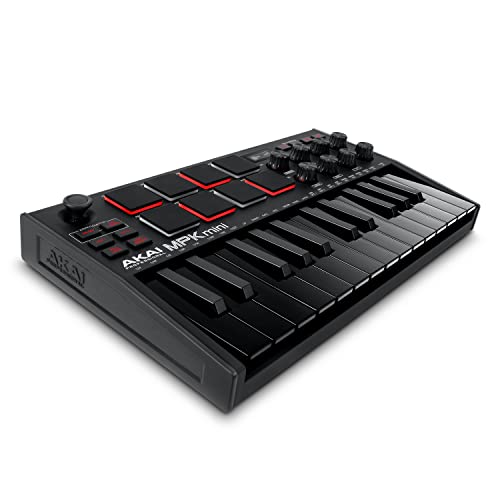
This variant of the MPK Mini MK3 emphasizes the same core features with a distinct black finish. It maintains the 25 velocity-sensitive keys, eight backlit pads, and eight assignable knobs, all crafted for Mac-friendly production workflows. The four-way thumbstick offers trickier pitch and modulation control, while the arpeggiator expands rhythmic possibilities. With NKS integration, Mac users can Kontrol native instrument libraries directly from the controller, bridging hardware with software instrument packs for a streamlined creative process.
As a mobile studio component, this version prioritizes portability without sacrificing feature depth. It is well-suited for sketching ideas in a coffee shop, hotel room, or on a tour bus, while still providing enough control surfaces to manage complex software environments in macOS-based DAWs and plugins.
Donner N-32 USB MIDI Keyboard Controller

The Donner N-32 offers a larger 32-key keyboard in a compact footprint with a screen for quick visual feedback, making it a practical bridge between travel-friendly options and full-size keyboards. The velocity-sensitive keys support dynamic playing, while the onboard chord, scale, and transpose features help with songwriting and live sketching. Compatibility with Mac and other USB-MIDI hosts is straightforward, and the unit is designed for plug-and-play use with minimal setup.
Key advantages include a broader key range compared to 25-key models, a user-friendly interface, and essential performance controls that suit both beginners and intermediate players. The N-32 is particularly attractive for Mac users who want a mid-sized keyboard that travels well, yet still offers practical on-device features to speed up the music-making process.
M-AUDIO Keystation 49 MK3 USB MIDI Keyboard Controller

The Keystation 49 MK3 is a favorite for Mac studios that prefer a traditional, full-size keybed. Its 49 velocity-sensitive keys deliver a natural playing feel suitable for expressive performances, while a dedicated volume fader, transport controls, and draggable pitch/mod wheels provide hands-on control of software. Octave up and down buttons and a sustain pedal input expand performance options, and the plug-and-play design requires no drivers or external power. The device is bus-powered, aligning well with Mac laptops and compact desktop setups.
This model is ideal for producing melodic parts, live playing, and classroom teaching where a larger keyboard improves accuracy and expressiveness. It integrates easily with major DAWs on macOS and supports a smooth transition from beginner to intermediate stages of music production.
M-AUDIO Keystation Mini 32 MK3 USB MIDI Keyboard Controller

The Keystation Mini 32 MK3 emphasizes extreme portability without sacrificing essential performance features. Its 32 velocity-sensitive mini keys deliver a piano-like feel within a compact frame, making it ideal for on-the-go production, sketching ideas on a laptop, or teaching scenarios with limited space. Velocity curves can be adjusted to suit playing style, and pitch bend/modulation controls provide expressive options for software instruments. It remains plug-and-play with Mac systems, offering a simple route to immediate music creation when traveling or working away from a full studio setup.
With 32 keys and a lightweight design, this model targets users who value mobility but still want a capable controller for Mac-based music production, scoring, or app development that involves MIDI input.
Buying Guide: Key Purchase Considerations For Mac Users
- Keybed and feel: Decide between mini keys, synth-action, or full-size keys. For piano-style playing and longer sessions, full-size keys (like 49 keys) are often preferred, while portable setups benefit from 25 or 32 keys with velocity sensitivity.
- Number of controls: Evaluate how many pads, knobs, faders, and arpeggiators you need. More controls can speed up workflow in DAWs and synths, but they add size and cost.
- Software compatibility: Look for models with strong macOS compatibility and bundled software or library support. NKS integration or bundled DAW/software packages can provide immediate value.
- Portability vs. performance: If you travel or work in small spaces, compact controllers (like 25-key or 32-key units) offer convenience. For a home studio, larger keyboards can improve playability and expression.
- Power and connectivity: Most USB MIDI keyboards are bus-powered via USB. Confirm that your Mac provides sufficient USB ports or consider a powered hub if needed.
- Future-proofing: Consider whether you might expand your setup later. A model with additional USB MIDI ports or a broader control surface can adapt to a growing macOS-based studio.
- Drum pads and pads vs. keys: If you produce beats, pads enable quick drum programming. If you focus on melodies and chords, prioritizing keys and knobs may be more efficient.
- Arpeggiator and scale features: Built-in arpeggiators and scale/chord features can spark ideas and reduce learning curves for beginners.
- Warranty and support: Check the manufacturer’s warranty and community support. Reliable customer service can be valuable when integrating with macOS updates or DAW changes.
When selecting a USB MIDI keyboard for Mac, align the choice with your workflow: portability for on-the-go production, larger keys for expressive playing, or a balanced mix with pads and knobs for hands-on control. The models reviewed here cover a range of needs, from compact travel keyboards to more capable at-home studio controllers, all designed to work with macOS through a standard USB connection.