Whether you’re expanding a workspace, upgrading charging setups, or simply swapping ports to fit devices, USB male-to-female converters offer flexible, quick solutions. This guide highlights five reliable options, describing what each product can do, how it’s built, and who benefits most. You’ll find clear comparisons to help you choose the right adapter kit for USB 3.0 and USB-C needs, along with practical buying tips to avoid common pitfalls.
| Product | Type | Key Benefit | Included Styles |
|---|---|---|---|
| HIEbee 3kinds USB 3.0 Kit | USB 3.0 A Male/Male, Female/Female | Extends USB 3.0 signals; flexible connections | Male/Male, Female/Female, Female/Male |
| Fidioto USB 3.0 Adapters Kit | 4 Styles: Male/Male, Female/Female, Male to Female, Male to Male | Multiple pairing options in one pack | 4 adapters in one kit |
| AreMe 90 Degree USB 3.1 Adapters | USB A Male to Female, 90° design | Better routing with strong data and charging specs | Left and right angle options |
| Pastall 4pack USB Female/Female Adapters | Female/Female | Simple extension between USB cables | 4 pack |
| QianLink USB C Female to USB A Male Adapter | USB-C female to USB-A male | Enables USB-A devices on USB-C hosts | Pack option |
Note: All items listed are compatible with standard USB-A and USB-C devices, offering different combinations to fit your setup. The focus here is on facilitating data transfer, charging, and flexible cable routing for American users in everyday and professional environments.
HIEbee USB 3.0 Adapters Kit

The HIEbee kit combines three styles to expand USB 3.0 connections: USB 3.0 A male to A male, USB 3.0 A female to female, and a female-to-male pairing. These adapters support high-speed transfers, enabling easier data communication between computers and peripherals. The compact design makes it suitable for travel and desk setups where ports are tight or cables need a quick extension. Use cases include connecting USB storage drives to laptops, extending printer cables, or bridging devices in a workshop environment.
Fidioto 4 Styles USB 3.0 Adapters Kit

The Fidioto kit includes four adapters: USB 3.0 Male to Male, USB 3.0 Female to Female, USB-A Male to USB-C Male, and USB-A Male to USB-A Female. This assortment accommodates a variety of needs, including connecting USB-A devices to hosts with different ports, extending existing USB cables, and enabling fast data transfer. The set supports fast charging and data transfer, making it convenient for both workstations and mobile setups where multiple cable types are in play.
AreMe 90 Degree USB 3.1 Adapters (2 Pack)

AreMe offers 90-degree left and right angle USB A male to female adapters, designed to route cables with minimal stress on ports. This design helps protect devices during heavy use and keeps cables clear of edges or furniture. The adapters support up to 5V/3A charging (Power Delivery) and high-speed data transfer up to 10 Gbps, making them suitable for laptops, chargers, and external storage setups where space is constrained or cable management is critical.
Pastall USB Female to Female Adapters (4 Pack)

Pastall’s four-pack focuses on connecting two USB devices with female-to-female adapters. The kit is designed to extend the distance between cables and simplify data transfers between computers and peripherals. It emphasizes wide compatibility with devices like Samsung Galaxy Note, Google Pixel, and many USB-A powered devices. The metal alloy shell and copper conductors provide durability, shielding, and reliable signal integrity, making it a practical addition for on-the-go setups or fixed workstations that frequently rearrange components.
QianLink USB C Female to USB A Male Adapter (4-Pack)
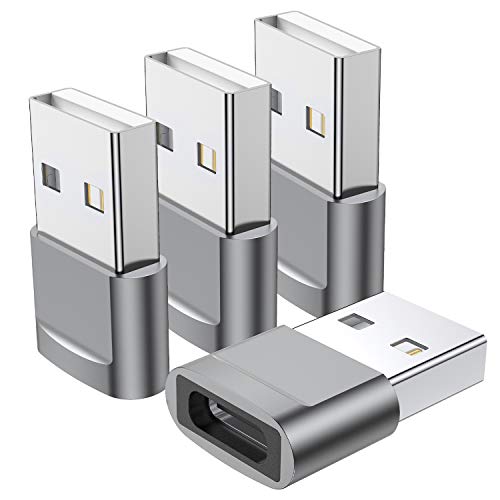
This USB-C female to USB-A male adapter converts USB-C ports into USB-A outlets. It is ideal when you need to connect older USB-A devices to a USB-C laptop or hub. The product notes emphasize safe charging and data transfer speeds up to 480 Mbps and up to 3A charging. It’s a compact, portable option for travelers who carry both USB-C devices and USB-A accessories, such as flash drives, keyboards, or charging cables.
ULTIENCE USB C to USB A Adapter 2 Pack

The ULTIENCE adapters offer USB 3.2 performance with a USB-C to USB-A interface. They support fast data transfers up to 10 Gbps and up to 60W (3A) charging. They are designed for broad compatibility with laptops, tablets, and phones that use USB-C, including devices like iPhone and Galaxy series. The product stresses a high-quality chip and compact form factor for convenient pairing with portable devices and workstations that require quick access to USB-A functionality from USB-C hosts.
Henrety USB C to USB A Adapter (3-Pack)

Henrety’s USB-C to USB-A adapters emphasize a premium zinc alloy housing and a slim profile that minimizes port blocking. The adapters are compatible with a broad range of devices including iPhone, MacBook Pro, iPad, and Android devices with USB-C ports. They support USB 3.0 transfer rates and charging, enabling quick data syncing and device charging when using a flash drive or peripheral with a USB-A connector on a USB-C host. The design focuses on durability and ease of use for everyday professionals.
Buying Guide: Key Purchase Considerations And Comparisons
When choosing a USB male-to-female converter, consider compatibility, speed, charging capability, and build quality. Here are practical criteria to help you compare options:
- Port Type and Compatibility: Confirm whether you need USB-A, USB-C, or a mixed set. If you work with both USB-A and USB-C, a kit with multiple styles offers flexibility without carrying extra adapters.
- Data Transfer Speed: For high-speed needs, prioritize USB 3.0/3.1/3.2 compatible adapters. While some 480 Mbps charging-focused items exist, faster data speeds are essential for large file transfers.
- Charging Power: If you rely on charging while using adapters, check the maximum amperage and wattage supported. Higher values support faster charging for devices like laptops or tablets.
- Durability And Design: Aluminum or zinc alloy housings improve wear resistance and reduce interference. 90-degree designs help with cable routing and reduce port wear on devices.
- Portability and Pack Value: Multi-pack kits save money and reduce clutter, especially for travel or shared workspaces. Look for combinations that fit your common devices.
- Safety And Compliance: Choose adapters that meet standard USB specifications to avoid overcharging or data integrity issues. Avoid overly cheap builds that may degrade signal or heat up with use.
For most users, a balanced kit offering USB-A and USB-C compatibility, with at least USB 3.0 performance and durable housings, provides reliable day-to-day functionality. Consider your devices, whether you need right-angle options to prevent cable strain, and whether you prefer a single versatile kit or separate adapters for specific tasks.