Whether you’re crafting personalized gifts or prototyping small-batch designs, a USB-powered laser engraving machine can expand your creative toolkit. This guide highlights five versatile models with compact footprints, good precision, and straightforward setup. Each product section includes key features, material capabilities, and connectivity options to help you compare at a glance. Use the buying guide to weigh performance, safety, software compatibility, and ease of use.
| Product | Estimated Power | Working Area | Key Benefit |
|---|---|---|---|
| ACMER S1 Laser Engraver (6000mW) | 6000 mW | 130×130 mm | Ultra-fine precision; broad material support |
| LONGER Ray5 (5W) | 5W | 400×400 mm | High-speed engraving; large work area |
| Artilume T1 (3W) | 3W | 200×150 mm | Foldable, portable, beginner-friendly |
| WAINLUXPRO K10 (5W) | 5W | 80×80 mm | No assembly; memory mode; multi-device compatibility |
| Carverall 5W Desktop Laser Engraver | 5W | Unknown refinement, compact desk model | Camera positioning; AI features; ready presets |
ACMER S1 6000mW Laser Engraver

The ACMER S1 uses a 6000 mW diode laser with a 455±5 nm wavelength and a 2 mm focal length, delivering high-precision engraving and cutting at up to 10,000 mm/min. It supports a 130×130 mm working area and claims 0.01 mm repeatable positioning accuracy for detailed results. Free AcmerTool software is included, with compatibility for other common engraving programs. This dual-function system aims at DIY projects, crafts, and small business tasks needing crisp outputs on wood, acrylic, and more.
LONGER Ray5 5W Laser Engraver

The Ray5 5W model from Longer emphasizes speed and precision, featuring a 240 MHz ESP32-based system and a 0.08×0.08 mm laser spot with 0.01 mm engraving accuracy. With a generous 400×400 mm work area, it’s well-suited for larger projects and batch tasks. The device supports offline operation and a range of materials including wood, metal, acrylic, and more, making it a versatile choice for hobbyists and makers who need quick turnaround times.
Artilume T1 Foldable 3W Laser Engraver

The Artilume T1 appeals to portable setup seekers with a foldable design that arrives ready to use. Its 3W laser supports engraving on wood, leather, acrylic, and coated metals with 0.01 mm precision. The package emphasizes ease of use, with a quick setup and calibration so beginners can start crafting almost immediately. This model suits students, teachers, and crafters who value on-the-go capability and a compact footprint.
WAINLUXPRO K10 5W Compact Engraver

The K10 offers a true 5W laser in a compact 80×80 mm working area, emphasizing quick setup and a memory mode for repeating projects. It supports CutLabX, LightBurn, and LaserGRBL, accommodating different software ecosystems. The device emphasizes safety and efficiency, with a focus on classroom-friendly or small studio environments where repeatable results and easy operation are valued for education and hobbyist use.
Carverall 5W Desktop Laser Engraver
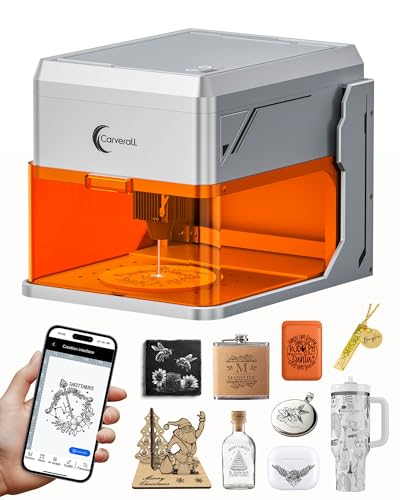
The Carverall model combines a 5W laser with AI-assisted features and a built-in camera for precise positioning. Real-time previews and ready-to-use presets assist beginners while enabling more advanced users to leverage AI-guided design adjustments. Connectivity includes WiFi and USB, supporting multi-device workflows. It targets home makers who want reliable alignment, quick setup, and flexible project types across wood, leather, paper, glass, and more.
Buying Guide
- Power and materials: Higher wattage enables faster cutting and deeper engraving on denser materials, but may require stronger cooling and better safety practices. Consider the materials you plan to work with most.
- Working area: Choose a size that fits your typical projects. Larger beds enable bigger pieces but may increase machine footprint and cost.
- Precision and repeatability: Look for a laser spot size around 0.01 mm and repeatable accuracy claims for detailed work. Calibration features and stable drivers help maintain consistency.
- Software and workflow: Confirm compatibility with popular programs (AcmerTool, LightBurn, LaserGRBL, CutLabX). A turnkey experience with ready presets saves time for beginners.
- Ease of use: Foldable designs, no-assembly setups, and memory modes minimize startup friction. For education or shared spaces, safety certifications and enclosed housings matter.
- Connectivity: USB, WiFi, and offline modes affect how you integrate the device into existing workflows and locations. Check whether mobile apps are supported and whether file formats are flexible.
- Safety: Look for Class 1 safety classifications, eye protection considerations, and automatic shutdown features when enclosures are opened or motion is detected.
- Future expandability: Some models support external software or upgrades; others emphasize plug-and-play simplicity. Align with your long-term project ambitions.