Discover the best USB hub charging stations designed to replace cluttered cords with a single, organized hub. This guide highlights five reliable, feature-rich options that support multiple devices, fast charging, and safe power management. Each product is evaluated for capacity, port variety, and compatibility with popular devices such as iPhone, iPad, Android, and laptops.
| Product | Ports | Total Power | Best For |
|---|---|---|---|
| Upoy Charging Station | 6 USB | 40W | Home and small office |
| Anker PowerPort 6 | 6 USB | 60W | Fast, reliable family charging |
| Roruite USB C Station | 6 ports (6x USB-C/USB-A) | 200W | Power-hungry devices |
| Generic 6-Port Charger | 6 Ports (6x USB-A/USB-C) | 30W | Budget multi-device charging |
| vhbw 6-Port Station | 6 ports (3 USB-C/3 USB-A) | 15W | Nightstand convenience |
Below are five top picks that balance speed, safety, and convenience. Each entry includes a direct link to its Amazon product page, a quick image reference, and the key features that matter for daily use in homes and offices.
Upoy 6-Port Desktop Charging Hub
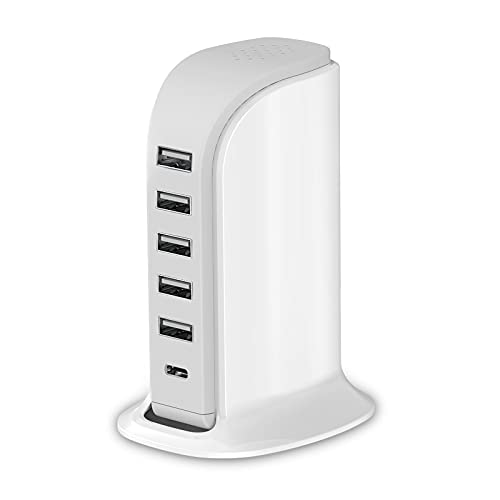
The Upoy charging station is a compact hub designed to handle multiple devices without taking up a lot of desk space. It features a 40W total output, with support for up to six devices simultaneously. The device emphasizes heat management and compact sailboat-inspired design for better dissipation, making it suitable for busy home offices or living rooms. While it focuses on shared charging, individual ports deliver up to 2.4A per port, providing solid performance for smartphones, tablets, and smaller devices. The 6-in-1 setup reduces the need for several wall adapters, helping to declutter workspaces.
What to consider: If you frequently charge power-hungry devices like tablets or larger smartphones at once, the 40W total output may bottleneck at peak usage. The device’s emphasis on heat dissipation helps during prolonged use, but you’ll want to monitor temperature during heavy loads. Its design suits desktops and charging towers more than wall-mounted configurations, making it a good fit for desks, nightstands, or conference rooms.
Anker Desktop Charger, 60W 6-Port

The Anker 60W 6-Port USB charging hub is built on PowerIQ and VoltageBoost technology to deliver fast, efficient charging for multiple devices. Each port can supply up to 2.4A, with a cumulative 12A total, enabling rapid charging for smartphones, tablets, and small laptops. The hub emphasizes safety and reliability, with smart distribution that prevents overcharging. It’s compact for travel and stays organized on desks, nightstands, or workstations. Note that Qualcomm Quick Charge is not supported, but overall performance is strong for everyday device charging and small ecosystems of gadgets.
What to consider: If your workflow includes devices that require Quick Charge or very high power for laptops, you may need a higher-output hub or separate laptop charger. The six-port setup is ideal for households or offices with multiple phones and tablets seeking synchronized charging without competing outlets.
Roruite 10-Port GaN Type-C Station
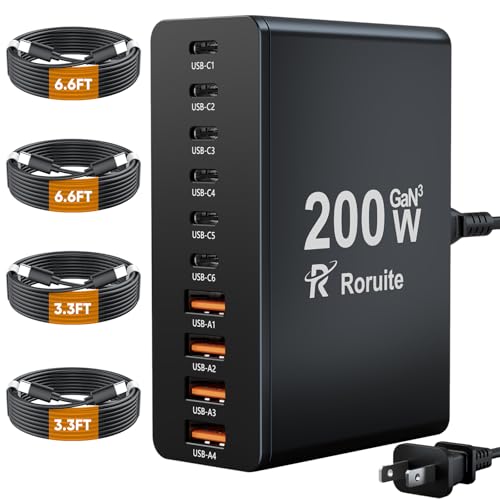
The Roruite charging station is a powerhouse with 10 ports, including six USB-C PD 3.0 ports and four USB-A ports, delivering up to 200W total output. This configuration is designed to handle several devices simultaneously—phones, tablets, wearables, and even some laptops. The GaN technology supports faster charging while keeping heat under control, and a flexible universal compatibility set ensures it works with most major brands and models. Safety protections guard against overcharging and overheating, which is essential in high-capacity hubs.
What to consider: The high output makes this option best suited for a tech-heavy environment or households with multiple power-intensive devices. The larger footprint and higher price point reflect its capability and intended use for simultaneous high-demand charging rather than simple, occasional topping up of devices.
SIWMER USB Charging Station 10-Port Block

The SIWMER charging block packs 10 ports—six USB-A and four USB-C—into a single block designed to charge many devices quickly. The auto-detect technology optimizes output per device to maintain safe and efficient charging across all ports. This unit is UL-certified with safety protections against over-current, over-voltage, over-heating, and short circuits, making it a solid choice for households and classrooms seeking a reliable multi-device hub. The included design is compatible with a wide range of devices, from smartphones to tablets and wearables, with independent port control improving safety and performance.
What to consider: While the auto-detect feature is helpful, users expecting uniform high-speed charging across all ports may notice variations depending on device power draw. The unit’s robust safety features and wide compatibility make it a practical all-around solution for diverse device sets.
[2026 Updated] BREEKET 100W GaN 6-Port

The BREEKET 100W GaN 6-Port USB-C charging hub emphasizes speed and versatility. With three USB-C PD 3.0 ports and three USB-A ports, it delivers up to 100W total output and supports rapid charging for devices like iPhone 17/16/15/14, iPad Pro, and many Android phones. GaN technology minimizes heat while maintaining safety protections against overcharging and overcurrent. The compact cube design makes it easy to place on a desk or travel bag, and its 5-foot cord offers flexible placement options in homes or offices.
What to consider: The 100W total output is strong for mixed device sets, but heavy laptop charging may still benefit from a dedicated laptop charger if needed. The device’s emphasis on a compact, travel-friendly footprint makes it appealing for users who move between workspaces or want to reduce desk clutter.
Buying Guide: Key Purchase Considerations
- Power output and port mix: Determine total wattage and per-port current. If you own power-hungry devices (tablets, laptops), prioritize hubs with higher total wattage and multiple USB-C PD ports.
- Port type and compatibility: USB-C PD ports support fast charging for newer devices. Ensure the hub supports the devices you own (iPhone, iPad, Android, laptops).
- Safety and protection: Look for surge protection, over-current, over-voltage, and temperature safeguards. UL or ETL listings add credibility.
- Heat management: GaN technology and good heat dissipation enhance performance during prolonged charging sessions.
- Design and footprint: Consider desk or nightstand space. Some hubs include stands or stands-friendly shapes to improve usability while charging.
- Cable management and build quality: Durable materials, braided cables, and a compact form factor reduce clutter and extend longevity.
- Intended use: Home office, living room, or travel—choose a hub that fits your space and typical device mix. A higher port count is beneficial for households with multiple devices, while compact designs suit single users with several gadgets.
- Future-proofing: If you anticipate adding devices (devices with USB-C PD), invest in hubs with more USB-C ports and higher total wattage to avoid bottlenecks later.
All five products provide multi-device charging capability, with varying emphasis on speed, safety, and space efficiency. When selecting, match the hub’s port mix and total power to your device ecosystem to ensure optimal, safe charging without cable clutter.