When upgrading or migrating data between Windows PCs, a dedicated USB data transfer cable can simplify the process. The options below are designed to transfer files, settings, and folders without cloud reliance. Each product includes software or licenses to streamline the move and supports multiple Windows versions. This guide highlights five reliable cables, focusing on speed, compatibility, software support, and build quality to help you choose the right tool for a seamless PC-to-PC transition.
| Product | Brand | Key Benefit |
|---|---|---|
| Plugable USB Transfer Cable | Plugable | Includes Bravura software for Windows PC-to-PC transfers |
| Cable Matters USB 3.0 Data Transfer Cable PC to PC | Cable Matters | Two software options; wide Windows/macOS support via PClinq5 / Bravura |
| Ruaeoda USB to USB Cable 3 ft | Ruaeoda | USB 3.0 A-to-A for fast, durable transfers |
| Plugable USB Data Transfer Cable PC to PC (USBC-TRAN) | Plugable | Hybrid USB-C/USB transfer with Easy Computer Sync |
| CIQILY USB to USB Cable 6FT | CIQILY | USB 3.0 A-to-A with high-speed data transfer |
Plugable USB Transfer Cable With Bravura Software

The Plugable transfer cable is designed for Windows-only file moves between two PCs. It supports 32-bit and 64-bit Windows versions across Windows 11, 10, 8.x, 7, Vista, and XP. The package includes a Bravura Easy Computer Sync license key, which enables centralized transfer management for large data sets. Because the cable operates without a network, it helps protect sensitive data and eliminates cloud-related exposure. Note that macOS and Windows S Mode are not supported.
Data transfers focus on ease-of-use and reliability. The cable ships with Bravura software, allowing you to select exactly which files and folders to move and to perform bulk migrations with minimal setup. For environments with restricted network access, this cable provides a dependable, offline method for moving user data, documents, and media. Maximum security is achieved by avoiding any cloud or server dependencies during the process.
Cable Matters USB 3.0 Data Transfer Cable PC to PC

This USB transfer cable for PC-to-PC support enables direct file and folder migration between Windows computers. It includes two software licenses: PClinq5 and Bravura Easy Computer Sync, offering cross-platform compatibility and remote-control options for synchronized transfers. With Windows XP through Windows 11 support, this cable fits a broad range of hardware lifecycles. The bundled software licenses facilitate drag-and-drop transfers, and the remote control capability can simplify complex multi-user migrations. It’s suitable for users moving between old and new machines or consolidating data across devices.
Transfer speed depends on the connected hardware, but the cable is designed to handle large data sets efficiently. The dual-software approach provides flexibility: Bravura handles straightforward transfers, while PClinq5 helps manage macOS and Windows scenarios. This makes it a versatile choice for mixed-OS households or small offices performing scheduled migrations.
Ruaeoda USB To USB Cable 3 Ft 3.0 A-To-A
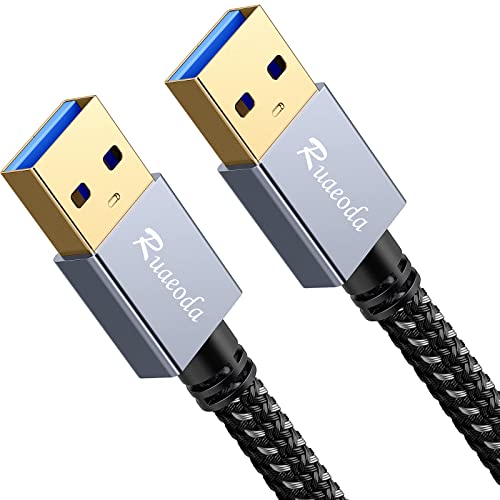
The Ruaeoda USB 3.0 A-to-A cable focuses on high-speed data transfer with up to 5 Gbps and backward compatibility with USB 2.0. Its braided construction and aluminum connectors emphasize durability for repeated PC-to-PC use. The cable supports quick data transfers for large media libraries, backups, and system migrations. Its versatility extends to connecting USB 3.0 devices to legacy systems, expanding potential transfer scenarios beyond simple PC-to-PC moves.
Compatibility spans Windows PCs and a wide range of USB 3.0 peripherals, including external hard drives and USB hubs. The robust shielding minimizes interference, helping maintain signal integrity during large transfers. While it provides a fast link, the actual throughput will still depend on the devices being connected and the overall system performance during migration tasks.
Plugable USB Data Transfer Cable PC to PC (USBC-TRAN)

The USBC-TRAN cable combines USB-C and USB 3.0 for PC-to-PC data migration. It ships with Bravura Easy Computer Sync software, enabling secure, cloud-free transfers between Windows computers. The included license supports unlimited transfers across an unlimited number of Windows PCs, making it well-suited for users upgrading multiple machines or IT environments that require repeated migrations. The 2-meter length provides flexibility in workspace layouts during setup.
Key features include fast transfer rates up to 5 Gbps when the hardware supports USB 3.0/USB-C, and secure local transfers without cloud involvement. The hybrid cable design also supports newer devices with USB-C ports, extending compatibility beyond older PCs. This makes it a practical option for ongoing IT refresh cycles and personal PC upgrades alike.
CIQILY USB To USB Cable 6FT

The CIQILY USB 3.0 A-to-A cable supports high-speed data transfers up to 5 Gbps with a 6-foot length for comfortable workspace setups. It is designed for a broad range of USB 3.0 peripherals and PCs, including hard drives, printers, scanners, and external enclosures. The nylon shielding and durable construction aim to withstand frequent connections and disconnections during file migration tasks. While not a dedicated PC-to-PC software bundle, it serves as a fast transfer link for direct device-to-device copies when used with appropriate software tools.
As with other USB-to-USB cables, actual transfer performance will depend on the devices used and system bottlenecks. The cable’s emphasis on reliability and compatibility makes it a sensible choice for users who need a straightforward, high-speed data transfer path between computers or between a computer and a compatible USB 3.0 device during migration projects.
Buying Guide: Key Purchase Considerations
When selecting a USB-to-USB data transfer cable for PC-to-PC moves, consider these factors:
- Transfer software: Patented or bundled software (such as Bravura Easy Computer Sync or PClinq5) can simplify migrations, handle permissions, and dray-and-drop transfers across multiple PCs. Ensure the software supports your Windows version and licenses are clearly stated.
- Connectivity: USB 3.0/3.1 Gen 2 or USB-C compatibility offers higher throughput. A-to-A cables are common for direct PC-to-PC moves, while USB-C variants add broader device compatibility for newer machines.
- Length and build: Longer cables provide flexibility but may introduce slight signal loss if not well shielded. Look for braided shielding and robust connectors for durability during frequent pulls and setups.
- Security: Offline transfers reduce exposure to cloud-based threats. Verify that the product promotes local transfers only and does not require internet access.
- Cross-platform support: If you use a mix of Windows, macOS, or other systems, choose cables with software that supports cross-platform migrations or multiple OS environments.
- Driver and compatibility notes: Some cables are Windows-only or do not support certain Windows features (like S Mode). Confirm system requirements before purchasing.
How to Choose Among These Cables
For pure Windows-to-Windows migrations with robust software support, the Plugable and Cable Matters options offer comprehensive software ecosystems and clear license coverage. If you need a longer reach or plan to move large media libraries, Ruaeoda and CIQILY provide durable, high-speed USB 3.0 links with strong physical builds. For users who want a USB-C ready approach on newer devices or flexible USB-C/I/O configurations, the USBC-TRAN model from Plugable provides a modern connector mix with unlimited transfer potential across Windows PCs. Compare software features, driver compatibility, and device support to align with your migration workflow.
Consider your environment: a single upgrade vs. ongoing IT refresh cycles; whether macOS or Windows ecosystems will be involved; and whether you require remote management features or purely local transfers. Each option above prioritizes fast, secure transfers and offline operation, helping ensure your data migrates with minimal risk and effort.