In a world where devices multiply and charging needs vary by outlet, the right USB-C and USB-A adapters can simplify power, syncing, and compatibility. This guide surveys five reliable USB charging cable adapters, highlighting how each option turns USB-A into USB-C, supports USB 2.0 data transfer, and sustains durable builds for everyday use. Whether you’re traveling, at home, or in the office, these adapters help bridge older ports with modern cables without sacrificing safety or performance.
| Product | Brand | Key Benefit |
|---|---|---|
| Basesailor USB to USB C Adapter | Basesailor | USB-A to USB-C conversion for charging and data transfer |
| Multi Charging Cable 4 in 1 | KINGBACK | All-in-one charging including Mini, IP, Micro USB, Type-C |
| USB C Female to USB Male Adapter (4-Pack) | QianLink | USB-C port from USB-A source for charging and data |
| Elebase USB to USB C Adapter | Elebase | USB-A to USB-C with durable aluminum housing |
| 4 Pack Upgrade USB to USB C Adapter | xiwxi | USB 2.0 charging and data transfer with USB-C compatibility |
Basesailor USB to USB C Adapter
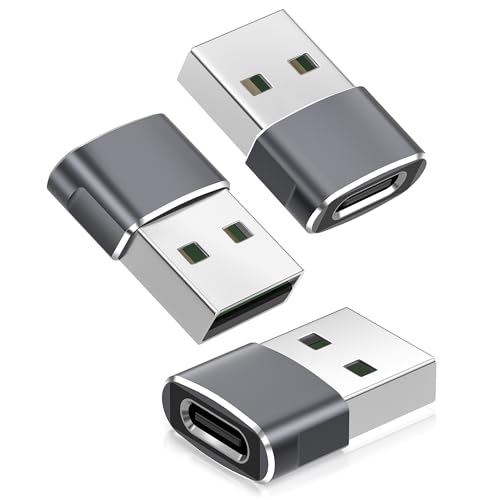
The Basesailor adapter converts USB-A ports into USB-C inputs, enabling charging and data transfer via USB-C cables. It is designed for USB 2.0 data transfer up to 480 Mbps and charging up to 5V/2A, depending on the host power source. This makes it suitable for everyday tasks like syncing photos or charging compatible devices, though it does not support video outputs such as HDMI or DisplayPort. The aluminum alloy housing offers improved durability and heat dissipation, helping the adapter stay reliable with frequent use.
KINGBACK Multi Charging Cable 4 in 1

This 4-in-1 cable provides Mini USB, IP (Lightning), Micro USB, and Type-C ports in one retractable cord. It supports charging multiple devices simultaneously with a shared total output up to 4A, delivering faster charging relative to many standard single-cable cords. The design emphasizes portability and space-saving storage, with an ideal length of about 3 feet for home, office, or travel use. It’s particularly convenient for users who travel with multiple devices and want a compact charging solution without carrying several cables.
QianLink USB C Female to USB A Male Adapter (4-Pack)

QianLink’s 4-pack converts USB-C female ports to USB-A male for charging and data transfer. It supports up to 480 Mbps data speeds and up to 3 amps of power output, offering a safe, short-term solution when a USB-A outlet needs a USB-C connection. While it cannot transmit video or support USB 3.0/3.1 speeds, it does provide a compact, reliable bridge for devices that rely on USB-C accessories but only have USB-A sockets available. This option suits everyday charging, syncing, or accessory pairing tasks.
Elebase USB to USB C Adapter

Elebase offers an aluminum alloy housing USB-A to USB-C adapter designed for iPhone 17 Pro Max and other USB-C devices. This model emphasizes durability and heat management while enabling USB 2.0 charging and data transfer. Like other models in this category, it does not support video output, making it a straightforward choice for charging and basic data tasks on older devices that lack USB-C ports. It complements a user’s existing USB-A outlets with a solid, long-lasting chassis.
4 Pack Upgrade USB to USB C Adapter

This 4-pack upgrade focuses on USB 2.0 compatibility with USB-C adapters, suitable for charging and data transfer. The device set emphasizes durability and ease of use, with connectors designed for repeated plugging and unplugging. It’s a practical option for households with multiple devices and outlets, ensuring that USB-C cables can reach older ports without specialized equipment.
Buying Guide: Key Purchase Considerations
When selecting a USB charging cable adapter, consider these dimensions to ensure the best fit for your devices and environment:
- Compatibility: Verify whether the adapter supports charging, data transfer, or both. If you require video output, these adapters typically won’t provide it.
- Data Transfer Speed: Most USB-A to USB-C adapters offer USB 2.0 speeds (up to 480 Mbps). For touchscreen syncing or large file transfers, this is adequate, but note that USB 3.x speeds are not common in budget adapters.
- Power Output: Check the maximum current the adapter can pass through (often up to 2 A or 3 A). Higher amperage supports faster charging for compatible devices.
- Durability: Aluminum housings improve heat dissipation and longevity. Plastic shells may be lighter but can wear faster over time.
- Port Availability: If you need to charge multiple devices at once, a multi-port or 4-in-1 design can reduce clutter, though it may limit peak power per port.
- Build Quality: Look for connectors engineered for frequent plugging and unplugging, with reliable contact surfaces and reinforced cables if included.
- Port Conflicts: Some adapters only work when plugged into standard USB-A ports with adequate power. Avoid using them with underpowered hubs or wall adapters for high-demand devices.
Usage Scenarios And Comparison
For frequent travelers, the 4-in-1 KINGBACK cable offers portability and on-demand versatility, consolidating four port options into one retractable cable. In contrast,Basesailor and Elebase emphasize converting existing USB-A hubs into USB-C capable interfaces, which helps convert older devices to newer cables without replacing outlets. The QianLink and xiwxi options provide compact, single-purpose USB-C adapters with multiple-pack value, ideal for households or offices that deploy multiple devices. Consider whether you need a single-port bridge or a multi-cable solution when choosing between these models.
Safety And Compliance
All listed adapters target standard USB 2.0 charging and data transfer, with materials designed to withstand regular use. Aluminum housings reduce heat buildup, while the listed amperage levels help ensure safe charging within device specifications. Avoid adapters that claim speeds or outputs beyond what USB-A ports can safely supply, and always use certified cables that match your device’s power requirements.
Maintenance And Longevity
Regular inspection for loose connections, frayed cables, or signs of overheating is advised. Keep adapters away from liquids and extreme temperatures. When not in use, store them in a protective pouch to minimize wear. High-quality adapters often endure thousands of plug-unplug cycles, but gradual wear can occur with lower-grade components.