Discover top USB-C drawing tablets that pair with modern laptops, desktops, and Android devices. This guide highlights five reliable options, balancing pressure sensitivity, shortcut access, screen quality, and portability to suit students, hobbyists, and professionals alike.
| Product | Brand | Key Benefit | USB-C Ready? |
|---|---|---|---|
| XP-Pen Deco 01 V3 | XP-Pen | Budget-friendly with 16,384 pressure levels | Yes |
| HUION Inspiroy H640P | HUION | Compact with battery-free pen | Yes |
| XP-Pen Artist13.3 Pro V2 | XP-Pen | Integrated display, 16,384 levels | Yes |
| HUION H420X | HUION | Ultra-compact travel-sized tablet | Yes |
| Wacom Intuos Small | Wacom | Trusted pen tech with broad software support | Optional |
Note: All entries emphasize battery-free styluses where applicable, reliable pressure sensitivity, and convenient shortcut customization to streamline digital workflow across OSU, teaching, design, and remote work scenarios.
XP-Pen Updated Deco 01 V3 Drawing Tablet

The Deco 01 V3 delivers 16,384 pressure levels and up to 60 degrees tilt with a battery-free stylus, offering a natural drawing feel for beginners and pros alike. Eight customizable shortcut keys suit both right- and left-handed users, improving workflow for art, education, and remote teaching. Android compatibility expands mapping flexibility across devices with varied screen aspect ratios. The tablet is designed to be approachable for newcomers while still meeting more demanding digital art needs.
HUION Inspiroy H640P Drawing Tablet

This compact drawing tablet provides 8192 pressure levels with a battery-free PW100 stylus for a natural pen-like feel. Six accessible shortcut keys optimize day-to-day creative tasks, and Huion’s driver allows app-specific shortcut customization. Its slim profile makes it convenient for mobile work, classrooms, or tight desk spaces, while remaining compatible with Windows, Mac, and Android environments.
XP-Pen Artist13.3 Pro V2 Drawing Tablet with Screen

This 13.3-inch display tablet features a 16,384-level pen and a 24-step red dial plus 8 shortcut keys to optimize creative flow. The combination of an IPS screen with high color accuracy (99% sRGB/89% Adobe RGB) and precise pen input makes it suitable for detailed illustration, animation, and professional design workflows. It is widely compatible with Mac, PC, and Android devices, supporting diverse work setups.
HUION H420X Graphics Drawing Tablet
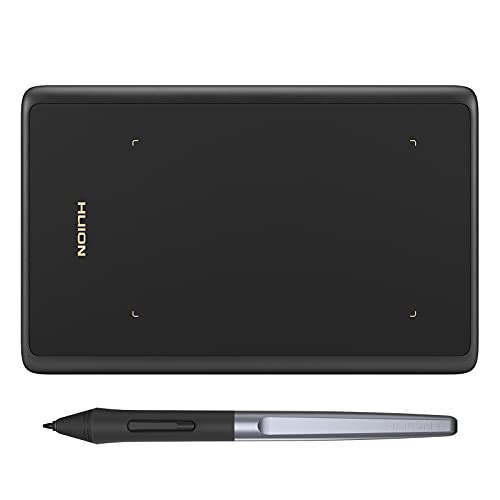
With a 4.17 x 2.6-inch active area and an ultra-thin profile, the H420X is ideal for portable use and travel. It uses a battery-free stylus with 8192 pressure levels and a 300 PPS report rate for quick, smooth lines. Its compact size pairs well with laptops and small desks, and it remains compatible with Windows, Mac, Android, and Linux ecosystems for versatile education and design tasks.
HUION Inspiroy H1060P Graphics Drawing Tablet

The H1060P provides a larger 10 x 6.25-inch working area with 12 programmable keys and 16 soft keys, plus a battery-free stylus with 8192 pressure levels and ±60° tilt. This configuration supports detailed digital art, CAD work, and educational use across Mac, Windows, and Android platforms, making it a strong mid-to-large sized option for dedicated creators.
Wacom Intuos Small Graphics Tablet
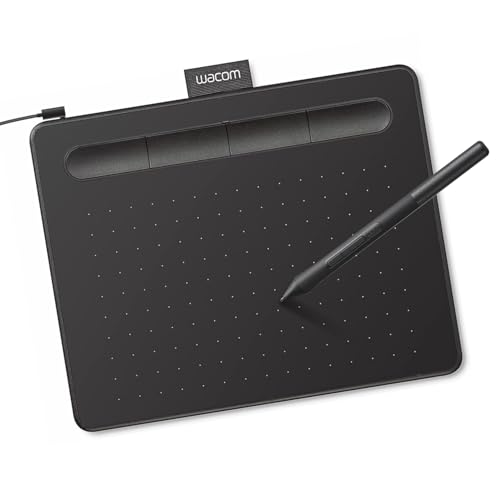
The Wacom Intuos Small emphasizes pen-to-paper feeling with EMR battery-free technology and broad software compatibility. It supports four express keys and works well across Chromebook, Mac, Android, and Windows ecosystems. This entry is ideal for learners and professionals seeking proven Wacom performance and reliable software integration for illustration, photo editing, and document annotation.
Buying Guide: Key Purchase Considerations
- Device compatibility: Ensure USB-C support for your computer or tablet and verify driver availability for your OS (Windows, macOS, Android, Linux).
- Pen technology: Battery-free stylus often reduces charging hassles. Check pressure levels (8k–16k+), tilt support, and pen buttons for workflow efficiency.
- Active area and screen: Decide between a non-display tablet for a traditional drawing feel or a pen display with color accuracy (sRGB/Adobe RGB) and brightness suitable for your projects.
- Shortcut customization: A robust set of express keys or a dial can dramatically speed up tasks in Photoshop, Illustrator, or CAD software.
- Portability vs. size: Compact tablets travel easily but may limit space for detailed work; larger tablets provide more drawing space but are less portable.
- Software ecosystem: Look for driver support and compatibility with your go-to apps (Office, design, teaching tools, video conferencing). Android compatibility is helpful for mobile mapping and teaching apps.
- Price-to-performance: Higher pressure levels and screen quality generally increase cost. Match features to your primary use (teaching, illustration, game development, or 3D work).
- Reliability and support: Consider brand reputation, warranty terms, and availability of replacement nibs and parts.