Enhancing PC audio with a USB 7.1 surround sound adapter can deliver more precise positional audio for gaming, richer music playback, and clearer communication. This guide highlights five well-regarded options, detailing how each unit supports virtual surround sound, compatibility, and user-friendly controls. The selections focus on plug‑and‑play reliability, build quality, and features such as mic volume control, LED indicators, and multiple input/output options to suit desktops, laptops, and game consoles.
Product Quick Reference
| Product | Brand | Key Feature | Output Options |
|---|---|---|---|
| [Upgrade] 1Mii USB Sound Card | 1Mii | Virtual 7.1 surround sound with plug‑and‑play | 3.5mm headphone & mic |
| StarTech.com 7.1 USB Sound Card | StarTech.com | 7.1, 5.1, and 2-channel output with SPDIF | 3.5mm jacks, SPDIF (optical) |
| Cubilux 7.1 USB Surround Sound Card | Cubilux | 7.1 surround with aluminum housing | Headphone, line-in, mic in |
| Vantec NBA-200U USB External 7.1 | Vantec | Simple USB 2.0 connection, 7.1 channels | Headphone, mic, line-in |
| DSYJ 7.1 Channel USB External | DSYJ | 7.1 channel external USB audio | USB, stereo out, mono mic |
Across these options, the common goal is to add multi-channel audio capability to systems that may lack it, while offering straightforward setup and reliable performance. Consumers should weigh driver requirements, supported sampling rates, and build quality to choose the best fit for gaming, streaming, or everyday listening.
[Upgrade] 1Mii USB Sound Card

The 1Mii USB Sound Card provides a 3.5mm audio output with virtual 7.1 surround sound. It supports Windows 10/7/XP and is designed to work with most desktops, laptops, and gaming peripherals that use standard 3.5mm jacks. The device emphasizes plug-and-play operation, eliminating the need for driver installation in many scenarios. A multifunction controller allows simultaneous microphone and headphone volume adjustment, along with a dedicated mic mute button. An LED indicator helps you confirm when 7.1 surround sound is active and the mic is muted. This unit targets gamers and multimedia users seeking an affordable upgrade to integrated audio without adding complexity.
Key features
- Widely compatible with Windows ecosystems and various 3.5mm devices
- 7.1 virtual surround for immersive gaming and music
- Volume controls and mic mute with LED indicators
Note: While many users experience seamless plug‑and‑play, some configurations may require drivers or manual setup on certain operating systems or hardware configurations. The design prioritizes portability and straightforward use for on-the-go setups.
StarTech.com 7.1 USB Sound Card
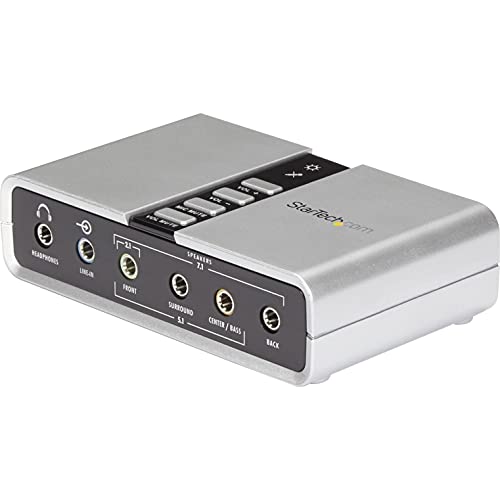
The StarTech ICUSBAUDIO7D external USB sound card adds up to 7.1 channels via USB. It supports 7.1, 5.1, and 2-channel output using a suite of 3.5mm jacks, along with a headphone port, line-in, and stereo microphone inputs. The device upgrades the PC’s audio path by enabling analog and digital outputs for various 7.1 audio applications. It ships with a one-meter USB cable and supports common sampling rates of 44.1 kHz and 48 kHz for analog playback and recording. SPDIF outputs provide digital routes for compatible setups. The accessory is aimed at users seeking higher fidelity and more flexible routing for games, media, and calls.
Key features
- 7.1, 5.1, and 2-channel output options
- SPDIF digital output and optical passthrough
- Quality analog playback at standard sampling rates
While there is robust support for many environments, some users may require additional configuration on certain laptops or desktops to achieve optimal surround mappings or to utilize optical output effectively.
Cubilux 7.1 USB Surround Sound Card

The Cubilux external USB sound card offers 7.1 surround sound with support for 7.1 and 5.1 configurations, catering to gaming, movies, and music. It provides headphone output, line-in input, and microphone input options, enabling versatile connection to headsets and microphones. The device supports high-resolution audio up to 384 kHz/24-bit for the headphone output, with 7.1 surround audio limited to 48 kHz. The aluminum alloy housing helps isolate electronics and minimize interference, contributing to cleaner signal transmission. This unit is targeted at users wanting a durable, metal-cased solution with solid audio performance.
Key features
- 7.1 and 5.1 surround options with multiple inputs
- High-res headphone output up to 384 kHz/24-bit
- Durable aluminum housing for electrical isolation
As with other external sound cards, performance depends on system configuration and the quality of the connected headphones or speakers. Compatibility with older systems varies by driver support and OS updates.
Vantec NBA-200U USB 7.1 External Card

The Vantec NBA-200U provides 7.1 channel surround sound via USB 2.0, designed for broad compatibility with Windows systems. It supports 48 kHz and 44.1 kHz sampling rates for both playback and recording, delivering flexible performance for games and multimedia. The device is backward compatible with USB 1.1, offering broader compatibility with older hardware. Its simple design focuses on providing a reliable external sound option for users seeking straightforward plug‑and‑play operation without complex software requirements. This makes it suitable for budget-conscious setups that still demand multi-channel output.
Key features
- 7.1 channel output with USB 2.0
- Supports common sampling rates for playback/recording
- Backward compatibility with USB 1.1
Potential buyers should note that SPDIF or digital routing features are not included, so this unit excels for analog headphone and mic setups rather than high-end digital audio paths.
DSYJ 7.1 Channel USB External Card

The DSYJ 7.1 Channel USB External Sound Card provides a dedicated USB 2.0 interface with a 7.1 channel output. It features a USB Type A connection, a stereo output jack, and a mono microphone input jack. This configuration supports standard headset and mic usage for gaming and conferencing, delivering multi-channel audio through a compact external device. The DSYJ unit emphasizes plug‑and‑play convenience with minimal setup required, targeting users who want a simple upgrade path for enhanced spatial audio without driver installs.
Key features
- 7.1 channel USB audio with basic I/O
- USB 2.0 interface for compatibility
- Compact external form factor
As a budget-friendly option, users should consider whether they need additional digital outputs or higher sampling rates, which may be found in other models with more advanced routing capabilities.
MEIRIYFA External USB Sound Card

The MEIRIYFA external USB sound card combines 7.1 channel surround sound with convenient physical controls, including a microph one mute, volume up/down, and 7.1 on/off toggles. It supports USB 2.0 connectivity and provides a 3.5mm headphone jack, microphone input, and a connector setup to accommodate PC or console use. The kit emphasizes low background noise and improved signal clarity, aiming to give gamers a competitive edge by enabling precise audio cues. The device is designed for easy plug‑and‑play setup while offering practical gaming-oriented features for sound management during play sessions.
Key features
- 7.1 surround with dedicated mic mute and volume controls
- Wide compatibility with consoles and PCs via USB and 3.5mm jacks
- Low-noise design for clearer audio signals
Users should verify supported operating systems and any required drivers on specific platforms, especially legacy gaming consoles that may have unique USB audio expectations.
USB Sound Card 7.1 Channel Adapter

This USB sound card offers a 7.1 virtual surround experience with easy controls for microphone and headphone volumes, plus a mute feature and LED indicators to clearly show active states. The device emphasizes plug‑and‑play functionality and supports multiple devices including PS5 and Series X/S, suggesting broad compatibility with modern gaming ecosystems. The emphasis on the 7.1 virtual surround mode makes it suitable for gamers who rely on spatial audio cues for judgement and reaction in fast-paced titles.
Key features
- 7.1 virtual surround sound for immersive audio
- Integrated mic/headphone volume controls with mute
- LED indicators for quick state awareness
Potential users should ensure the device meets their platform requirements and check if the LED indicators and mute controls integrate with their specific software and game titles.
Buying Guide: How to Choose a USB 7.1 Surround Sound Adapter
- Compatibility: Verify operating system support (Windows, macOS, or gaming consoles). Some devices provide broad compatibility, while others may require specific drivers for full functionality.
- Surround Sound Type: Distinguish between true hardware 7.1 vs. virtual 7.1. Most USB adapters offer virtual surround on stereo headsets; check if you need true multi-channel output or simply enhanced positional cues.
- Inputs and Outputs: Confirm the number of 3.5mm jacks for headphones and microphones, plus any digital outputs (SPDIF) if you plan to route audio digitally.
- Sampling Rates: Look at supported playback/recording rates (44.1 kHz, 48 kHz, up to higher rates). Higher sample rates may correlate with clearer audio across genres but require compatible hardware.
- Build and Isolation: Aluminum housings and solid construction help reduce interference and improve signal integrity, especially in electrically noisy environments.
- Controls and Convenience: Evaluate features like mic mute, volume wheels, LED indicators, and easy plug‑and‑play setups for quick access during gaming or streaming.
- Power and Bus Type: USB 2.0 vs USB 3.x compatibility may influence latency and power delivery. Bus-powered devices keep desk setup simple without extra power adapters.
- Use Case: Choose based on primary needs—gaming with precise footsteps, music listening with high fidelity, or calls and streaming with reliable mic support.
- Future-Proofing: Consider whether the adapter supports newer headsets and gaming consoles, ensuring continued usefulness as devices evolve.
Overall, selecting the right USB 7.1 surround sound adapter involves balancing budget, intended use, and system compatibility. For gamers and multimedia users, prioritizing surround performance, input flexibility, and build quality will typically yield the best long-term satisfaction.