Expand your computer’s USB capacity with high-performance PCIe USB cards. This guide highlights five reliable options that offer multiple USB 3.0/3.2 ports, strong power delivery, and compatibility across Windows, macOS, and Linux systems. Each card is designed to maximize throughput and support high-demand peripherals such as external drives, VR devices, cameras, and docking stations. Explore top picks, features, and what to consider before you buy.
| Product | Brand | Ports | |
|---|---|---|---|
| ELUTENG PCIE USB 3.0 Card 7 Ports | ELUTENG | 7 USB 3.0 | Independent outputs with power isolation |
| FebSmart FS-U4-Pro | FebSmart | 4 USB 3.0 | Self-powered design; high-bandwidth 5Gbps |
| YEELIYA PCIE USB 3.0 Expansion Card 7 Ports | YEELIYA | 7 ports (5x A, 2x C) | Dual USB-C plus high port count |
| StarTech.com 4-Port USB PCIe Card | StarTech.com | 4 USB 3.2 Gen 2 | Dual controllers with up to 20 Gbps total bandwidth |
| StarTech.com 7 Port PCI Express USB 3.0 Card | StarTech.com | 7 USB 3.0 | 7 ports with both internal and external support |
Note: All cards support USB 3.x speeds, but check motherboard compatibility, power requirements, and whether a supplemental power connection is needed for high-drain devices.
ELUTENG 7-Port USB 3.0 PCIe Card

The ELUTENG 7-Port USB 3.0 PCIe card provides seven independent USB 3.0 Type-A ports for expanding external connections. It includes a 2-phase power supply module that allows each port to be powered individually, reducing power-related bottlenecks. The card operates without needing an external power supply, while solid capacitors and NEC 720201/720210 controllers help stabilize voltage. The device supports theoretical USB 3.0 speeds up to 5Gbps, enabling quick transfers for large media files and backups. It is compatible with Windows systems across multiple versions and is designed to avoid cross-port interference by keeping outputs isolated.
Key features include: 7 USB 3.0 ports; independent port power per output; high-speed 5Gbps; NEC controller-based stability; no additional required power supply for typical workloads. Note: Not compatible with PS3/PS4.
FebSmart FS-U4-Pro 4-Port USB 3.0 PCIe Card

The FebSmart FS-U4-Pro adds four USB 3.0 ports via a PCIe X1 interface. It leverages a built-in self-powered technology to supply up to 5V/2A per port (10W total per card), allowing high-power devices such as external NVMe enclosures, industrial cameras, and VR peripherals to operate without an external power adapter. The controller uses RENESAS UPD720201, ensuring broad compatibility with AMD, ARM, and Intel platforms. All ports share a total 5Gbps bandwidth, and the design emphasizes safety with integrated fuses and voltage regulation for data protection.
Highlights include: 4 USB 3.0 ports at up to 5Gbps; self-powered design; robust protection features; compatible with various PC architectures; suitable for demanding peripherals and NAS setups. Note: Requires PCIe slot availability and proper motherboard support.
YEELIYA 7-Port USB 3.0 PCIe Expansion Card
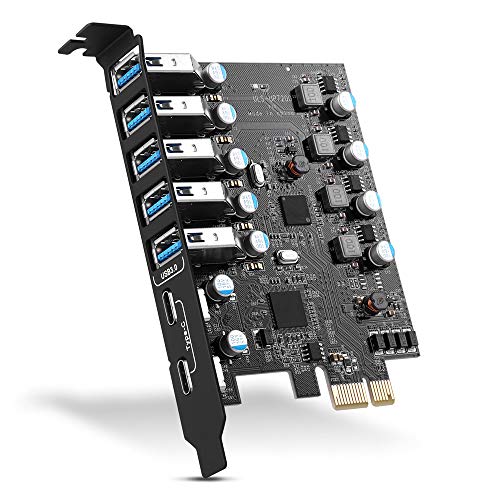
The YEELIYA 7-Port card provides a mix of Type-A and Type-C USB 3.0 interfaces, expanding a desktop’s USB capacity while maintaining broad OS compatibility (Windows, macOS, Linux). It supports up to 5Gbps transfer rates and is designed to work with PCIe x1, x4, x8, or x16 slots. The card emphasizes that Windows 10 and macOS 10.8.2+ environments may not require driver installation, while Windows XP/Vista/7 may require initial driver setup. It is suitable for keyboards, mice, external storage, cameras, docking stations, and other USB peripherals.
Key points: 7 ports total (5 Type-A, 2 Type-C); 5Gbps speed; broad OS compatibility; PCIe slot flexibility; driver considerations vary by OS.
ELUTENG 8-Port USB 3.2 PCIe Card

The ELUTENG USB 3.2 card adds eight ports: seven USB-A plus two Type-C ports, allowing two devices to operate concurrently. It uses NEC720210/720201 controllers and a solid-state capacitor design to support stable high-temperature performance and reliable power delivery. Each port has independent capacitors to prevent cross-port interference, and the design includes independent power modules for stable operation. The card supports USB 3.2 Gen 2 speeds (theoretical up to 10Gbps) and aims to deliver robust performance for multimedia editing, large file transfers, and peripheral-heavy setups.
Important considerations include: USB 3.2 Gen 2 speeds; dual Type-C plus multiple USB-A ports; independent power considerations; high-temperature resilience; broad OS support with driver considerations based on OS version.
Sinefine 4-Port PCIe to USB 3.0 Card
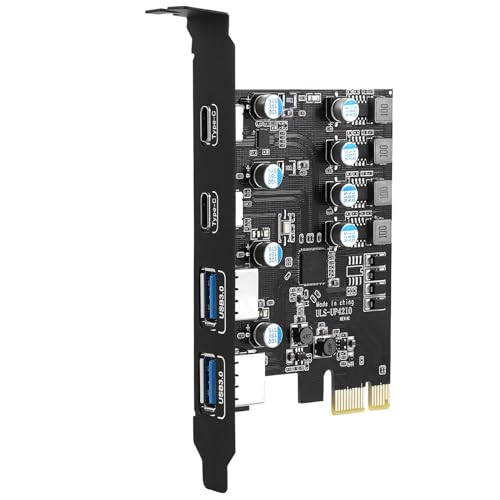
The Sinefine UP4210 PCIe expansion card offers four USB 3.0 ports (2 USB-A and 2 USB-C) via a PCIe Express 1X interface. It supports up to 5Gbps total bandwidth and is designed for desktop PCs, workstations, and NAS environments. Installation does not require an external power adapter, as the design can draw power from the motherboard for typical devices. The product emphasizes data safety with protective circuits and separate power modules to stabilize current and voltage per port, ensuring safer operation for high-data-transfer peripherals.
Key features include: 4 USB 3.0 ports; 2x USB-C and 2x USB-A; self-powered capability from the motherboard; 5Gbps total bandwidth; built-in protection to safeguard devices and data.
Buying Guide: Key Purchase Considerations For USB 3 PCIe Cards
- Port count and type: Determine whether you need USB-A, USB-C, or a mix. Higher port counts are great for workstations, servers, or media centers, but ensure your motherboard and case can accommodate the expansion card.
- Power delivery: Some cards include independent power rails per port or self-powered designs. For high-draw devices (NVMe enclosures, VR gear, multiple external drives), choose cards with robust power management to prevent bottlenecks or device resets.
- Controller and chipset compatibility: Cards use controllers like NEC UPD720201/720210, ASM3142, or Renesas RENESAS. Check compatibility with your operating system, and confirm driver requirements for legacy systems (e.g., Windows XP/Vista).
- Bandwidth and performance: Theoretical speeds (5Gbps for USB 3.0, up to 10Gbps for newer USB 3.2 Gen 2) are important, but actual throughput depends on devices, hub usage, and PCIe lane bandwidth. For NAS or external drives, prioritize cards with higher sustained throughput and, if possible, multiple controllers for better throughput distribution.
- Form factor and installability: Some models are full-profile while others are low-profile. Ensure your PC case and motherboard have the appropriate PCIe slot (x1/x4/x8/x16) and space for the card’s height, length, and any power connectors.
- OS compatibility and drivers: While newer OS versions may auto-detect devices, older OSes might require drivers. Verify driver availability and installation steps for Windows, macOS, and Linux environments.
- Reliability and safety features: Look for independent port protection, surge safeguards, and capacitor design that helps stabilize power and reduce surge risk during high-load transfers.
- Use case alignment: For media editing, backup workflows, or dense peripheral setups, consider cards with higher port counts or a mix of USB-C and USB-A to maximize device compatibility.