Choosing the right USB 3.0 internal cables and headers helps to expand front-panel ports without sacrificing space or PCI slots. The following five products offer internal USB 3.0 header adapters, extenders, and splitters designed to simplify front-panel access while maintaining signal integrity and high data transfer speeds. Each option interoperates with standard 19/20-pin USB 3.0 headers and supports up to 5 Gbps. The list below highlights features, compatibility, and typical use cases for American PC builders and enthusiasts.
| Product | Brand | Type | Key Benefit |
|---|---|---|---|
| RIITOP 2 Ports USB 3.0 Back Panel to MB 20pin | RIITOP | Back-panel to motherboard header adapter | Adds two external ports via PCI slot plate |
| XMSJSIY USB 3.0 Front Panel Cable | XMSJSIY | Front-panel USB 3.0 extension | Front USB 3.0 access with shielding for EMI reduction |
| GINTOOYUN USB 3.0 Header Extension Cable | GINTOOYUN | Internal 19/20-pin extension | High-speed, flexible for tight spaces |
| HOXIBSL USB 3.0 Header Splitter Extension Cable | HOXIBSL | Split extension cable | Expands to two headers for more devices |
| GELRHONR 2 Port USB 3.0 A to 20 Pin | GELRHONR | Two-port splitter from back to front | Converts two USB 3.0 sockets to front-panel ports |
RIITOP 2 Ports USB 3.0 Back Panel to MB 20pin Header Connector Cable Adapter with PCI Slot Plate Bracket 1.5ft
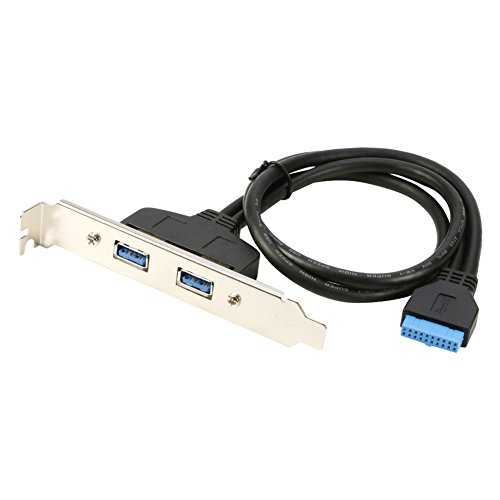
RIITOP provides a solution to convert a spare internal USB 3.0 port into two external ports behind the PC case. The cable uses a USB 3.0 Female (x2) and a 20-pin motherboard connector header. It installs without occupying PCI slots, and ships with a PCI slot plate bracket for a clean rear-panel appearance. This option is ideal for users seeking additional rear-access USB 3.0 connections without adding expansion cards.
XMSJSIY USB 3.0 Front Panel Cable, Motherboard 19/20pin Cable to USB Female Splitter Adapter Extension Connector -50cm/19.6inch

This dual-port USB 3.0 front-panel adapter converts a 19-pin motherboard header to two USB 3.0 interfaces directly, allowing front-panel access where a USB 2.0 location used to be. Data performance reaches up to 5 Gbps with twisted-pair conductors and shielding to minimize interference. The design emphasizes impedance matching and EMI protection for stable transfers.
GINTOOYUN USB 3.0 Header Extension Cable, USB 3.0 19/20 Pin Male to Female Internal Extension Adapter

GINTOOYUN offers a compact USB 3.0 internal extension for 19/20 pin headers. It supports up to 5 Gbps data transfer and is suitable for SLI configurations or builds where access to internal USB 3.0 headers is necessary. The cable supports full duplex operation and independent signaling for stable, high-speed data transmission.
HOXIBSL USB 3.0 Header Splitter Extension Cable, 1 to 2 Y Type Cable

The HOXIBSL splitter expands a single USB 3.0 header to two connectors, enabling more devices to be connected via the front or rear. It provides stable power and signal transmission and remains compatible with standard USB 3.0 protocols while maintaining data integrity at high speeds.
GELRHONR 2 Port USB 3.0 A to 20 Pin Header Motherboard Cable, Y Splitter Cable

GELRHONR’s two-port USB 3.0 A to 20-pin header cable converts two back-panel USB 3.0 sockets to two front-panel USB 3.0 ports. It is designed for quick plug-and-play installation and supports USB 3.0 speeds with standard 20-pin headers. This option is convenient for upgrading front-panel connectivity without extra PCI slots.
Buying Guide: Key Purchase Considerations for USB 3.0 Internal Cables
- Compatibility: Ensure the header is a standard USB 3.0 19/20-pin interface and that your case supports the chosen configuration (front-panel, back-panel, or dual-port expansion).
- Data Speed and Shielding: Look for cables with twisted-pair conductors, shielding, and EMI/RFI protection to support up to 5 Gbps and minimize signal interference in compact builds.
- Form Factor: Choose based on space constraints and mounting options (back-panel PCI plate, front-panel, or internal extender). Flexible or flat cables can help in tight spaces.
- Power Delivery: USB 3.0 cables should provide stable power to devices. Panels that split or expand ports should maintain consistent power delivery to prevent device instability.
- Installation Complexity: Some adapters require minor motherboard header alignment or loose-fit tolerances. Check manufacturer notes for compatibility with your motherboard and chassis design.
- Durability and Build Quality: Look for connectors with robust latching mechanisms and good strain relief to withstand repeated insertion and organization within the case.
- Future-Proofing: If you anticipate more USB 3.0 devices, consider splitter or multi-port solutions that minimize the need for future upgrades while preserving signal quality.
- Noise and Interference: Shielded designs and EMI protection help reduce crosstalk, especially in builds with multiple front-panel ports and high-speed devices.