Finding a reliable USB 3.0 to SATA III adapter can simplify external storage upgrades, backups, and data recovery. The following hand-picked picks showcase compatibility with 2.5″ and, in some cases, 3.5″ drives, solid performance with UASP support, and convenient plug-and-play operation. Each option is evaluated for ease of use, power needs, and transfer speeds to help American consumers choose the right tool for laptops, desktops, and game consoles.
| Product | Brand | Key Feature |
|---|---|---|
| SABRENT SATA to USB Cable – EC-SSHD | SABRENT | USB 3.0, 5Gbps, UASP, 2.5″ SATA I/II/III, hot-swappable |
| BENFEI SATA to USB Cable | BENFEI | 2.5″ SATA SSD/HDD, USB 3.0, UASP, 6Gbps theoretical, backward compatible |
| UGREEN SATA to USB 3.0 Adapter Cable | UGREEN | Supports 3.5″/2.5″ SATA, UASP, 5Gbps, plug-and-play |
| WEme USB 3.0 to SATA Converter | WEme | 2.5″/3.5″ drives, 18TB support, hot-swappable, driver-free |
| Unitek USB 3.0 to SATA III Adapter Kit | Unitek | 2.5″/3.5″ drives, UASP, 5Gbps, power adapter included |
SABRENT SATA to USB Cable — EC-SSHD

The SABRENT EC-SSHD provides a compact external solution for connecting a 2.5″ SATA I/II/III hard drive or SSD to a computer via USB 3.0. It supports UASP for improved transfer efficiency and can reach speeds up to 5Gbps under compatible hardware. The adapter is hot-swappable and plug-and-play, requiring no additional drivers. It is ideal for quick backups, disk cloning, and data transfer between systems. Its minimalist design makes it a portable option for on-the-go storage needs. Power needs are minimal, typical for 2.5″ drives, with no extra power adapter required for most drives.
BENFEI SATA to USB Cable (2in1 USB-C/USB 3.0)

The BENFEI adapter targets 2.5″ SATA drives, offering USB 3.0 speeds with up to 5Gbps transfer rates and backward compatibility with USB 2.0/1.1. It leverages UASP to deliver faster reads and writes than traditional USB 3.0. This cable is designed for quick storage expansion, backups, disk imaging, and data transfers. It does not support 3.5″ drives, making it a streamlined option for laptop users or compact external drives. Expect plug-and-play use with supported systems and straightforward cable-based connectivity.
UGREEN SATA to USB 3.0 Adapter Cable

UGREEN’s SATA to USB 3.0 adapter supports both 3.5″ and 2.5″ drives and provides UASP-enabled data transfers up to 5Gbps. It emphasizes simple plug-and-play setup with no driver installation, and hot-swapping capability. This makes it suitable for expanding external storage, backing up systems, and performing data recoveries. It’s compatible with Windows, Mac, and various devices, offering a broad OS footprint for versatile use across multiple computers.
WEme USB 3.0 to SATA Converter
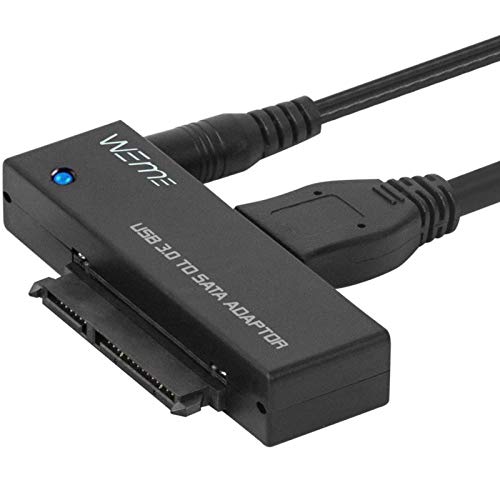
WEme’s USB 3.0 to SATA adapter supports 2.5″ and 3.5″ drives and includes a power adapter and USB 3.0 cable. It enables external use of HDDs and SSDs with up to 18TB capacities. The product is designed for hot-swapping and driver-free operation, delivering a straightforward external drive experience for backups, media storage, and data transfers across Windows, macOS, and other systems. The included power supply ensures adequate power for higher-capacity 3.5″ drives.
SABRENT USB 3.0 to SATA External Docking Station

This lay-flat docking station supports both 2.5″ and 3.5″ SATA drives and uses USB 3.0 with UASP to maximize performance. It’s suitable for users who frequently swap drives or clone multiple disks. Keeping firmware up to date is recommended to ensure compatibility with larger capacity drives. The dock’s design aims for quick access to the drives, speed, and straightforward operation, ideal for data migration tasks and testing drives in a lab-like setup.
Unitek USB 3.0 to SATA III Adapter Kit

Unitek’s universal hard drive adapter supports 2.5″ and 3.5″ SATA devices with up to 18TB capacity. It features USB 3.0 speeds (up to 5Gbps) and UASP for faster transfers, alongside compatibility with Windows and Mac OS. A dedicated 12V/2A power adapter is included to ensure stable operation for larger 3.5″ drives. The adapter provides a reliable, all-occasion solution for upgrading laptops, restoring data, or syncing large files between systems.
MIAOERJING SATA to USB 3.0 Cable

The MIAOERJING adapter enables 2.5″ SATA HDD/SSD connections with USB 3.0 transfer rates up to 5Gbps. It offers compatibility with USB 3.0/2.0/1.0 systems and supports SATA III drives, excluding 3.5″ drives. It’s designed for easy data expansion and backups on laptops and desktops, with driver-free operation for straightforward use on multiple operating systems. The device is particularly suitable for users working with 2.5″ SSDs and HDDs who require reliable, portable performance.
Buying Guide: Key Considerations For USB 3.0 To SATA III Adapters
- Drive compatibility: Confirm whether the adapter supports 2.5″ drives only or also 3.5″ drives. 3.5″ drives often require a separate power supply due to higher power consumption.
- USB interface and speed: Look for USB 3.0 (5Gbps) or higher, with UASP support for faster read/write speeds and lower CPU usage. USB-C variants may offer additional compatibility with newer laptops.
- Power requirements: Some adapters include a dedicated power adapter (12V/2A) to support 3.5″ drives; others run purely off USB power, suitable for smaller 2.5″ drives.
- Plug-and-play vs. drivers: Driver-free operation simplifies setup across Windows, macOS, and Linux. Ensure hot-swappable support if you frequently connect/disconnect drives.
- Data integrity features: UASP improves performance; consider hardware with robust build quality and reliable cables to minimize data loss during transfers.
- Driver and firmware updates: Some docks and adapters require firmware updates for larger capacity drives or new OS support. Check manufacturer resources for updates.
- Use case and portability: Docking stations are great for frequent drive swapping; cable adapters are compact for travel; consider your typical workflow (backup, cloning, data recovery) when choosing.
- OS compatibility: Ensure the adapter works with your primary operating system (Windows, macOS, Linux) and any other devices you plan to connect (game consoles, media players).
- Maximum drive capacity: While many adapters support up to 18TB or more, confirm the listed maximum capacities for your specific model and firmware version.