Choosing the right USB 3.0 enclosure or docking station helps turn internal hard drives into portable external storage. This guide highlights five reliable options that support IDE and SATA drives, including 2.5″ and 3.5″ formats, with fast USB 3.0 transfer speeds. Each product emphasizes ease of use, compatibility, and safe data handling. Use the buying guide to compare features like power requirements, multi-drive support, and plug-and-play capabilities.
| Product | Brand | Key Advantage |
|---|---|---|
| SABRENT USB 3.0 Enclosure | SABRENT | Tool-free setup and UASP for fast transfers |
| GODO USB 3.0 to 3.5″ Enclosure | GODO | Aluminum housing with safe, independent power supply |
| X-MEDIA XM-EN3451 V3 | X-MEDIA | Supports IDE and SATA up to 3.5″/2.5″ drives with USB 3.0 |
| Unitek USB 3.0 to IDE/SATA Converter | Unitek | Dual-head IDE and SATA with power for multiple drives |
| Tccmebius USB 3.0 Docking Station | Tccmebius | Dual slots for IDE and SATA with One-Touch Backup |
Note: All options use USB 3.0, offering up to 5 Gbps transfer speeds. They support various combinations of IDE and SATA drives, with some models capable of hosting multiple drives simultaneously or providing dedicated power for stability during transfer.
SABRENT USB 3.0 Enclosure
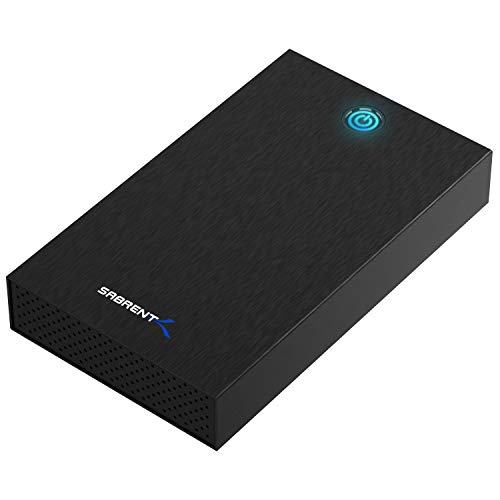
The SABRENT enclosure supports 2.5” and 3.5” SATA drives and SSDs, transforming internal drives into fast external storage. Its tool-free setup lets users swap drives quickly, and USB 3.0 with UASP enables efficient data transfers up to 5 Gbps. It provides a straightforward, universally compatible solution for Windows, macOS, and Linux environments. Power needs are handled via included cables, and the enclosure typically ships with a durable external case for portability.
GODO USB 3.0 to 3.5″ Enclosure

The GODO enclosure uses a robust aluminum housing with a dedicated 12V/2A power supply, improving heat dissipation and drive stability. It supports up to 18TB drives, includes UASP for faster transfers, and provides LED indicators for status. The design emphasizes plug-and-play operation with minimal driver requirements and a vertical stand for compact desktop use. Safety protections mitigate over-voltage and short circuits, helping protect connected drives.
X-MEDIA XM-EN3451 V3

The X-MEDIA XM-EN3451 V3 supports most 3.5″ IDE/PATA and 3.5″/2.5″ SATA drives, including SSDs, with USB 3.0 delivering up to 5 Gbps. It offers Plug & Play and hot-swappable operation, with broad compatibility across PC and Mac. This model prioritizes a simple, universal installation process, making it suitable for users upgrading or restoring data from multiple drive types.
Unitek USB 3.0 to IDE and SATA Converter

The Unitek kit provides a dual-head IDE and SATA interface with a built-in 12V/2A power supply for stable operation. It supports up to 5 Gbps data transfer and is backward compatible with USB 2.0. The package commonly includes a power cable and connectors, enabling flexible use with multiple drive formats and sizes. It’s designed for users who need to access multiple drive types from a single external enclosure or adapter.
Tccmebius USB 3.0 Docking Station

The Tccmebius USB 3.0 docking station provides dual slots for IDE and SATA drives, with One-Touch Backup capability. It supports 2.5″ and 3.5″ drives and offers straightforward plug-and-play access. The device is designed for quick data transfers and backup operations, with USB 3.0 delivering up to 5 Gbps. Users should ensure that drives with higher power requirements are connected to the included power adapter for stable operation.
Buying Guide
Key considerations when selecting a USB 3.0 IDE enclosure or docking station:
- Drive compatibility: Verify support for 2.5″ and/or 3.5″ IDE and SATA drives, plus SSDs if needed. Some units also accommodate optical drives or multiple drive types at once.
- Power requirements: Some enclosures need external power, especially for 3.5″ drives or multi-drive setups. Check whether a power adapter is included and if an additional power supply is required for stable operation.
- Data transfer speeds: USB 3.0 offers up to 5 Gbps, but actual performance depends on the drive, enclosure efficiency, and host computer. Look for UASP support for faster, more efficient transfers.
- Plug-and-play and tool-free setup: For quick swaps, choose models that allow tool-free drive installation and hot-swapping where supported.
- Safety and protection: Aluminum enclosures with good heat dissipation reduce thermal throttling. Look for built-in protections against over-voltage, short circuits, and leak currents on powered units.
- Multi-drive support: If you plan to use more than one drive simultaneously, consider dual-slot or docking stations with independent power and robust data handling.
- Portability vs. desktop use: Docking stations offer desk-friendly setups, while compact enclosures are more portable for on-the-go use.
- Operating system compatibility: Most options support Windows, macOS, and Linux; verify driver requirements and hot-plug capabilities if you work across systems.
- Reliability and reviews: Check user feedback on heat management, noise, and long-term stability, especially for high-capacity drives.