Finding reliable USB 3.0 RAID enclosures can simplify data backup, expand capacity, and improve transfer speeds for projects, media libraries, or backups. The following selections emphasize versatility, multiple RAID modes, and solid cooling to maintain performance. Each option supports USB 3.0, with configurations spanning from 2 to 8 bays to fit varying storage needs and budgets.
style=”display:none;”>Table of selected products:
– ORICO RAID 5 Bay HDD Enclosures USB 3.0 Push-Pull Mounting for 3.5-inch HDD, Max 110TB (9858RU3)
– Syba 5 Bay 2.5″ and 3.5″ SATA HDD External USB 3.0 / eSATA RAID Enclosure (SY-ENC50122)
– CENMATE 4 Bay Hard Drive RAID Enclosure with Cooling Fan (4 RAID Modes)
– SanDisk Professional 48TB G-RAID Project 2 (HD, Thunderbolt 3, USB)
– LaCie Rugged Raid Shuttle 8TB External Hard Drive (RAID 0/1)
ORICO 5-Bay USB 3.0 RAID Enclosure

The ORICO 9858RU3 provides flexible RAID mode management across eight configurations: 0, 1, 3, 5, 10, JBOD, CLONE, and CLEAR. It is designed for 3.5-inch SATA drives, with a maximum total capacity of up to 110TB in its 5-bay chassis. Data security and backup strategies can be tailored via RAID switching, though users should back up data prior to mode changes. Transfer speeds can reach up to 235MB/s over USB 3.0, supporting efficient backups and centralized drive management for large projects or media libraries.
Key considerations include drive compatibility (3.5″ SATA HDDs only), the importance of regular backups during RAID transitions, and the value of supporting high-capacity configurations for growing storage needs. The enclosure emphasizes speed with USB 3.0 and supports SATA 6 Gbps disks, making it a practical choice for professionals who manage large files.
Product highlights:
– 5-bay design supports up to 110TB total capacity
– Eight RAID modes including CLONE and CLEAR
– USB 3.0 interface with up to 235MB/s transfer
Syba 5 Bay USB 3.0 / eSATA RAID Enclosure
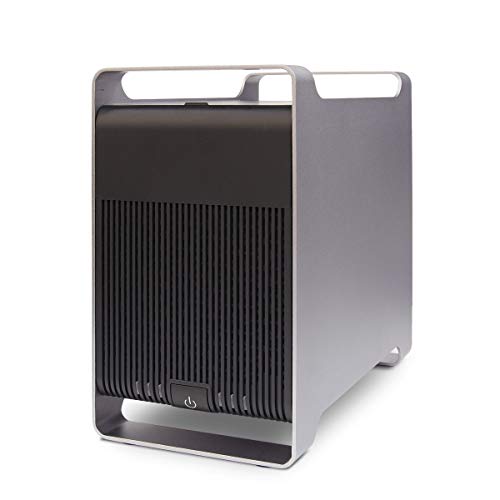
The Syba SY-ENC50122 supports both 2.5″ and 3.5″ SATA drives, with a combined capacity up to 120TB. It offers RAID 0, 1, 3, 5, 10, SPAN, and JBOD configurations and requires an eSATA Port Multiplier setup for multi-drive access when using eSATA. This enclosure is useful when you need flexible RAID options across mixed drive sizes and brands, while USB 3.0 or eSATA interfaces enable fast data transfer and easy expansion of desktop storage for media editing or backups.
Key considerations:
– Compatible with 2.5″ and 3.5″ SATA drives up to 120TB
– Wide RAID support including JBOD and SPAN
– Requires Port Multiplier eSATA setup for multi-drive access
CENMATE 4 Bay RAID Enclosure With Cooling

The CENMATE 4 Bay enclosure supports 2.5″ and 3.5″ SATA HDDs and SSDs with a maximum per-drive capacity of 20TB, totaling up to 80TB. It includes two 2-inch cooling fans and aluminum-alloy construction to help minimize heat. RAID modes include 0, 1, 3, 5, 10, CLONE, and NORMAL, with a noted emphasis on careful RAID setup to avoid data loss. The unit functions as a DAS (Direct Attached Storage) solution without NAS capabilities, and there is a caution about raid mode switching and intended operating conditions.
Important considerations:
– Up to 80TB total capacity across four bays
– Active cooling to manage drive temperatures during sustained use
– RAID modes require careful handling to prevent data loss
SanDisk Professional 48TB G-RAID Project 2

The SanDisk Professional G-RAID Project 2 offers up to 48TB in a two-drive configuration housed in enterprise-class Ultrastar hard drives. It ships in RAID 0 for maximum performance, delivering transfer speeds up to 540MB/s read and 490MB/s write in the 48TB variant. A Pro-Blade slot enables easy expansion with SSD capacity for higher throughput and faster editing workflows, all within a rugged PCIe-grade design designed for demanding workloads and content creation pipelines.
Key takeaways:
– Up to 48TB using two Ultrastar drives
– RAID 0 performance optimization with high throughput
– Optional Pro-BLADE SSD capacity for extra speed
LaCie Rugged RAID Shuttle 8TB
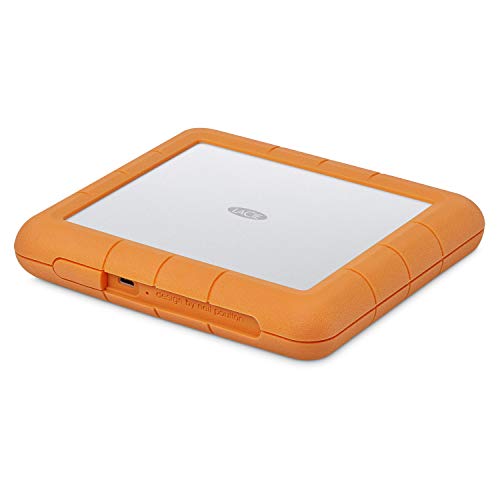
LaCie’s Rugged RAID Shuttle combines rugged portability with RAID 0/1 capabilities via a streamlined wizard. At 8TB, it’s designed for media professionals needing reliable external storage on the go, with features like self-encrypting password protection to help safeguard projects and backups. The rugged, drop-resistant casing supports USB-C/USB 3.0 compatibility for broad device support and field work scenarios.
Buying considerations:
– RAID 0 for performance or 1 for redundancy
– Rugged build suitable for travel and field use
– Self-encryption password protection for security
Buying Guide: USB 3.0 External RAID Enclosures
Overview: USB 3.0 RAID enclosures combine multiple drives into a single enclosure with varied RAID configurations. They offer scalable capacity, improved redundancy, and faster data transfers—useful for backups, video editing, archiving, and large data sets. When choosing, assess capacity needs, drive compatibility, RAID options, cooling, and portability.
- Capacity and scalability: Determine total usable capacity and per-drive limits. Consider future growth and the potential to add drives later.
- RAID configurations: Common modes include RAID 0 (speed), RAID 1 (redundancy), RAID 5/6 (parity-based redundancy), RAID 10 (striped mirrors), JBOD (independent disks). Some models add CLONE or NORMAL modes for quick duplication or simple setup. Be aware that RAID changes can risk data loss if backups are not current.
- Interface and speed: USB 3.0 provides up to ~5 Gbps theoretical bandwidth, with real-world transfers typically around 100–250 MB/s depending on drives and controller. Some enclosures also support eSATA or USB-C with higher throughput when paired with fast disks.
- Cooling and build quality: Aluminum housings and active fans help manage drive temperatures during sustained workloads, reducing thermal throttling and potential drive wear.
- Drive compatibility: Most enclosures support 2.5″ and/or 3.5″ SATA drives. Check per-bay drive limits and whether the unit supports mixed-drive configurations.
- Reliability and security: Look for features like password protection, drive health monitoring, and warranty terms. Consider how easy it is to replace failed drives without dismantling the entire unit.
- Portability vs. capacity: Larger multi-bay enclosures offer high capacity but are less portable. Smaller, lighter units favor on-the-go use but may offer less expansion.
Comparison snapshot:
– For high capacity and robust RAID options, multi-bay enclosures like the 4- to 8-bay models provide flexibility for media libraries and editing suites.
– If you prioritize rugged travel and field work, a compact, durable model with RAID 0/1 is advantageous.
– Enclosures with cooling and aluminum construction help maintain performance during long transfers or backups.
Notes on usage:
– Always back up critical data before changing RAID configurations.
– Regularly monitor drive health and firmware updates from the manufacturer.
– Ensure firmware and software tools match your operating system (Windows or macOS) and that you understand RAID mode-switch steps to minimize data loss.