Finding reliable USB 3.0 extension cables that can reach 10 meters without losing performance is essential for setups like VR, external hard drives, printers, and cameras. This article highlights five top options, all designed to boost signal integrity over long runs, with active repeater tech and optional power support. Whether you’re wiring a VR station, a studio setup, or a classroom network, these cables offer robust data transfer up to 5 Gbps and compatibility with USB 2.0 devices.
| Product | Brand | Length | Key Benefit |
|---|---|---|---|
| Cable Matters Active USB Extension Cable | Cable Matters | 32.8 ft / 10 m | Signal booster for long-distance USB 3.0 connections |
| BlueRigger USB 3.0 Extension Cable | BlueRigger | 32 ft / 10 m | In-wall CL3 rated, multi-layer shielding |
| Plugable 10 Meter USB 3.0 Active Extension | Plugable | 32 ft / 10 m | AC power adapter for stable long-distance power |
| ZVOIYKM USB 3.0 Active Extension Cable | ZVOIYKM | 30 ft / 10 m | Integrated signal booster for high-speed transfer |
| MutecPower 32 Feet Active USB Extension Cable | MutecPower | 32 ft / 10 m | Dual-bus architecture for USB 2.0 and 3.0 compatibility |
These picks emphasize active extension with signal boosting, compatibility across USB generations, and practical power options to prevent voltage drop over long distances. Each product below includes a concise overview, supported features, and a direct link for quick reference.
Cable Matters Active USB Extension Cable 10m

The Cable Matters active USB extension cable extends the connection between a computer and USB peripherals, delivering SuperSpeed 5Gbps data transfer. It is designed to connect VR headsets, webcams, USB hubs, and external hard drives. The included amplification chipset supports longer transmission distances beyond standard passive cables and remains backward compatible with USB 2.0 devices. An optional 5V 2A power supply may be used to ensure adequate power when devices draw more than 900 mA, or when USB bus power is insufficient.
BlueRigger USB 3.0 Extension Cable

The BlueRigger USB 3.0 extension is an active, long-range repeater designed to extend USB connections to VR headsets, printers, hard drives, keyboards, mice, and more. It is compatible with USB 1.1/2.0/3.0 devices across Windows, Mac, Linux, and Chrome OS. The cable features shielding to minimize interference, nickel-plated connectors for signal clarity, and an aluminum alloy housing for heat dissipation, with CL3-rated in-wall suitability for some installations.
Plugable 10 Meter USB 3.0 Active Extension

Plugable’s 10m USB 3.0 extension pairs a long reach with an AC power adapter to maintain stable device performance. It provides up to 5Gbps transfer speeds and supports back-voltage protection. The setup is suitable for studio podcasts, long-range peripheral connections, and configurations requiring a flexible distance between the computer and USB devices. The included power option helps prevent voltage drop over extended runs.
ZVOIYKM USB 3.0 Active Extension Cable

The ZVOIYKM active extension offers a 30-foot reach with a built-in signal booster, delivering consistent 5Gbps data transfer. It’s presented as ideal for VR setups and remote connections to printers, hard drives, Xbox, and PC peripherals. The design emphasizes multi-layer shielding and a robust aluminum housing to minimize interference and heat buildup during extended use.
MutecPower 32 Feet Active USB Extension Cable
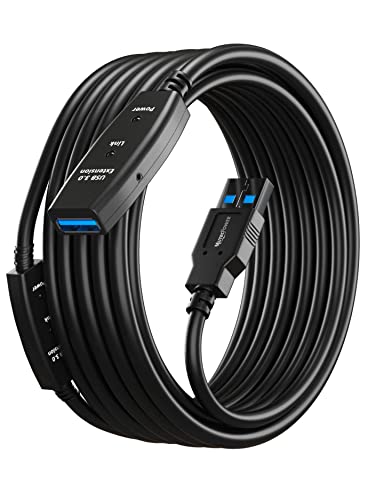
MutecPower’s active USB extension cable supports 32 feet with a dual-bus architecture, enabling simultaneous USB 2.0 and USB 3.0 operation. This design makes it suitable for connecting hard drives, USB hubs, mice, keyboards, printers, and more at a distance without sacrificing performance. The 5Gbps capability ensures fast data transfer across the extended link and broad device compatibility.
Cable Matters Active USB Extension Cable (Alternate)

The Cable Matters 32.8 ft active USB extension cable version for webcams, Oculus sensors, Vive Link Box, Xbox Kinect, and PlayStation cameras runs on an active repeater design to support long-range USB 2.0 and some USB 3.0 peripherals. It provides a reliable signal boost and stable connections across extended distances, making it suitable for multimedia setups that require careful placement of sensors and peripherals.
Buying Guide: Key Purchase Considerations
- Active vs passive: Active extension cables include signal boosters or repeaters to maintain data integrity over long distances (10 m in this article). Passive cables may suffer signal loss beyond short runs.
- Data transfer speed: Verify 5Gbps support for USB 3.0 devices, and compatibility with USB 2.0 peripherals if needed.
- Power requirements: Some long cables require external power (AC adapter or powered hub) to prevent voltage drop, especially for storage devices or bus-powered peripherals.
- Shielding and construction: Look for multi-layer shielding, corrosion-resistant connectors, and durable housings to reduce interference and heat buildup.
- In-wall use and safety: If installing in walls, choose CL3-rated cables and ensure compliance with local electrical codes.
- Compatibility: Confirm compatibility with your operating system and devices (Windows, macOS, Linux, VR headsets, cameras, printers, etc.).
- Length vs. practicality: 10 meters is long; ensure the cable routing minimizes bending radii and avoids tight bends that could degrade performance.
- Power options: Some cables offer optional power adapters or auxiliary power cables to stabilize connections for power-intensive devices.
- Brand reliability: Consider brands with documented performance notes and customer support, especially for long-term use in professional environments.
Choosing the right 10-meter USB 3.0 extension involves balancing distance, power, and device type. Active extensions with shipment-ready booster circuitry generally provide more reliable performance for VR setups and storage peripherals, while in-wall or CL3-rated models are best for discreet, built-in installations. Always verify transfer speed, power needs, and compatibility with your particular devices to avoid bottlenecks.