When choosing a USB 3.0 device cable, consumers look for fast data transfer, durable build, and compatibility with external drives, hubs, printers, and more. The following selections cover a range of common USB 3.0 A-to-B and Micro-B configurations, plus a USB-C to USB-B option for legacy devices. Each product highlights speed, durability, and practical use cases to help you pick the right cable for your setup.
| Product | Brand | Key Use | Approx. Length | Notable Feature |
|---|---|---|---|---|
| Cable Matters 5Gbps Long USB 3.0 Cable – 10ft | Cable Matters | External hard drives, hubs, enclosures | 10 ft | Type-A to Type-B 3.0 with up to 5 Gbps |
| Amazon Basics USB-A to USB-B 3.0 Cable – 6 ft | Amazon Basics | Printers, scanners, external drives | 6 ft | Gold-plated connectors for signal integrity |
| Jelly Tang USB 3.0 Cable A to B – 3 ft | Jelly Tang | Scanners, printers, external drives | 3 ft | Superspeed data transfer |
| SaiTech IT 45cm USB 3.0 Cable A to Micro B | SaiTech IT | Portable external drives | 45 cm | High-speed USB 3.0 up to 4.8 Gbps |
| Cable Matters USB C to USB B 3.0 Cable – 3.3ft | Cable Matters | USB-C laptops to USB-B peripherals | 3.3 ft | USB-C to USB-B 3.0 with reversible USB-C connector |
Introduction: This article examines top USB 3.0 device cables suitable for American households and small offices. Each pick emphasizes speed, compatibility, and durable design, helping you connect hard drives, docking stations, printers, and more to modern computers. The list includes both USB-A to USB-B cables and Micro-B variants, plus a USB-C to USB-B option for newer laptops with USB-C ports. Use the buying guide to compare lengths, connector types, and durability features to match your setup.
Cable Matters 10ft USB 3.0 A to B Cable

The Cable Matters 5Gbps Long USB 3.0 Cable offers a versatile A-to-B connection suitable for desktop external hard drives, powered USB hubs, docking stations, 3.5-inch enclosures, scanners, and monitors with a USB 3.0 Type-B port. It delivers up to 5 Gbps SuperSpeed data transfer, which is ideal for large file transfers and backup tasks. Built with molded strain relief and grip treads, the cable remains durable through frequent plugging and unplugging. Note that this is a USB-A to USB-B 3.0 cable and doesn’t work with USB 2.0 Type-B ports.
Amazon Basics USB-A to USB-B 3.0 Cable – 6 Ft

This Amazon Basics USB 3.0 cable uses gold-plated connectors to optimize signal integrity and corrosion resistance. It connects USB 3.0 A-male to B-male devices like printers, scanners, and external drives, ensuring reliable data transfer up to 4.8 Gbps when used with compatible USB 3.0 hosts. The 6-foot length offers enough slack for most desktops and workstations while maintaining performance. It’s not compatible with USB 2.0 Type-B connectors, aligning with USB 3.0 standards for speed and compatibility.
Jelly Tang USB 3.0 A to B Cable – 3 Ft
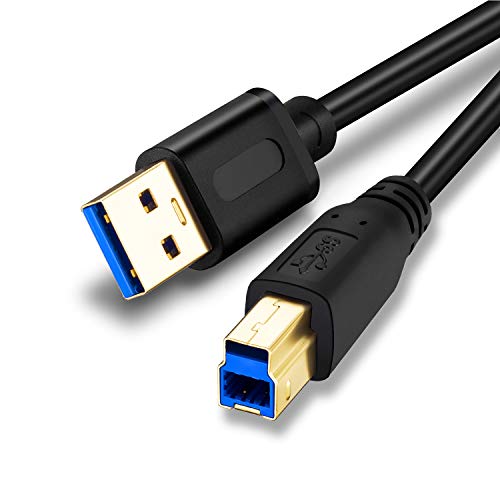
The Jelly Tang USB 3.0 A-to-B cable is designed for quick connectivity to printers, scanners, external hard drives, and USB 3.0 hubs. It supports SuperSpeed data transfer, enabling faster file movement between a USB-A host and USB-B peripheral. The 3-foot length is convenient for desktop setups with nearby devices. It’s compatible with USB 3.0 devices while ensuring reliable connections due to its robust connector construction.
SaiTech IT 45cm USB 3.0 A to Micro B Cable

The SaiTech IT 45 cm USB 3.0 A-to-Micro-B cable is tailored for portable external drives that use Micro-B connections. It supports USB 3.0 speeds up to 4.8 Gbps on compatible hosts, enabling fast backups and quick file access on portable drives. The compact length is ideal for tidy desk setups or travel. The cable’s durable construction includes strain relief to withstand regular plugging and unplugging during everyday use.
Cable Matters USB C to USB B 3.0 Cable – 3.3ft

This Cable Matters cable bridges USB-C laptops to USB-B 3.0 peripherals such as external drives and docking stations. It supports up to 5 Gbps data transfer and uses a reversible USB-C connector for easy plugging. It’s compatible with many USB-C devices and legacy USB-B 3.0 peripherals, making it a flexible option for mixed-device environments. The compact 3.3-foot length suits modern workstations with limited space while maintaining high-speed performance.
Buying Guide: Key Considerations For USB 3.0 Device Cables
- Connector Type: Identify whether you need USB-A to USB-B, Micro B, or USB-C to USB-B based on your devices. USB-A to USB-B 3.0 cables are common for printers, scanners, and external drives; Micro-B is typical for portable drives; USB-C to USB-B caters to newer laptops with USB-C ports.
- Speed And Bandwidth: USB 3.0 commonly achieves up to 5 Gbps. Ensure both ends and the host device are USB 3.0-capable to maximize throughput. Some cables advertise 4.8 Gbps or 5 Gbps; use these with compatible hardware for best results.
- Length And Signal Quality: Longer cables may introduce signal loss. For most setups, 6–10 feet is practical; longer runs require high-quality shielding and robust construction to preserve signal integrity.
- Durability Features: Look for molded strain relief, grip treads, and high-quality connectors. This reduces wear from frequent plugging and unplugging and helps extend the cable’s life in busy workspaces.
- Compatibility: Verify that the cable’s end connectors match your devices (e.g., USB-B for enclosures, Micro-B for some portable drives, USB-C for newer laptops). Some USB-C adapters or hubs may be required for full compatibility with legacy USB-B peripherals.
- Gold-Plated Connectors: Gold plating can enhance corrosion resistance and signal integrity over time, particularly in environments with frequent use.
- Use Case Clarity: For data backup and large transfers, prioritize cables with higher speed ratings and durable construction. For basic peripheral connectivity, standard USB 3.0 cables will suffice.
In summary, selecting the right USB 3.0 device cable depends on your devices, required length, and how often you plug in and unplug peripherals. The options above balance speed, durability, and compatibility across common USB-A, USB-B, Micro-B, and USB-C configurations to support fast, reliable connections in a typical American home or office setting.