Looking to expand a single USB port into multiple high-speed connections? This guide highlights top USB 3.0 data hubs that deliver fast transfer speeds, reliable power, and thoughtful design for desktops, laptops, and studios. Each option below supports USB 3.0 with up to 5 Gbps data rates, helps manage power with built-in adapters or independent ports, and is compatible across Windows, macOS, and Linux environments.
Summary of Selected Hubs
| Product | Brand | Ports | Power | Highlight | Amazon Link |
|---|---|---|---|---|---|
| TP-Link Powered USB Hub 3.0 UH720 | TP-Link | 7 data + 2 smart charging | 12V/4A | Smart charging with auto-identification | View |
| GEKRY USB 3.0 Hub 7-Port | GEKRY | 7 data | 36W adapter | High power per port, BC 1.2 compatible | View |
| Atolla 7-Port USB 3.0 Hub | atolla | 7 data + 1 smart charging | 5V/4A power adapter | Individual on/off switches | View |
| Anker Powered USB Hub 7-Port | Anker | 7 data | Included 36W adapter | BC 1.2 charging on one port | View |
| SABRENT 10-Port USB 3.0 Hub | SABRENT | 10 data | 60W power adapter | Individual power switches | View |
The hubs listed blend high-speed data delivery with practical power options, making them suitable for keyboards, mice, printers, external drives, and charging needs. Read on to compare features and find the best fit for your setup.
TP-Link Powered USB Hub 3.0 UH720

The TP-Link UH720 extends a single USB 3.0 port into seven data ports plus two dedicated smart charging ports. USB 3.0 delivers up to 5 Gbps data transfer, enabling rapid syncing of peripherals such as keyboards, mice, printers, and external drives. The hub includes a 12V/4A power adapter to support stable performance across all ports and prevent bottlenecks. TP-Link’s charging technology identifies connected devices and supplies the fastest compatible charge, helping to reduce overall charging time.
GEKRY USB 3.0 Hub 7-Port

GEKRY’s 7-Port powered hub offers robust 5 Gbps data transfer with backward compatibility to USB 2.0/1.1 devices. It ships with a 36W AC adapter that delivers up to 900 mA per port, and supports BC 1.2 charging on compatible ports. A built-in power design minimizes heat and ensures stable performance when multiple devices are connected. The device is compatible with Windows, macOS, and Linux, and requires no drivers for basic operation.
Atolla 7-Port USB 3.0 Hub
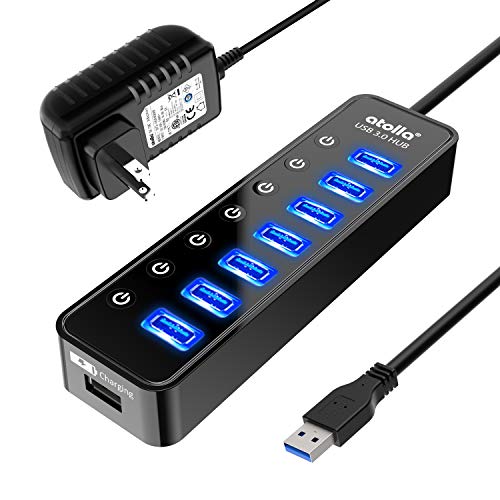
Atolla’s 7-Port hub combines seven SuperSpeed USB 3.0 ports with a separate smart charging port. Supplied by a 5V/4A adapter, the hub can deliver up to 2.4A to charging devices, helping to power phones and tablets quickly. Each port has an individual on/off switch, enabling selective use and reducing idle power draw. The design focuses on simple plug-and-play use, with plug-and-play compatibility across major desktop and laptop operating systems.
Anker 7-Port USB 3.0 Hub

Anker’s compact 7-port hub provides seven USB 3.0 ports with speeds up to 5 Gbps, enabling quick file transfers and rapid device syncing. One port supports BC 1.2 charging while the remaining ports offer daily charging capabilities at modest rates. This hub is designed for portability and ease of use, suitable for laptops and desktops that need extra connectivity without clutter.
SABRENT 10-Port USB 3.0 Hub

The SABRENT HB-BU10 expands into ten USB 3.0 ports, offering data transfer speeds up to 5 Gbps and a 60W power adapter to support full-speed operation across multiple devices. It includes individual blue LEDs to indicate port power status and provides user-friendly on/off switches for each port, helping users manage power and devices efficiently. It remains compatible with Windows, macOS, and Linux without requiring drivers for standard use.
Buying Guide: Key Purchase Considerations
- Port count and layout: Determine how many USB 3.0 ports you need and whether you want a mix of data-only ports and dedicated charging ports. Some hubs include separate smart charging ports to speed up device charging without sacrificing data throughput.
- Power delivery: Check the included power adapter wattage. Higher-wattage adapters (e.g., 36W, 60W) support more devices simultaneously and maintain stable performance when multiple devices draw power.
- Data transfer speeds: USB 3.0 hubs typically offer up to 5 Gbps. If you use external hard drives or large file transfers, ensure the hub supports full USB 3.0 speeds and compatible chipsets for reliable throughput.
- Device compatibility: Most hubs work with Windows, macOS, and Linux. If you rely on BC or fast-charging standards, verify charging compatibility and port behavior (e.g., whether charging is supported on all ports).
- Power management features: Look for individual on/off switches for ports to reduce energy use and avoid accidental unplugging. Some hubs also auto-detect devices to optimize charging speeds.
- Size and portability: Desktop hubs with multiple ports may be bulkier but offer stable power. Compact hubs are easier to carry but may have tighter power constraints.
- Build quality and cooling: Metal casings tend to dissipate heat better than plastic, which can help maintain performance during long sessions with many devices connected.
- Driver requirements: Most USB 3.0 hubs are plug-and-play and do not require drivers, but some specialized hubs may require software for advanced features.
The right USB 3.0 data hub depends on your device mix, whether you need extra charging, and how many ports you manage at once. For content creators, developers, and power users, hubs with independent power adapters and individual port controls tend to offer the most reliable, scalable performance across devices.