Direct PC-to-PC USB 3.0 bridge cables let you move files between computers without a network. This guide highlights five top options, including forensic-grade bridges and easy transfer cables that pair with migration software. All selections support fast USB 3.0 speeds and compatible software to simplify large migrations. Read on to compare features, compatibility, and how each cable fits different transfer needs.
| Product | Brand | Key Benefit | Software Included |
|---|---|---|---|
| Tableau Forensic USB 3.0 Bridge TK8U SiForce Bundle | SiForce | Forensic-grade imaging with read/write modes | Included with kit (multi-instrument bundle) |
| Plugable USB Transfer Cable, Unlimited Use | Plugable | Easy Windows-only file transfers | Bravura Easy Computer Sync Software Included |
| Cable Matters USB 3.0 Data Transfer Cable PC to PC | Cable Matters | Windows PC-to-PC data migration | Bravura Easy Computer Sync & PCli nq5 included |
| Plugable USB 3.0 Transfer Cable for Windows PCs | Plugable | High-speed PC-to-PC transfers | Bravura Easy Computer Sync Software License |
| LAPLINK USB 3.0 Super Speed Transfer Cable | LAPLINK | USB 3.0 data transfer up to 5 Gbps | PCmover compatibility (software not included) |
Tableau Forensic USB 3.0 Bridge TK8U SiForce Bundle

The Tableau TK8U+ kit combines a USB 3.0 bridge with a read/write capable bridge and case, plus power and USB cables. It supports Windows 7 through 10 and macOS X with caveats for forensic software. Features include a backlit LCD, six LEDs for status, and a dedicated read/write mode. Imaging speeds reach up to 340 MB/s, suitable for lab and field work. The kit is designed for forensic imaging environments and includes comprehensive setup guides and transport protection.
Plugable USB Transfer Cable, Unlimited Use

This PC-to-PC transfer cable is designed for Windows environments, supporting 32-bit and 64-bit systems. It enables hassle-free file transfers when upgrading from older Windows PCs and includes a Bravura Easy Computer Sync software license. The solution operates without a network connection and has no file size limits, making it suitable for transferring sensitive data in restricted networks. It notes compatibility limitations with Windows S Mode and Windows Server editions.
Cable Matters USB 3.0 Data Transfer Cable PC to PC

This USB 3.0 transfer cable provides a straightforward PC-to-PC migration path with two included software licenses. It supports Windows XP through Windows 11 and Mac OS X, enabling drag-and-drop transfer via PClink5 and Bravura Easy Computer Sync. The kit emphasizes offline transfers and remote control capabilities, facilitating cross-platform data moves while maintaining data structure integrity.
Plugable USB 3.0 Transfer Cable for Windows PCs

Designed for high-speed data transfers between Windows PCs, this cable supports up to USB 3.0 speeds and works across Windows XP to Windows 11 (32/64-bit). It ships with a Bravura Easy Computer Sync software license, enabling seamless file transfers, including photos, documents, and media files. It emphasizes offline operation with no need for internet connectivity, ensuring privacy during migrations.
LAPLINK USB 3.0 Super Speed Transfer Cable
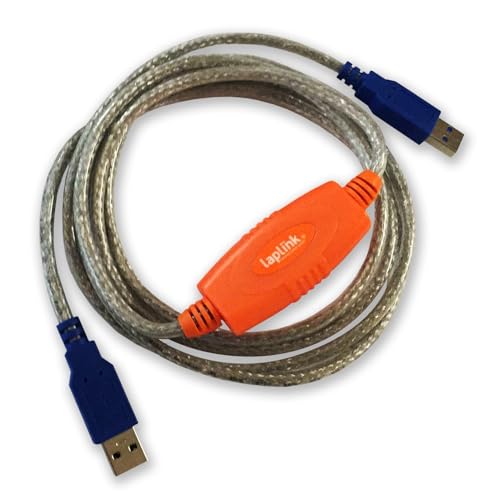
Offering up to 5 Gbps speeds, this USB 3.0 cable is intended for high-speed transfers between PCs and is designed for use with Laplink’s migration software (PCmover). It is backward compatible with USB 2.0 ports and supports Windows 10 and 11. Note that the cable is a data-transfer medium and typically requires PCmover software for full migration capabilities.
Buying Guide
Key considerations when choosing a USB 3.0 bridge or PC-to-PC transfer cable:
- Compatibility: Check OS support (Windows versions, macOS) and whether the target setup uses S Mode or Server editions. Some cables specify Windows-only operation or require virtualization for Mac.
- Software and Licenses: Many cables include Bravura Easy Computer Sync or PCmover licenses. Confirm whether licenses are attached to the cable or require separate registration.
- Transfer Speed: USB 3.0 speeds can reach up to 5 Gbps, but actual performance depends on the host PCs and software. For large migrations, prioritize higher speeds and reliable transfer management features.
- Offline Operation: Cables that function without a network connection help preserve security and privacy, especially in sensitive environments.
- Read/Write Capabilities: For forensic contexts, bridges with explicit read/write modes and status indicators (LEDs, LCD) provide visibility and control during imaging.
- Cross-Platform Support: If you need Windows-to-M Windows-to-Mac data movement, choose a solution that supports cross-platform syncing and includes compatible bridge software.
- Form Factor and Bundles: Some kits include power supplies, cables, cases, and start-up guides. For field work, a rugged bundle can be advantageous.
Performance considerations vary by use case: forensic imaging emphasizes verified read/write modes and detailed status feedback, while ordinary PC migrations prioritize straightforward file transfers and robust software support. If you plan to migrate entire systems or run complex transfers, evaluate PCmover or Bravura Sync compatibility and whether the software supports your data types and folder structures.