Ultra quiet USB fans offer compact, low-noise cooling for electronics, gaming gear, and office desks. This guide highlights five top picks that balance airflow, noise, and versatility. Each option provides USB-powered operation, making them ideal for cabinets, routers, consoles, and personal workspaces. Read on to compare features, sound levels, and usability.
| Product | Brand | Key Feature | Type |
|---|---|---|---|
| AC Infinity MULTIFAN S5 | AC Infinity | UL-certified, dual 80mm fans, multi-speed | Cabinet/electronics cooling |
| AC Infinity MULTIFAN S7 | AC Infinity | UL-certified, dual 120mm fans, adjustable | Cabinet/receivers |
| GSCOLER X4 USB Fan | GSCOLER | Dual 140mm, high CFM, stackable design | Router/PC cooling |
| Koonie USB Desk Fan | Koonie | 3 speeds, 220° tilt, USB-C powered | Desk/office cooling |
| Gaiatop USB Desk Fan (5.5″) | Gaiatop | 3 speeds, portable, compact | Home/office travel |
AC Infinity MULTIFAN S5 Overview
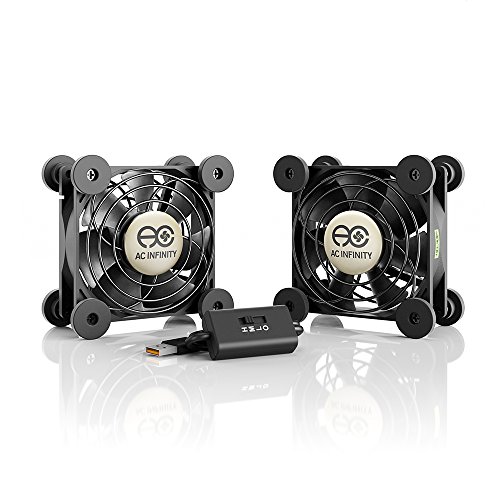
The AC Infinity MULTIFAN S5 provides a compact cooling solution suitable for a variety of electronics and enclosures. It features ultra-quiet operation with UL certification and a multi-speed controller to tailor airflow to your noise tolerance. Dual-ball bearings offer a long lifespan, enabling flexible installation options—either laid flat or stood upright. This model is designed to deliver steady airflow without adding noticeable noise, making it a practical choice for media centers, game consoles, or PC cabinets where quiet operation matters.
AC Infinity MULTIFAN S7: Silent, Strong
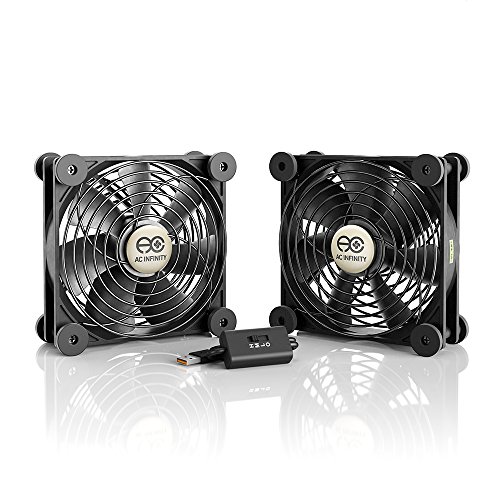
The MULTIFAN S7 extends the S5 design with larger 120mm dual fans, enhancing cooling capacity for higher-heat setups such as receivers or gaming consoles. UL-certified and designed for quiet operation, the S7 offers a similar multi-speed controller for balancing noise and airflow. Its dual-ball bearings maximize lifespan, and the option to position the unit horizontally or vertically provides flexible installation for cabinets and AV racks. This model targets users needing more robust cooling with minimal acoustic impact.
GSCOLER X4 Quiet USB Cooling Fan

The GSCOLER X4 pairs dual 140mm fans with an 11-blade design and improved hydraulic bearings to deliver 65.8 CFM at a compact footprint. It’s designed for stackable use on routers, laptops, DVRs, and gaming consoles, with a low-noise profile around 18 dB. The stackable design creates elevated layers for devices and accessories, providing flexible cooling for tight spaces in home theaters, servers, and network equipment. This model prioritizes cooling efficiency while staying discreet in noise and size.
Koonie USB Desk Fan: Tilted Comfort

The Koonie USB Desk Fan emphasizes versatility with 180° tilt and three speed levels, powered by USB-C. Its 5-inch form factor makes it suitable for desks, nightstands, or small work areas, while the stable triangular base helps keep it in place. The three wind settings let users choose a light breeze or stronger airflow to match comfort needs, all without requiring a battery, making it a straightforward option for personal cooling in office or study spaces.
Gaiatop USB Desk Fan: Portable Quiet Power
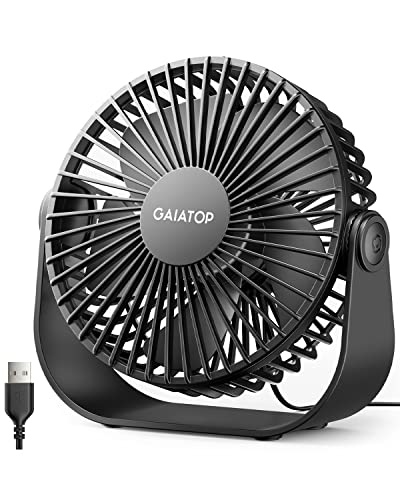
The Gaiatop 5.5-inch desk fan combines portability with quiet operation. With three speeds, it offers adjustable airflow for personal comfort in a compact package. Its small footprint makes it ideal for travel, small offices, or dorm rooms, where quiet cooling is beneficial without occupying much space. The longer cord adds convenience for placement near power sources, while maintaining a discreet presence on a desk or shelf.
Gaiatop Compact Desk Fan (Blue)
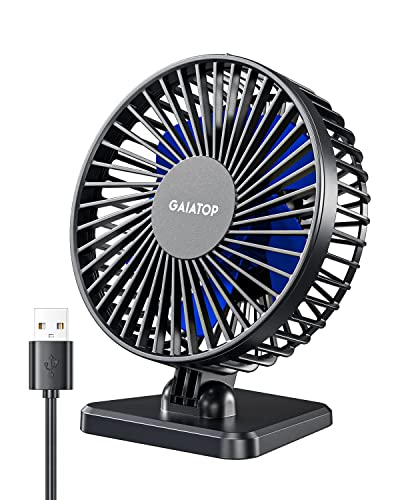
This blue Gaiatop model emphasizes portability and quiet operation in a compact form factor. With three speed settings and a small, lightweight build, it suits desks, travel bags, and small workspaces where space and noise are concerns. The design focuses on delivering sufficient air without intruding on concentration or comfort, making it a practical personal cooling option for students or remote workers.
Buying Guide: Key Considerations for Choosing an Ultra Quiet USB Fan
- Noise level: Look for models specified in decibels (dB); lower numbers indicate quieter operation. If you’re sensitive to sound, aim for 18 dB or below.
- Airflow (CFM): Higher CFM means stronger cooling. Assess your cooling needs—smaller devices vs. larger enclosures may require different airflow.
- Size and form factor: Compact fans fit desks or tight cabinet spaces; larger 120mm or 140mm designs move more air but require more space.
- Power options: USB-powered fans are convenient for PCs, consoles, and hubs. Check for USB-C compatibility if you want modern power delivery.
- Mounting flexibility: Flat, upright, or stackable designs offer installation versatility in cabinets, racks, or on shelves.
- Durability and bearings: Dual-ball bearings typically offer longer lifespans and stability, especially in vertical or front-facing setups.
- Noise vs. airflow balance: Multi-speed controls help tailor performance to your environment—quiet background use or higher cooling during peak activity.
- Compatibility: Ensure the fan’s mounting footprint and cable length match your devices (routers, DVRs, consoles, or PCs).
- Energy efficiency: Lower-power fans reduce load on USB ports and devices, especially when running multiple devices simultaneously.
- Maintenance: Look for easy-clean designs and accessible blades if dust buildup is a concern in closed enclosures.