Finding the right TV remote can be essential for caregivers and loved ones dealing with dementia or Alzheimer’s. This guide highlights simple, large-button remotes designed to minimize confusion, reduce frustration, and help seniors enjoy their favorite programs with less effort. Each option below is tailored for easy use, with large buttons, clear labeling, and straightforward setups that work with standard TVs and common set-top boxes.
Summary of chosen products:
| Product | Brand | Key Benefit |
|---|---|---|
| Flipper Big Button Universal TV Remote | Flipper | Large color-coded buttons; 3 main functions; supports most IR devices |
| EZclicker TV Remote for Seniors (Black) | EZClicker | Big buttons; simple setup; universal for major TVs |
| Universal Big Button Remote for Seniors (XGBFH) | XGBFH | Auto search and learning; straightforward operation |
| TabTime Big Button Universal Remote | TabTime | 7 large labeled keys; IR compatible; easy learning process |
| Learning Big Button Universal Remote (MYHGRC) | MYHGRC | Learning function; customizable keys; supports many brands |
Flipper Big Button Universal TV Remote for Seniors

The Flipper remote is designed specifically for seniors and dementia care, featuring large, color-coded tactile buttons. It offers essential functions—On/Off, Channel Up/Down, Volume Up/Down, and Mute—reducing complexity for daily use. It can control a TV alone or work with a TV plus a cable set-top box and even some soundbars. It also supports many IR devices from major brands like Xfinity, Spectrum, and more, making it versatile for various home entertainment setups. Up to 25 favorite channels can be stored to minimize channel-surfing and search times.
EZclicker TV Remote for Seniors (Black)
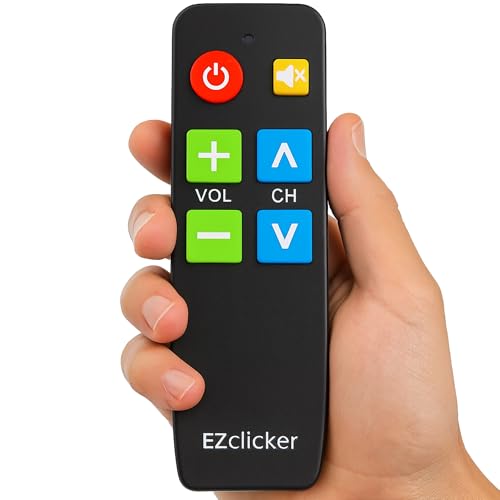
The EZclicker Black model emphasizes a simple, large-button layout with tactile feedback, aimed at seniors with limited dexterity or vision. It operates as a universal remote for major TV brands, explicitly not intended for streaming devices or cable boxes. Setup is straightforward: turn on the TV and program by holding Mute and Volume+ together until the volume responds. It’s designed to minimize learning steps and avoid complex menus during everyday use.
Universal Big Button Remote for Seniors (XGBFH)

Designed for elderly users, this remote features large, tactile buttons and a simple layout. It emphasizes an automated setup through auto search and learning functions, enabling quick pairing with major TV brands. The compact design reduces the cognitive load required to find and press the correct controls, making it easier to navigate channels and volume controls without frustration.
TabTime Big Button Universal Remote

The TabTime remote is a dementia-friendly option with seven large, clearly labeled keys covering essential functions like power, channel control, volume, and a customizable button. It supports IR-enabled TVs, set-top boxes, DVD players, and more. Quick setup uses an original remote to program via learning, making it adaptable across different brands and devices while avoiding Bluetooth or RF-based connections that can complicate usage.
Learning Big Button Universal Remote (MYHGRC)
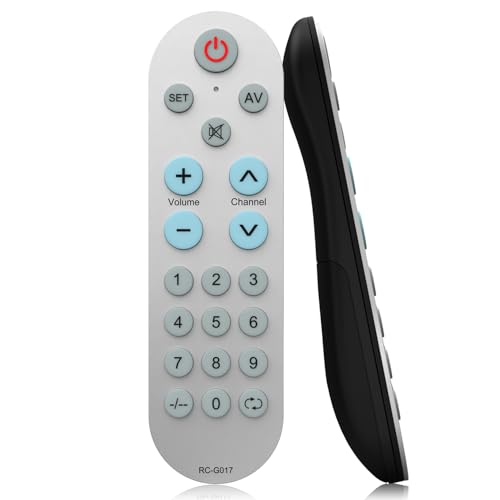
This learning remote is designed for families needing a fully customizable experience. It supports hundreds of TV brands with a learning function to capture the original remote’s signals. It offers two setup paths: code-based setup or learning mode, where you press keys on the original remote to transfer commands. The LED indicators guide progress, helping caregivers tailor the device to the user’s needs with a personal touch.
Buying Guide: Key Purchase Considerations
- Ease of use: Favor remotes with large, clearly labeled buttons and minimal functions. Fewer choices reduce confusion.
- Compatibility: Check IR compatibility with your TV, soundbar, cable box, and set-top boxes. IR-only remotes avoid technical hurdles common with RF or Bluetooth devices.
- Setup method: Auto search and learning features speed up configuration. A remote that learns from the original can be a strong advantage.
- Visibility and durability: Look for backlit or luminous buttons for nighttime use and a sturdy, non-slip design that resists drops or spills.
- Memory for favorites: If channel selection matters, a remote with a favorites function helps reduce scrolling and frustration.
- Multi-device control: If your care setup uses a soundbar or multiple TVs, ensure the remote can control several IR devices as needed.
- Safety and accessibility: Consider color-coded or icon-based labeling to aid recognition for users with visual or cognitive challenges.
- Replacement and compatibility: Ensure the remote can be easily reprogrammed if hardware changes or new devices are added.
When choosing, consider the user’s environment and daily routines. A single, reliable remote that minimizes decision-making steps tends to deliver the best ongoing relief for caregivers and a smoother viewing experience for dementia patients.