When you want to turn a laptop into a portable production studio, a reliable TV capture card is essential. These devices convert HDMI video and audio from consoles, cameras, or set-top boxes into a USB stream that your computer can record or broadcast. The right capture card offers high resolution, low latency, broad compatibility, and plug-and-play simplicity. Below, explore five strong choices designed for American creators and gamers using laptops, PCs, or Macs for streaming, video conferencing, or on-the-go capture.
| Product | Brand | Resolution/Frame | Interface | Notes |
|---|---|---|---|---|
| Guermok Video Capture Card | Guermok | 1080p60, 4K@30 input | USB 3.0 / USB-C | Ultra-low latency; portable |
| Capture Card Nintendo Switch (Rybozen) | Rybozen | 1080p60, 4K30 input | USB 3.0 | Broad compatibility with consoles |
| Audio Express AXHDCAP | Audio Express | 1080p60 output; 4K@30 input | USB | Low latency; stereo audio |
| 4K HDMI Capture Card (Dcyfol) | Dcyfol | 1080p60 output; 4K input | USB | Passthrough and plug-and-play |
| UGREEN 2K30Hz Capture Card | UGREEN | 2K30Hz output; 4K30Hz input | USB-C / USB-A | Dual port design |
Note: Each device is suited for different setups—from casual gaming livestreams to professional meetings. Review compatibility with your laptop’s OS and your preferred streaming software to ensure smooth operation. All options below emphasize simple setup, reliable performance, and broad device support.
Guermok 4K USB Capture Card With 1080P 60FPS Streaming

The Guermok capture card emphasizes versatility with 4K input capability and 1080p60 output, making it suitable for laptops and desktops used for streaming, online meetings, or content creation. It supports USB-C and USB-A connections to accommodate modern devices, including iPads and Windows/Mac systems. Users can capture 60 FPS HD video directly to storage or streaming platforms, while enjoying ultra-low latency during live play or recording. The aluminum body aids heat dissipation for longer sessions and stable performance.
Key features include plug-and-play operation without external power, enabling quick setup for on-the-go livestreams or classroom sessions. While designed primarily for capture rather than direct display mirroring, its compatibility with OBS and other software makes it a reliable centerpiece for a laptop-based workflow. Note that some users may need capture software to enable full functionality beyond basic recording, depending on their setup.
Ideal use cases include live game streaming from consoles to a laptop, screen-sharing during virtual meetings, or recording gameplay footage for later editing. Its portability supports field demos, esports practice, or travel broadcasts. The device’s build quality and active cooling contribute to stability during longer sessions and higher workloads.
Rybozen Switch 4K HDMI Capture Card: 1080P 60FPS
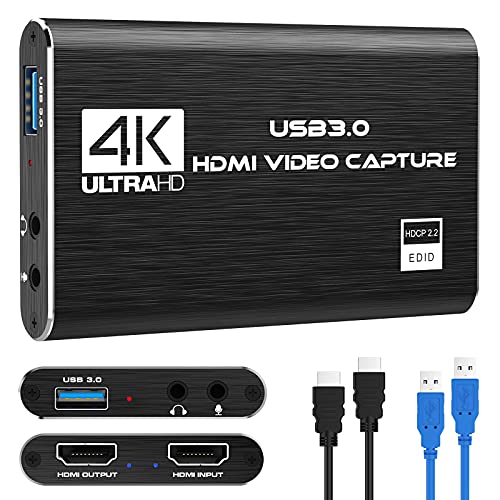
The Rybozen capture card is designed around a simple plug-and-play workflow with USB 3.0. It captures up to 1080p at 60 frames per second for smooth gameplay and streaming, while supporting a 4K30 input to future-proof the device with compatible sources. It’s suitable for Windows and MacOS as well as popular streaming platforms like OBS and Twitch, with automatic input detection that reduces setup time. Optional audio capture adds flexibility for commentary or teaching scenarios.
With broad compatibility across gaming consoles (PS4/PS5, Xbox) and cameras, this card makes a solid choice for users who want reliable performance without driver installations. The device is compact and portable, ideal for LAN parties, school projects, or remote broadcasts. While it does not offer built-in audio mixing, it confidently handles standard capture needs at a budget-friendly price point.
Users should consider latency and overall system load if streaming at high resolutions while multitasking, but for most laptop setups, the Rybozen capture card delivers steady performance with minimal configuration.
Audio Express AXHDCAP 4K HDMI Video Capture Card

Audio Express AXHDCAP focuses on delivering enhanced video capture with 4K input support and 1080p output, paired with robust audio transmission for clear sound in streams or recordings. Its low-latency design helps reduce delay during live broadcasts, making it suitable for real-time gaming, virtual classrooms, and professional conferences. The device plugs into a computer via USB, with broad compatibility that spans Windows, macOS, and Linux environments, and supports streaming to common platforms via OBS, Zoom, and other software.
Versatility is a highlight, as it can connect to cameras, camcorders, or action cams, enabling high-quality content creation across multiple scenarios. While it offers rich features, users should confirm their capture workflow to ensure HDMI output and USB capture alignment with their recording software. The included stereo audio support is beneficial for creators who require synchronized vocal tracks during streams.
Dcyfol 4K HDMI Capture Card: 1080P 60FPS & Loop-Out

The Dcyfol capture card emphasizes high-quality video capture with 4K input and 1080p 60 FPS output, including a handy HDMI loop-out for pass-through viewing. The plug-and-play USB design reduces setup friction and supports streaming via OBS and other software on Windows and Mac. Its stated compatibility with major consoles and cameras makes it a versatile option for multi-source content creation, while the loop-out feature facilitates on-device monitoring without latency in the captured feed.
Real-time performance is aided by low-latency tech, ensuring that game play or video feeds stay in sync with commentary. It targets streamers who value simple installation, stable capture, and the option to pass video through to a display while recording. For educators or presenters, the device can simplify demonstrations by providing a clean, reliable HDMI capture path to a computer.
UGREEN 2K@30Hz Capture Card With USB-C And USB-A
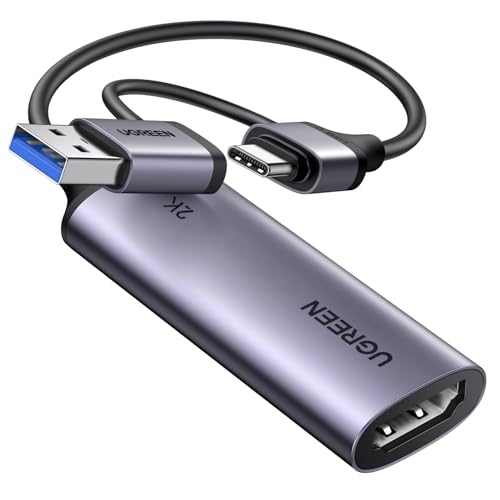
UGREEN presents a versatile capture card designed for a broad range of devices, including Switch 2, Xbox, PS4/PS5, and cameras. It supports 2K output at 30Hz while handling a 4K input at 30Hz, providing a balanced option for higher-quality source material with broad compatibility. The card offers both USB-C and USB-A interfaces, which helps accommodate modern laptops, tablets, and phones. It works with Windows and macOS and is backward compatible with USB 2.0, ensuring wide reach across devices used for streaming, recording, and conferencing.
The unidirectional HDMI input to USB output keeps the workflow straightforward. Users should consider their target resolution and frame rate; if higher frame rates are needed for fast-paced games, verify that the source device and software support 2K/30Hz or explore alternative models. The dual-port approach makes it suitable for multi-device capture on laptops that have limited ports.
acer USB 3.0 Video Capture Card: 4K Loop-Out, 1080P 60Hz

The acer USB 3.0 video capture card highlights 4K input with 1080p 60Hz output, utilizing YUY2 for richer color during live streaming and recording. The device supports microphone input for easy commentary, which is especially helpful for gamers, educators, and content creators who want an integrated audio solution. It is a plug-and-play device with no driver installation required, making it convenient for on-the-go use with a laptop or MacBook for meetings, teaching, or casual streams.
Designed for compatibility with PS5, PS4, Switch, Xbox, and cameras, it also serves well for classroom demonstrations and portable broadcasts. The device’s compact form factor and low-latency performance make it a reliable addition to a laptop-based capture setup. As with others, confirm your software pipeline to ensure optimal audio-visual synchronization and frame rate stability during live sessions.
PDAPTMAG 4K Video Capture Card: 1080P Recording

The PDAPTMAG 4K capture card provides 1080p60 recording and 4K input, enabling high-quality streaming from HDMI sources such as consoles and cameras. The device uses USB 2.0 technology for video capture and supports audio transmission to a connected PC. It targets users who need a straightforward, economical solution for meeting rooms, home studios, or classroom setups. The simplicity of plug-and-play operation reduces setup time, while the device’s broad compatibility with laptops and desktops helps support diverse workflows.
Additionally, the PDAPTMAG model is positioned for versatile use cases—from streaming to conferencing—with straightforward sharing of HDMI content to computers. While not designed for ultra-high-end broadcast workflows, it remains a practical option for everyday capture tasks, especially for beginners and hobbyists who want reliable performance without elaborate configuration.
Buying Guide: Key Purchase Considerations For Laptop Capture Cards
- Resolution and Frame Rate: Consider your source material and desired output. If you primarily stream 1080p content, a capture card with 1080p60 output may be sufficient, but if your source can push 4K input, a model with 4K input support offers future-proofing.
- Interface And Compatibility: USB 3.0 or USB-C connections generally provide the best performance. Ensure compatibility with your laptop OS (Windows, macOS, Linux) and with your preferred streaming or conferencing software (OBS, Zoom, Teams).
- Latency: Low-latency capture is crucial for live gaming and real-time participation in streams or meetings. Look for cards that advertise ultra-low latency or real-time preview capabilities.
- Pass-Through And Monitoring: Some cards offer HDMI loop-out or pass-through, which helps you monitor gameplay or video without impacting the captured feed. This is useful for high-skill gaming or professional broadcasting setups.
- Audio Support: If you need synchronized voice commentary, choose a model with built-in audio input or clear audio capture compatibility. Check whether the device supports HDMI audio, external mics, or both.
- Portability: If you travel or work in different locations, a compact, plug-and-play device reduces setup time and power requirements. Aluminum housings often help with heat dissipation during longer sessions.
- Software Ecosystem: Confirm that the device integrates well with OBS, Streamlabs, XSplit, Zoom, or Teams. Some devices require no drivers, while others rely on specific software for optimal performance.
- Price-To-Performance: Compare features like input resolutions, frame rates, latency, and pass-through when evaluating value. A more expensive model may offer essential features for advanced workflows, but for basic needs, a budget option can be sufficient.
These considerations help tailor a laptop-based capture setup to your needs—whether you’re gaming, teaching, conducting virtual events, or recording content for later editing. Assess your primary use case, the devices you’ll connect, and your preferred software to choose a capture card that delivers consistent performance and reliability.