Looking to split TV optical or digital audio to two separate receivers, soundbars, or headphones without losing quality? This guide highlights top optical Toslink splitters that expand your home theater options. Each pick supports common formats like LPCM 2.0, Dolby Digital, and DTS, and is designed for plug-and-play use with televisions, game consoles, Blu-ray players, and receivers.
| Product | Brand | Format Support | Notes |
|---|---|---|---|
| BlueRigger Digital Optical Audio Splitter 1×2 | BlueRigger | LPCM 2.0, Dolby Digital, DTS 5.1 | Unidirectional Toslink splitter; 1 input, 2 outputs |
| NEWCAER Digital Optical Splitter 1 In 2 Out | NEWCARE | LPCM 2.0, Dolby Digital, DTS 5.1 | Plug-and-play; balance and protection features |
| NEWCARE Optical Audio Splitter 1 In 3 Out | NEWCARE | LPCM 2.0, Dolby Digital, DTS 5.1 | Multiple outputs; reliable signal with ESD protection |
| LiNKFOR Optical Cable Splitter 1×3 | LiNKFOR | LPCM 2.0, DTS, Dolby-AC3 | Long-distance signal support; three outputs |
| VANAUX Optical Splitter 1 In 2 Out | VANAUX | LPCM 2.0, Dolby Digital, DTS 5.1 | Note: two inputs cannot be used simultaneously |
Below are the five selected products, each with a concise overview, key features, and practical usage notes to help you choose the best option for your home theater setup.
BlueRigger Digital Optical Splitter 1×2

The BlueRigger Toslink splitter provides a simple way to duplicate one optical audio source, such as a TV, to two outputs like an A/V receiver and a soundbar. It supports common surround formats and remains plug-and-play. A practical note is to keep the output Toslink cable length under 10 feet for optimal performance. The device is unpowered and relies on the source and receivers to manage signal levels.
NEWCAER Digital Optical Splitter 1 In 2 Out

The NEWCAER optical splitter distributes a single optical input to two separate outputs. It emphasizes safety with an automatic balance system and electrostatic protection, plus broad device compatibility including Apple TV, cable boxes, gaming consoles, and Blu-ray players. It supports standard digital audio formats such as 5.1 Dolby Digital and DTS, ensuring stable, synchronized sound across devices.
NEWCARE Optical Audio Splitter 1 In 3 Out

This 1×3 optical splitter expands a single optical source to three separate outputs, suitable for users who want to drive multiple sound systems or headphones simultaneously. It features an automatic balance system and ESD protection for reliability, and supports LPCM 2.0 as well as Dolby Digital and DTS formats. It’s designed for simple plug-and-play use with compatible devices like TVs, receivers, and soundbars.
LiNKFOR Optical Cable Splitter 1×3

The LiNKFOR splitter distributes one optical input to three outputs, enabling simultaneous connection to multiple receivers or sound systems. It supports LPCM 2.0, DTS, and Dolby-AC3, and is designed for longer-distance transmission with minimal signal loss. The kit notes that while it can feed three devices, outputs may require careful balance if all devices are used at once.
VANAUX Optical Splitter 1 In 2 Out
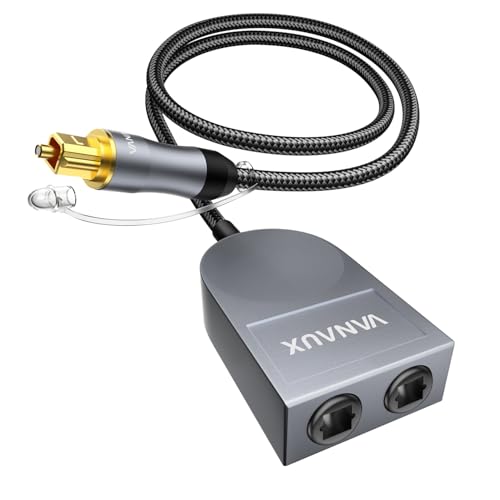
The VANAUX 1×2 optical splitter is designed to push a single optical signal to two outputs for TVs, soundbars, or receivers. It explicitly notes that two inputs cannot be used simultaneously, and it recommends keeping the output cable length under 10 feet for best performance. The design highlights a durable build with a cotton-braid outer layer for improved handling and longevity.
Buying Guide: Key Considerations For Choosing A TV Optical Splitter
- Output quantity and synchronization: Determine how many outputs you need (2 or 3) and whether you require simultaneous device operation. Some splitters support multiple outputs but do not guarantee perfect synchrony if all outputs are active.
- Format compatibility: Look for support for LPCM 2.0, Dolby Digital, and DTS formats to ensure compatibility with most TVs, receivers, and soundbars. Some models mention broader multi-channel support; verify this if you have advanced audio setups.
- Connection type and cable length: Toslink is the standard interface for these devices. Note recommended cable lengths (often under 10 feet) to prevent signal degradation. If you need longer runs, check for recommended solutions or powered splitters.
- Power requirements: Most optical splitters are passive (unpowered). If you experience weak signal, consider a powered option or ensure your source can drive the split without loss.
- Signal integrity features: Some models include ESD protection, automatic balance, or shielded cables. These features can improve reliability in complex setups with multiple devices.
- Durability and build quality: Look for robust jackets, gold-plated connectors, and quality fiber optics for long-term use, especially in high-traffic home theaters or entertainment rooms.
- Compatibility caveats: Some devices specify that only one input is active at a time if using multiple outputs, which can affect how you configure game consoles, TVs, and audio receivers together.
- Brand support and warranty: Consider reputable brands with clear return policies and product warranties in case of signal issues or compatibility questions.