When you need to connect a headset with separate microphone and headphone jacks to a single 3.5mm port on a computer, console, or mobile device, a TRRS splitter is essential. The right splitter preserves mic input while delivering clear stereo sound, avoiding signal loss and compatibility headaches. Below, five trusted options meet CTIA standards and fit a range of gaming, video calls, and media-sharing needs. This guide compares compatibility, build quality, and practical use cases to help you choose wisely.
| Product | Brand | Key Strength | Image |
|---|---|---|---|
| UGREEN Headphone Splitter 3.5mm 2 Female to 1 Male Mic and Audio | UGREEN | CTIA compatibility, durable braided cable |  |
| MillSO Headphone Mic Splitter, 3.5mm TRRS to 2x TRS | MillSO | Broad device compatibility, dual TRS ports |  |
| MillSO Headphone Splitter for Computer CTIA 3.5mm TRRS | MillSO | 4-pole to dual 3-pole, PC focus |  |
| MillSO Headset Splitter for 2 TRRS Headphones or Mics | MillSO | Split 4-pole to two TRRS with mic | 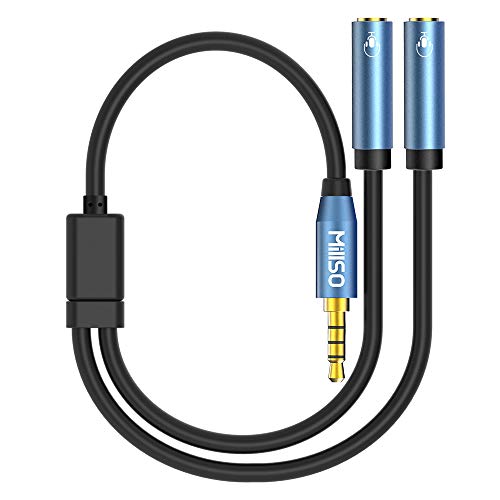 |
| STARTECH Headset Adapter, Microphone & Headphone Splitter | StarTech.com | Travel-friendly, legacy port support |  |
The following sections review five selected options in detail, highlighting what they do well, where they fit best, and how they compare for everyday use—from gaming to video calls and mobile setups.
UGREEN Headphone Splitter 3.5mm 2 Female to 1 Male
UGREEN’s 3.5mm splitter is designed to connect a headset with separate headphone and microphone jacks to a PC, laptop, or tablet with a single 3.5mm combo jack. It supports CTIA headsets and helps bypass the issue of incompatible iPhone or OMTP devices, provided the headset plugs are compatible. The cable uses a durable TPE body with a nylon braided design for extra protection and flexibility. Gold-plated connectors aim to reduce corrosion and preserve sound quality. A practical feature is ensuring both headset and mic are plugged into the adapter before connecting to the host device for reliable mic detection.
Best for: PC and laptop setups that require a CTIA 4-pole headset to work with dedicated mic input. It’s a solid option if you frequently switch between devices and value build quality and a flexible cord.
MillSO Headphone Mic Splitter, 3.5mm TRRS to 2x TRS
This MillSO adapter uses one TRRS male connector and two TRS female jacks to separate mic and audio signals for devices with a CTIA 3.5mm port. It’s compatible with PS4, Xbox, PC, and many smartphones and tablets. The product clearly distinguishes color-coded ports (green for headphones and pink for mic) to reduce setup confusion. Note that it does not support 3-pole TRS microphones or some condenser mics, which helps you avoid selecting unusable accessories.
Best for: Gamers and users who need a cost-effective, widely compatible splitter for consoles and PCs, especially when sharing a headset or using a mic and headphones on separate ports.
MillSO Headphone Splitter for Computer CTIA 3.5mm TRRS
This MillSO model focuses on PC use, converting a single 3.5mm CTIA combo port into separate microphone and audio jacks with two TRS plugs. It targets older laptops or desktops lacking a dedicated mic input while maintaining compatibility with many modern devices. The connector construction emphasizes reliability for VOIP apps like Skype or similar chat programs, offering consistent microphone signal alongside audio.
Best for: Users wanting to connect a four-pole TRRS headset to computers with separate mic and audio sockets, especially on older hardware or when you need a simple VOIP setup without extra adapters.
MillSO Headset Splitter for 2 TRRS Headphones or Mics
This 4-pole TRRS splitter turns one TRRS port into two TRRS ports with mic and audio support. It’s ideal for sharing a headset or using two separate headsets with a single device, including laptops, phones, or consoles that accept a 3.5mm combo jack. The product emphasizes compatibility with TRRS headsets while noting it may not work with certain iOS-standard headphones. The design aims to minimize signal loss and provide sturdy, long-lasting use in everyday sharing scenarios.
StarTech.com Headset Adapter, Microphone & Headphone Splitter
The StarTech headset adapter is a compact solution designed for travelers and mobile users who need a reliable mic and headphone port conversion. It shares a similar TRRS to dual TRS approach but emphasizes portability and legacy equipment compatibility. While it is often marketed as a travel companion, it remains a practical option for connecting older accessories to modern devices with a single 3.5mm port. It’s not intended as a dual-headphone splitter for two listening devices, but it reliably supports a microphone and headphone connection from a single combo jack.
Buying Guide: Key Purchase Considerations
When choosing a TRRS splitter, consider device compatibility, build quality, and intended use. Here are the main considerations from multiple viewpoints:
- Compatibility with CTIA vs OMTP: Most headsets use CTIA (tip-sleeve-microphone) wiring. Ensure the splitter explicitly supports CTIA to avoid mic or audio failure on your device.
- Device focus: For PCs and laptops, a model that splits into separate mic and audio jacks is often best. For consoles like PS4/PS5 or Xbox, look for a splitter that clearly states console compatibility and reliable mic passthrough.
- Build quality: Look for features like nylon braided cables, gold-plated connectors, and reinforced strain relief. These reduce wear and signal loss during frequent plugging and unplugging.
- Signal integrity and noise: A good splitter minimizes crosstalk and grounding noise. Pay attention to user reviews about audio clarity and mic pickup reliability.
- Mobility vs. desk use: If you travel or work on the go, prioritize compact designs and travel-friendly adapters. For home setups, longer cables and sturdier housings can be advantageous.
- Mic compatibility caveats: Some splitters do not support certain 3-pole TRS mics or do not work with iOS-native headsets. Check the product notes to avoid incompatibility.
- Pricing and value: Consider if you need a simple adapter or a feature-rich splitter with braided cable, color-coded ports, and universal device support. A mid-range option often balances cost and reliability.
Choosing the right TRRS splitter involves balancing compatibility with build quality and the devices you plan to use. For shared gaming sessions, simple dual-TRS adapters with CTIA compatibility usually perform well. For broader device support—PCs, consoles, tablets, and smartphones—opt for a model with explicit CTIA support, robust construction, and clear port labeling.