In today’s multitasking environments, a reliable triple monitor HDMI splitter can unlock true productivity. Whether you’re expanding a design workstation, boosting trading layouts, or creating immersive presentations, the right splitter converts a single source into three capable displays. This guide reviews five top-rated options, highlighting compatibility, performance, and practical considerations to help you choose the best fit for your computer and monitors.
Summary of chosen products
| Product | Brand | Key Benefit |
|---|---|---|
| UANTIN DisplayPort to HDMI Splitter | UANTIN | One DP input to three HDMI outputs with up to 4K@60Hz |
| NEWCARE 4K HDMI Splitter 1 in 3 Out | NEWCARE | Mirror output to three displays, compact aluminum shell |
| UANTIN USB C to 3 HDMI Adapter | UANTIN | 3x HDMI from USB-C with up to 4K@60Hz, 100W PD pass-through |
| THANDBLE USB C to 3 HDMI Adapter | THANDBLE | Triple 4K@60Hz HDMI outputs with 100W PD and MST support |
| FQuanmap DisplayPort to HDMI Splitter | FQuanmap | DP 1.4 to 3x HDMI, 4K@60Hz, requires active power |
UANTIN DisplayPort To HDMI Splitter Review

UANTIN’s DP to HDMI splitter expands a single DisplayPort source into three HDMI outputs, enabling triple-screen synchronization or independent displays. It supports up to 4K@60Hz, making it suitable for design, gaming, and multitasking. A key caveat is one-way signal conversion (DP to HDMI), so you must connect the source device via DP and verify monitor HDMI compatibility and HDMI cable quality. The unit features an all-aluminum housing and a high-density braided cable to reduce interference and improve durability, with gold-plated interfaces for signal integrity.
Performance notes suggest a graphics card capable of multi-monitor output and compatible HDMI versions across monitors. If you’re constructing a dedicated multi-monitor workstation, this option offers robust heat dissipation and a straightforward setup, especially for users who want to keep DP inputs on their GPUs. Remember to ensure your GPU supports MST or extended output from DP and that monitors can display the chosen resolution without downscaling.
NEWCARE 4K HDMI Splitter 1 In 3 Out

NEWCARE’s 1×3 HDMI splitter mirrors a single HDMI source to three displays. It is advertised as not extending displays—useful for synchronized presentations or retail displays. It supports 4K@30Hz and 1080p@60Hz, with 3D formats and high-bit-depth color options. A practical note is that ARC/eARC are not supported, and there is no audio extraction to external devices. A long Ethernet-friendly transmission range and included HDMI cable provide convenience for setups across larger rooms or offices.
This model emphasizes stable mirroring across screens, which is ideal for demonstrations or shared content across three monitors. It is a straightforward plug-and-play solution for users who require exact image replication on multiple displays without the complexity of independent screen management. Be mindful of resolution limits and ensure your source equipment can push 4K video to the modules if you intend higher fidelity than 1080p.
UANTIN USB C To 3 HDMI Adapter With PD

UANTIN’s USB-C to 3 HDMI adapter delivers triple independent displays via MST under Windows, with up to 4K@60Hz resolution and HDR enhancements. It includes a built-in PD 3.0 port capable of up to 100W charging, ensuring power-hungry devices can stay charged while multi-monitor operations run. The chassis is aluminum with a braided cable and gold-plated connectors to minimize interference and maintain signal integrity. It’s particularly well-suited for laptops and ultrabooks that require multiple external panels without a bulky docking station.
The device supports extended mode to display different content on each screen, enabling finite multitasking layouts. Mac OS users may encounter MST limitations, so extended mode performance could vary. Consider power requirements on the host device, as higher refresh rates or multiple 4K streams may demand substantial bandwidth and power from the USB-C port.
THANDBLE USB C To 3 HDMI Adapter
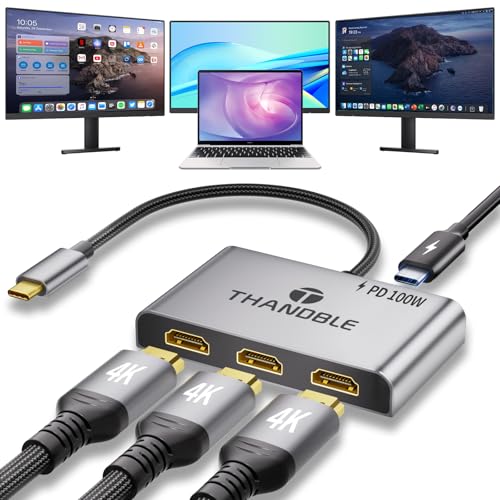
THANDBLE’s USB-C to 3 HDMI adapter supports three independent 4K@60Hz outputs via MST, delivering strong bandwidth for high-resolution tasks. It includes 100W PD charging in a dual-purpose design that powers a laptop while driving three displays. The product supports Windows MST and Mac OS triple SST, with noted limitations for some Mac configurations. It also mentions USB-C compatibility with Thunderbolt 3/4/5 ports and USB 4.0, which expands device compatibility beyond standard USB-C laptops.
When selecting this device, verify your computer’s support for MST and Extended mode. Mac users should expect mirrored output or SST limitations, depending on OS support. The setup is particularly beneficial for creative workstations, data analysis, and gaming rigs connected to a power-sufficient host. Ensure the power supply is adequate to avoid performance bottlenecks during heavy workloads.
FQuanmap DisplayPort To HDMI Splitter

FQuanmap’s DisplayPort to HDMI splitter converts one DP input to three HDMI outputs with 4K@60Hz support. It emphasizes DP 1.4 compatibility and notes that multiple monitors must all support 4K@60Hz to achieve true 4K across all displays. The device requires power, and macOS does not support MST, limiting extended display scenarios on Apple hardware. It’s a practical option for Windows-based workstations needing three independent HDMI outputs from a single DP source.
Assess whether your graphics card and monitors can sustain 18Gbps bandwidth to maintain fluid 4K images. Confirm that cables and adapters are rated for DP 1.4 and HDMI 2.0 for stable performance. A dedicated power supply is recommended to ensure all three outputs run at full 4K capability, especially under heavy multitasking or rendering workloads.
Buying Guide: Key Purchase Considerations
When choosing a triple-monitor HDMI splitter, several factors determine long-term reliability and performance. First, confirm directionality: DP/DP++ sources to HDMI outputs are common, but some adapters do not support reverse signals. Ensure you’re connecting from the source to the display chain as intended by the device’s design.
Next, review display modes. MST (multi-stream transport) enables independent displays, while SST (single-stream transport) mirrors content. Mac users often see MST limitations, so plan around extended or mirrored modes accordingly. Windows users typically gain more flexibility with MST-enabled GPUs and compatible driver settings.
Resolution and refresh rate matter. For true 4K@60Hz across all three monitors, ensure your GPU, DP/USB-C outputs, and HDMI cables all support the bandwidth demands. Some products specify 4K@60Hz on all outputs; others may cap to 4K on one monitor while the others run at 1080p. If color depth or HDR is important, verify compatibility and bandwidth requirements per display.
Power and stability are essential. Many triple-output adapters require external power or rely on host port power. A strong power supply or a dedicated PD charger (for USB-C hubs) helps prevent throttling or re-connection issues during heavy workloads. Aluminum housings and braided cables improve durability and reduce signal interference in busy setups.
Compatibility with your host computer matters. Windows and Linux users often benefit from MST-enabled adapters, while macOS compatibility can be limited for extended multi-monitor configurations. Check driver requirements and consider whether you are willing to install vendor drivers or adjust OS display settings for optimal results.
Cable quality and length can influence performance. Longer cables can introduce signal degradation at high resolutions. When possible, keep HDMI cables short and use certified cables that match HDMI 2.0 or higher and DP 1.4 standards for consistent results.
Finally, plan for use case. If you need true extended displays for productivity and design workflows, prioritize MST-capable adapters and verify your graphics card supports multi-monitor outputs. If your goal is synchronized mirroring for presentations or across a storefront, mirror-capable devices with strong signal integrity will suffice.
In short, select a product that aligns with your source interface (DP or USB-C), supports MST for independent displays, delivers 4K@60Hz where required, and provides robust power management. Evaluate OS compatibility, driver requirements, and the need for a durable build to ensure dependable triple-monitor performance over time.