Wireless HDMI transmitters turn wired HDMI connections into wireless streams, letting you mirror or extend video and audio from a laptop, set-top box, or camera to a TV, projector, or monitor without cable clutter. This guide focuses on reliable options that support 1080p to 4K content, multi-display setups, and plug-and-play installation. Below you’ll find five top-shelf picks with clear advantages for home theaters, offices, or classroom use. Each product is evaluated on range, latency, compatibility, and ease of setup to help you choose the right system for your space.
Summary Of Chosen Products
| Product | Max Range | Resolution | Number Of Receivers | Notes |
|---|---|---|---|---|
| Wireless HDMI Transmitter and Receiver (YUYUNLOMN) | Up to 165 ft in open space | 1080p@60Hz | 1 TX to 6 RXs | Plug-and-play; dual-band support; wall obstacles may affect signal |
| OREI Wireless HDMI Extender (5.1-5.2 GHz) | Up to 60 ft | 4K@60Hz | 1 TX to 1 RX (single receiver shown) | HDMI loop-out; no software required |
| WELUSOPU Wireless HDMI Extender | Up to 165 ft | 4K input / 1080p output | Supports up to 6 receivers | Multi-display casting; low latency |
| YAOMAISI G9R Pro Wireless HDMI | Up to 165 ft | Supports multiple displays (HDMI) | 1 TX + 2 RX (expandable) | Heat-control technology; plug-and-play; TX cannot direct-connect to TVs |
| OREI UltraHD Transmitter (4K@60Hz) | Up to 165 ft | 4K@60Hz | 1 TX to 1 RX (with loop-out) | HDCP 2.2 compliant; suitable for home theater or office use |
All five products below are designed to help you transmit video and audio from a source to a display without running cables. They cover a range of configurations—from one-to-one to one-to-many setups—so you can match your room layout, number of displays, and latency tolerance.
YUYUNLOMN Wireless HDMI Transmitter And Receiver

The YUYUNLOMN kit is an upgraded wireless HDMI solution with a dual-antenna design intended to improve signal stability across distances up to 165 feet in open spaces. It operates on dual bands, 2.4G and 5.8G, for high-speed, low-latency streaming of 1080p content. The system ships pre-paired for quick plug-and-play use, reducing setup time. It supports one transmitter to multiple receivers (up to six), making it suitable for classrooms or small home theaters that want to mirror to multiple screens. Note that walls and obstacles can reduce coverage, and TV-to-TV transmission is not supported in this configuration.
Key features include a robust 1080p@60Hz signal, a straightforward setup, and compatibility across laptops, set-top boxes, cameras, and PCs. If you’re integrating with an Apple TV box, ensure the TV output is set to 1080p 60Hz for best results. This option is ideal for users who want a reliable, plug-and-play wireless link with flexible expansion for additional displays.
OREI UltraHD 4K Wireless Extender

This OREI model delivers ultra-high-definition wireless transmission up to 4K at 60Hz. It supports a point-to-point connection (one transmitter to one receiver) with a range of about 60 feet and uses the 5.1–5.2 GHz band to minimize wireless interference. A notable feature is the HDMI loop-out that lets you connect a local display at the source while streaming to a distant screen. It’s a straightforward plug-and-play solution that does not require software, drivers, or apps, making it well-suited for home theaters or conference rooms where quick setup is essential. Latency is present but generally acceptable for non-gaming uses.
1Mii 2.4GHz Wireless Audio Transmitter Adapter
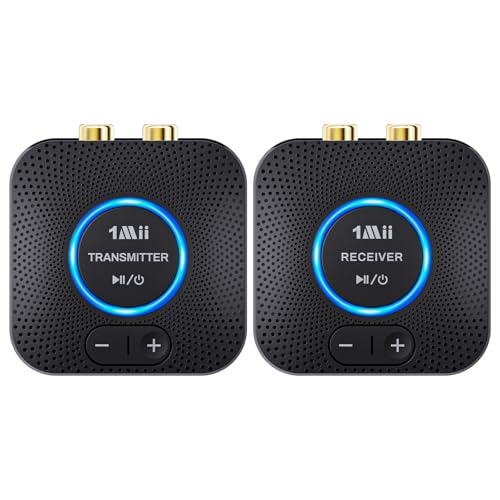
While primarily an audio-focused solution, the 1Mii unit offers quick pairing and reliable wireless transmission for audio streams from TVs or PCs to external speakers or soundbars. It operates on 2.4 GHz and supports dual AUX/RCA outputs to drive two powered speakers or an amplifier. It’s a practical option if you’re looking to upgrade a wired-to-wireless audio path rather than full HDMI video. It advertises simple operation: plug in, power on, and the system automatically pairs. This is ideal for users prioritizing lossless audio with minimal setup, though it does not directly convert video to wireless displays.
WELUSOPU Wireless HDMI Extender (2 Receivers)

The WELUSOPU system supports multi-display casting with up to six receivers, enabling one source to mirror across several TVs or monitors. It uses a dual-band 5.8G/2.4G transmission with auto frequency hopping and up to 60Hz support, delivering 4K input and 1080p output for crisp visuals with stereo sound. The kit is suitable for households, classrooms, or small business spaces that require synchronized displays. Latency is minimized for most typical viewing tasks, though high-frame-rate gaming may experience minor delay depending on environment and blockages.
YAOMAISI G9R Pro HDMI Transmitter And Receivers

The G9R Pro kit from YAOMAISI is designed for multi-display expansion, offering one transmitter and two receivers with a total range of up to 165 feet. It supports 2.4G/5G Hz wireless bands and can expand up to six screens with additional receivers (sold separately). The system emphasizes plug-and-play operation and pre-paired components, reducing technical hurdles. Note that the TX must connect to an HDMI output source (like a laptop or set-top box) rather than directly to a TV. The unit includes heat-control technology to maintain performance during longer sessions, making it a solid option for meetings or events where multiple displays are needed.
OREI 4K Wireless Extender With Loop-Out

This OREI model adds a loop-out port to a 4K@60Hz wireless link, letting you view on a local monitor while streaming to a remote display. It supports HDMI 2.0 and HDCP 2.2, ensuring compatibility with modern Blu-ray players, game consoles, laptops, and streaming devices while preserving protected content. The product is well-suited for home theaters and classrooms where simultaneous local and remote viewing is desirable. Range reaches up to 165 feet in line-of-sight environments, and setup remains straightforward and driver-free for quick deployment.
Buying Guide: Key Purchase Considerations
- Range and environment: For open spaces, many models reach 100–165 feet. Walls, metal objects, and furniture can reduce range. If your space has many obstacles, consider models with higher power transmitters and multiple receivers.
- Resolution and latency: If you plan to watch 4K content, choose devices supporting 4K@60Hz. Latency matters for gaming or real-time interactions; some models advertise ultra-low latency, while others are better suited for streaming and presentations.
- Number of displays: If you want to mirror to multiple screens, select kits that support 1 TX to 4–6 RXs. Ensure RXs are compatible with your displays and Placement flexibility is adequate for your room.
- Signal interference: Dual-band units (2.4G and 5G) with auto frequency hopping can reduce interference from Wi-Fi and other devices. Check if the device reports on interference-prone environments and select channels accordingly.
- Input source compatibility: Some units require the TX to connect to an HDMI output device (laptop, media box, or camera) rather than directly to a TV. Confirm compatibility with your source devices and ensure you don’t need additional adapters.
- Power and portability: Look for USB-powered kits for portability or wall-powered options for stability in a fixed setup. If you plan to relocate often, consider compact, lightweight kits with easy cable management.
- HDCP and content protection: If you plan to stream protected content (Blu-ray players, streaming devices), verify HDCP 2.2 compatibility to avoid playback issues.
- Installation and software: Most of these kits are plug-and-play, but a few may require minor configuration. Consider models with pre-paired devices and clear user guides to minimize setup time.
- Audio support: If you need high-fidelity audio downstream, ensure the device supports the desired audio formats and outputs (HDMI, analog AUX, or optical, as applicable).
- Future-proofing: If you expect to upgrade displays or sources, choose a system that supports higher resolutions and multiple receivers, with spare RX availability.
When selecting a wireless HDMI transmitter for cable TV or laptop-to-TV setups, prioritize devices that align with your room layout, desired number of displays, and whether you need 4K content or simple 1080p streaming. By weighing range, latency, compatibility, and ease-of-use, you can choose a system that minimizes cable clutter while delivering reliable video and audio transmission.