Transferring old analog video to digital formats and burning to DVD is a popular way to preserve memories from VHS, Hi8, and other tapes. Modern capture devices simplify this process, offering plug-and-play operation, direct USB or SD recording, and compatibility with Windows, Mac, and various video formats. Below, five top options help American shoppers secure crisp, retrievable copies of cherished moments. Each product section highlights key features to compare at a glance and informs you how to choose the right device for your setup.
Summary of Selected Products
- Portta VHS to Digital Converter – USB/SD storage, 1080p capture, built-in preview
- Oassuose VHS to Digital Converter – USB-C/USB-A, 1080P capture, driver-free
- ClearClick Video to Digital Converter 2.0 – Direct USB recording, no computer needed
- AMANKA VHS to Digital Converter – RCA input, widely compatible, OBS/QuickTime friendly
- VIXLW VHS to Digital Converter – USB capture with automatic format detection
Portta VHS To Digital Converter Overview

The Portta device functions as a combined converter, recorder, and capture box. It accepts AV/RCA (CVBS+R/L), S-Video, and AUX inputs, enabling direct recording up to 1080P at 30Hz. A built-in 3.0″ preview LCD and speaker provide immediate playback of captured footage, while USB or TF storage supports large capacities when using an external power supply. This model records videos in MP4 and audio in MP3, making it suitable for archiving family memories without a PC. Notably, it cannot play tapes independently; it must be used to convert and store content.
Key facets to consider include its compatibility with NTSC and PAL formats and the option to choose appropriate input channels. It’s an excellent pick for those who want a self-contained unit that offers direct viewing of captured material and easy transfer to USB drives. For best results, ensure your source device is connected via the correct input and confirm the volume levels in settings before recording.
Oassuose VHS To Digital Converter Overview
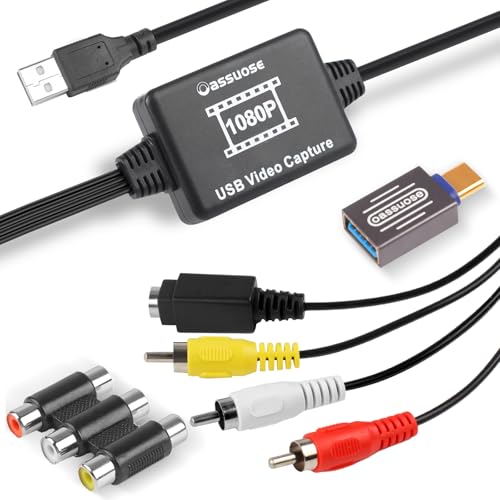
The Oassuose capture card targets users who want to digitize material from VHS, VCR, DVD, Hi8, DV tapes, camcorders, or other video sources. It outputs to USB-A or USB-C and supports 1080P/30fps. The device is designed for plug-and-play operation and works with PCs and Macs without drivers, though you’ll generally use accompanying software for acquisition. RCA or S-Video inputs provide flexible connectivity, and the box emphasizes easy sharing and storage of memories on a computer. It’s a strong option for those who prefer a straightforward capture workflow without complex setup.
ClearClick Video To Digital Converter 2.0 Overview
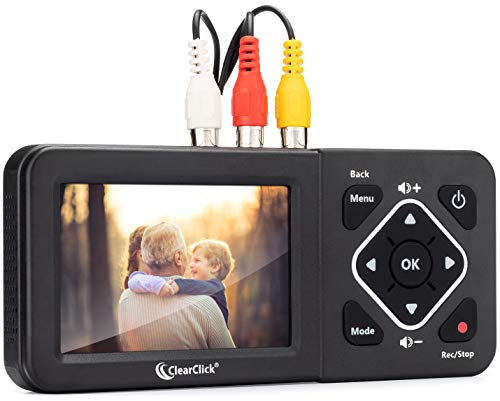
ClearClick’s 2.0 model emphasizes direct recording from VCRs, VHS tapes, AV, RCA inputs, Hi8, camcorders, DVDs, and gaming systems. It does not upscale to HD and requires a working VCR/camcorder to operate. A key benefit is no computer or software needed—recordings go directly to USB flash drive or SD card (not included). The unit supports SD or 640×480 to 720×480 recording resolutions, offering a simple, stand-alone path to digital copies for easy archiving. A must-consider for users seeking a no-PC solution with straightforward transfer capabilities.
AMANKA VHS To Digital Converter Overview

AMANKA’s USB video capture device translates analog VHS, VCR, Hi8, DV, and other sources into digital formats via RCA or S-Video connections. It is compatible with Windows, Mac OS, Linux, and Android, making it a flexible choice for multi-platform households. The device aims for easy plug-and-play operation, with an emphasis on making OBS, PotPlayer, QuickTime, and similar software compatible for recording. It supports NTSC and PAL formats and outputs MJPEG or YUV422 at up to 1080P, making it a versatile option for educators, families, and hobbyists creating digital archives.
VIXLW VHS To Digital Converter Overview

VIXLW presents an analog-to-digital converter aimed at digitizing VHS, VCR, Hi8, mini DV, and camcorder footage for PC or Mac. It automatically detects NTSC and PAL formats and captures video in MP4 or other digital formats. The device emphasizes a driverless setup and uses OBS or QuickTime for recording on Windows or Mac. Its user-friendly design includes step-by-step instructions and emphasizes a straightforward capture process with no complicated software requirements, ideal for quick archiving tasks.
Buying Guide: Key Purchase Considerations And Comparisons
- Input compatibility: Check that your source device uses RCA, AV, S-Video, or HDMI and confirm whether the converter supports CVBS, R/L, and AUX inputs as needed.
- Output formats: Seek devices that offer MP4, AVI, or MOV with audio in MP3 or WAV/PCM for broad compatibility with editors and players.
- Storage options: Prioritize units with USB drives, SD/TF cards, or cloud options. If using USB drives, ensure the device supports large capacities and has its own power supply for stable transfers.
- Display and preview: A built-in LCD preview helps verify footage during capture. Consider models with real-time playback to confirm settings before saving.
- Software-free options: If you want a plug-and-play experience without drivers or PC dependence, choose devices that support direct USB/SD capture (like ClearClick) but confirm required formats and storage limits.
- Cross-platform compatibility: If you work on Windows, macOS, and Linux, pick a device that explicitly supports multi-system operation and widely used capture software.
- Quality and resolution: For preserving memory quality, favor devices supporting 1080P capture at 30 fps, while recognizing that some units cap at SD or 720×480 for simplicity and speed.
- Required gear and setup: Some devices require a working VCR or camcorder to play tapes; others only need a signal source. Confirm that you have a functioning playback device before purchasing.
- Durability and support: Look for positive user reviews on reliability and check whether the manufacturer offers clear setup guidance, troubleshooting, and firmware updates.
Overall, the best choice depends on your priorities: do you prefer a standalone unit with an LCD for direct viewing, or a PC-based capture that integrates with editing software? For households with diverse source tapes, a versatile RCA/S-Video input device paired with robust software compatibility can provide the most flexible and durable archive solution.