Transferring 8mm, Hi8, and Digital8 tapes to digital formats or DVDs is essential for long-term preservation. This guide highlights five options that cover at-home digitizing with hardware, as well as professional transfer services. Each choice is evaluated for ease of use, compatibility, and output quality to help you decide the best path for your 8mm memories.
Summary of Selected Products
| Product | Type | Output | Notes |
|---|---|---|---|
| Tech Collector 8mm, Digital8, and Hi8 Transfer Bundle | Hardware Bundle | Digital files, DVD | Includes camcorder and USB adapter |
| 8mm & Super 8 Film to Digital Converter | Film Scanner | 1080P MP4 | Built-in LCD, no computer required |
| Video Tape Transfer Service (Time To Remember) | Service | MP4 | Cloud delivery and recycling included |
| August External USB Video Capture Card | Capture Card | Digital files | VHS to PC and burn to DVD |
| Lotus Media DVD Transfer Service | Service | MP4 | All tape formats including Beta |
Tech Collector Transfer Bundle for 8mm Tapes

This bundle is designed for playback and transfer of 8mm, Hi8, and Digital8 tapes. It includes a USB capture device that moves tapes to computer files or allows DVD burning. The kit also includes a camera battery and AV cables for transfer or TV playback, enabling a flexible, all-in-one solution for digitization at home.
8mm Film to Digital Converter with Built-In Screen

This fully automated digitizer converts 8mm and Super 8 reels into 1080P digital MP4 files. It supports reels up to 9 inches and saves directly to an SD card (32GB included). The 2.4-inch LCD lets you preview results, making it a convenient stand-alone device that requires no computer software.
Time To Remember: Video Tape Transfer Service

Time To Remember offers a professional transfer service for VHS, Hi8, 8mm, and related formats. You will receive an MP4 file suitable for mobile devices and computers. Standard turnaround is about 10 business days after receipt, with cloud delivery and complimentary recycling of media. This option is ideal for preserving fragile or large collections without hardware investment.
August USB Video Capture Card
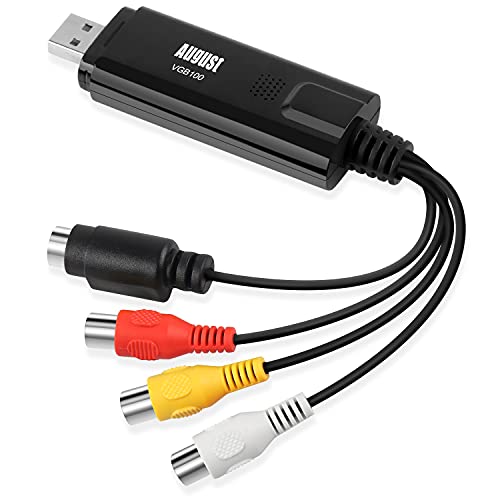
The August external USB capture card lets users save VHS tapes to a PC and burn copies to DVDs using bundled software. It supports S-Video and composite inputs and is designed for Windows environments. This option is suitable for those who already own a PC and want a budget-friendly digitization workflow.
Lotus Media DVD Transfer Service

Lotus Media offers digitization for a wide range of formats, converting to MP4 with clear processing directions. The service handles VHS, VHS-C, 8mm, Video-8, Hi-8, Digital-8, MiniDV, and even Beta. Output comes as MP4 and can be delivered in about 10 business days, with guidelines for mail-in submission and format versatility.
Buying Guide: Key Considerations for 8mm Transfer Decisions
When choosing between at-home digitizing and professional transfer services, consider these factors to match your needs and budget:
- Input formats: Ensure compatibility with your specific tapes (8mm, Hi8, Digital8, VHS, etc.).
- Output formats: Decide whether you want MP4, DVD, or both. MP4 is widely compatible for streaming and storage.
- Equipment familiarity: Hardware options require comfort with selective hardware setup and software. Services remove the tech burden.
- Quality expectations: At-home devices can produce high-quality digital copies, but professional services may offer retiming, color correction, and professional-grade results.
- Turnaround time: DIY transfers are immediate, while services vary from a few days to several weeks depending on backlog and mail-in speed.
- Budget: Hardware purchases have upfront costs; services charge per tape and may include cloud delivery and disposal options.
- Preservation considerations: If the goal is archival quality, consider higher bitrate outputs, reliable storage media, and multiple copies on different media.
- Future accessibility: MP4 on SD cards, USB drives, or cloud storage can ensure long-term access; DVDs provide physical backup but may age differently.