Finding a compact, reliable touchpad keyboard that works smoothly with Android devices can boost productivity on the go. The following selections emphasize cross-device compatibility, responsive touchpads, and travel-friendly design. Each option supports Android and other platforms, delivering versatile control whether you’re typing emails, navigating browsables, or inputting text on a tablet or smartphone. Read on for five strong choices, a quick summary, and a buying guide to help you compare features like multi-device pairing, battery life, and keyboard layout.
| Product | Brand | Primary Benefit |
|---|---|---|
| FINTIE Ultrathin 4mm Wireless Bluetooth Keyboard | FINTIE | Ultra-slim with built-in touchpad; long-range Bluetooth 5.0 |
| Bnnwa Multi-Device Wireless Bluetooth Keyboard with Touchpad | Bnnwa | Multi-device switching; full-size trackpad |
| Arteck Universal Backlit Bluetooth Touch TV Keyboard | Arteck | Backlit keys; broad compatibility including Android and TV |
| Samsers Foldable Bluetooth Keyboard with Touchpad | Samsers | Foldable, portable; built-in stand; touchpad |
| Rii X8 Mini Keyboard with Touchpad | Rii | Compact, RGB backlight; reliable 2.4GHz dongle |
FINTIE Ultrathin Keyboard With Built-In Touchpad
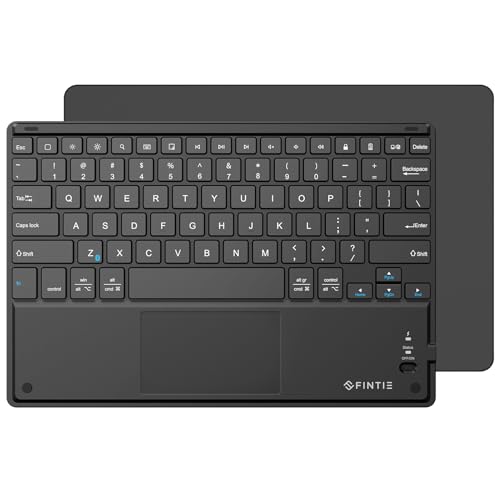
The FINTIE Ultrathin 4mm Keyboard blends portability with a practical touchpad for Android use cases like media centers or remote control setups. Its Bluetooth 5.0 connection reduces latency and keeps cords out of the way, delivering a wireless range up to 10 meters. While its touchpad is noted for cross-device control, users should be aware that Android devices may have limited touchpad compatibility depending on the row of features and drivers. The design is ultra-slim—about 4 mm thick—and lighter than a magazine, making it a strong travel companion for tablets and phones. A compact layout helps with quick typing on small screens, and the durable shell suits daily commuting.
Key features include a long-range, cross-compatible touchpad, and a lightweight build that travels well. The keyboard commonly pairs with Windows and some mobile platforms; it’s especially appealing for Android users who value a compact, multi-purpose accessory. If you’re seeking a no-fuss option to type on a tablet or phone while lounging, this model offers a balanced mix of portability and functionality.
Bnnwa Multi-Device Keyboard With Touchpad

The Bnnwa keyboard is designed for multi-device households and workspaces. It supports three devices and enables seamless switching with a single key press, reducing interruptions when moving between Android, Windows, and Chrome OS devices. The built-in multi-touch trackpad supports common gestures, enabling efficient navigation without a separate mouse. The keyboard itself is lightweight with a durable ABS shell, and its compact design preserves desk space while retaining essential function keys. This model suits users who regularly alternate between a tablet, laptop, and a phone for meetings or entertainment.
Data-driven design choices are evident in its range and battery life. The 10-meter operation range ensures reliable performance in office layouts or living rooms, while the compact layout preserves finger reach. If you value a versatile three-device workflow and an integrated touchpad for Android use, the Bnnwa option is a practical pick that emphasizes both portability and efficiency.
Arteck Backlit Bluetooth Touch Keyboard With Touchpad

The Arteck model stands out with seven-color backlighting and a set of media controls, making it suitable for media centers or living room setups connected to smart TVs or Android-enabled displays. It supports a wide range of operating systems including Windows, macOS, Android, iOS, and Chrome OS, which helps with cross-device usage. While the backlight enhances visibility in dim rooms, the touchpad provides intuitive navigation for cursor control. This option is particularly attractive for users who want a comfortable typing experience at night or in low-light environments without sacrificing compatibility.
Consider its power management and auto-sleep features to maximize battery life when used across different devices. The Arteck keyboard provides a robust blend of aesthetics, compatibility, and practicality for Android users who occasionally require quick media access or remote input on a connected TV or PC.
Samsers Foldable Keyboard With Touchpad

The Samsers foldable keyboard focuses on extreme portability without sacrificing the built-in touchpad. The foldable design makes it easy to slip into a bag or pocket, making it ideal for travel or business trips. It includes a phone stand holder, allowing you to set up a comfortable viewing angle while you type from a distance. The touchpad supports multi-touch, providing convenient navigation while on Android or other devices. A rechargeable battery supports extended sessions between charges, making it a versatile option for meetings, remote work, or casual use on the go.
Despite its compact form, Samsers prioritizes usability with a near-desktop typing feel and reliable wireless performance. The foldable design and included stand help optimize comfort during long sessions away from a traditional desk. If portability and integrated navigation are your top priorities, this model delivers a strong combination of features for Android users and travelers alike.
Rii X8 Mini Keyboard With Touchpad
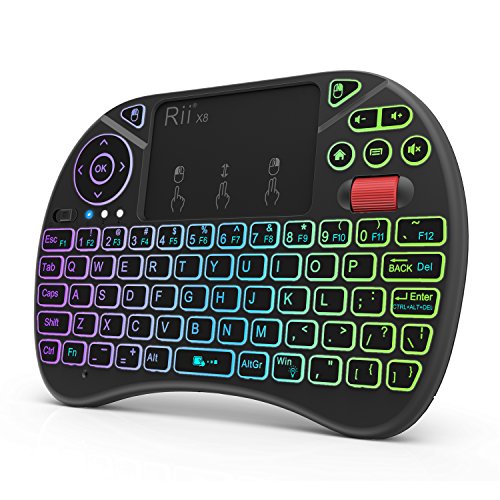
The Rii X8 Mini offers a compact 2.4GHz wireless solution with a built-in touchpad and RGB backlighting, ideal for Android TV boxes and HTPC setups. The included USB dongle provides plug-and-play simplicity, reducing setup time for Android devices and media centers. This model is particularly appealing for those who prioritize a compact form factor while still wanting a usable full keyboard and touch navigation. The 8-color backlight and media keys add convenience for low-light environments and multimedia control, making it a strong option for living room or small desk configurations.
With a rechargeable battery and a small footprint, the Rii X8 Mini is well-suited for travelers who want a quick, reliable input method on the go. The combination of portability, ease of use, and compatibility with Android devices makes it a practical pick for compact workstations or entertainment centers that rely on touchpad navigation.
Buying Guide: Key Considerations For Android Use
- Device compatibility: Look for cross-platform support (Android, Windows, Mac, iOS) and check whether the touchpad supports common gestures like scrolling and pinching.
- Connectivity: Bluetooth versions (5.0 or newer) generally offer better range and stability. Consider 2.4GHz wireless options for devices that support USB dongles or lack Bluetooth.
- Touchpad size and precision: A larger touchpad improves navigation accuracy, especially when navigating tablets or smart TV interfaces.
- Keyboard layout and size: Ultra-slim or foldable forms save space but may affect typing comfort. Ensure key travel and spacing suit your preferred typing style.
- Battery life and charging: Rechargeable lithium batteries with long standby times help when traveling. Check charging type (USB-C is common) and any automatic sleep modes.
- Backlight and visibility: If you type in dark environments, backlit keys are valuable, but they consume power. Consider brightness levels and auto-sleep features.
- Portability and durability: Ultra-thin profiles appeal to travelers, but ensure the build can withstand daily use and occasional bumps.
- Price-to-performance: Compare feature sets such as additional function keys, media controls, and stand-alone mode against the size and weight you require.
These keyboards are designed to balance portability with functional input for Android and other devices. When choosing, prioritize how you plan to use the device—at a coffee shop, on the couch, or huddled near a TV—and select a model that offers reliable Bluetooth or wireless connectivity, a comfortable touchpad, and a practical typing experience. Considering multi-device support can also streamline workflows across tablets, laptops, and smartphones in everyday scenarios.