Finding a touchscreen computer that’s simple, reliable, and comfortable for seniors can improve online safety, communication, and daily tasks. The following selections emphasize easy navigation, clear displays, helpful features like large touch targets, and dependable performance for web browsing, video calls, and entertainment. The list includes a mix of traditional laptops and external touch-enabled monitors to fit various setups and living spaces.
| Product | Brand | Key Feature |
|---|---|---|
| HP Touchscreen Laptop 14″ | HP | 1 Year Office 365, 14″ HD touchscreen, Windows 11 S |
| CAPERAVE 15.6″ Portable Touch Monitor | CAPERAVE | Full HD 1080p IPS touchscreen, USB-C and HDMI |
| HP 17.3″ Touchscreen Laptop | HP | Large 17.3″ touchscreen, Windows 11, 8GB RAM |
| HP Portable 13.8″ Touchscreen Laptop | HP | Compact, touchscreen with multiple ports |
| InnoView Portable Monitor 15.6″ | InnoView | 10-point touchscreen with protective sleeve |
The following five products were chosen for their balance of readability, touch responsiveness, and ease of use. Each product section provides a concise overview, a direct link to the Amazon listing, and the essential features that may benefit seniors seeking straightforward computing experiences.
HP Touchscreen Laptop With Office 365

The HP 14-inch laptop features a responsive Intel Celeron N4500 processor, designed for everyday tasks such as web browsing, emails, and light content creation. It includes 4GB DDR4 RAM and 64GB eMMC storage for quick boot times and straightforward file management. The 14″ HD touchscreen with anti-glare technology offers easier interaction and readability, and the device comes with a 1-year Microsoft Office 365 subscription to streamline common tasks. Built-in webcam and dual microphones support clear video calls, making staying in touch with family simple and reliable. Wireless connectivity includes WiFi 6 and Bluetooth 5.4 for stable connections with accessories and peripherals.
CAPERAVE 15.6” Portable Monitor With Touch

This 15.6-inch portable monitor adds touch capability to existing devices, featuring a 10-point capacitive touch interface that works with Windows and macOS. It connects via USB-C for power, video, and touch on compatible ports, or uses HDMI and additional cables for devices without USB-C. The Full HD 1920×1080 IPS display delivers wide viewing angles and vibrant colors, with eye-friendly features like reduced blue light and flicker-free technology. A lightweight design and included kickstand make it easy to use as a second screen at home or on the go, helping seniors manage larger text and comfortable layouts on a bigger display.
HP 2026 X360 Convertible Laptop

Though listed as Renewed, this HP 11.6″ convertible laptop focuses on simplicity and flexibility. It offers an 11.6″ HD touchscreen, an Intel 4-core processor up to 3.29GHz, 8GB memory, and 128GB storage, with USB Type-A and Type-C ports plus HDMI. The convertible form factor can help seniors switch between laptop and tablet modes for easier reading and touch navigation. While compact, it supports essential connectivity (WiFi) and basic multitasking for video calls, online shopping, and educational activities, with Windows 11 as the operating system to provide a familiar interface.
InnoView 15.6″ Touchscreen Portable Monitor

The InnoView 15.6-inch portable monitor offers a 1080p IPS touchscreen with 178° viewing angles. It’s designed for Windows and Mac, supporting a single USB-C connection for power, video, and touch on compatible devices. The monitor includes a protective sleeve and a built-in stand, making it easy to carry and set up anywhere. Its low blue-light and flicker-free technology help reduce eye strain during long sessions, while the 10-point touch responsiveness ensures intuitive control for seniors navigating menus, photos, and videos.
SKitphrati 21.5 Inch Touchscreen Monitor

This 21.5-inch IPS touchscreen monitor provides a broad display with a 10-point touch interface, ideal for shared navigation and larger text. It includes a 178° viewing angle and 250cd/m² brightness for clearer visibility in well-lit rooms. The multi-touch capability makes it suitable for those who prefer direct interaction with the screen, whether for photo viewing, browsing, or basic productivity tasks on a larger canvas. It connects via HDMI and VGA and is a straightforward addition to any desktop or laptop setup.
HP Portable 13.8″ Touchscreen Laptop
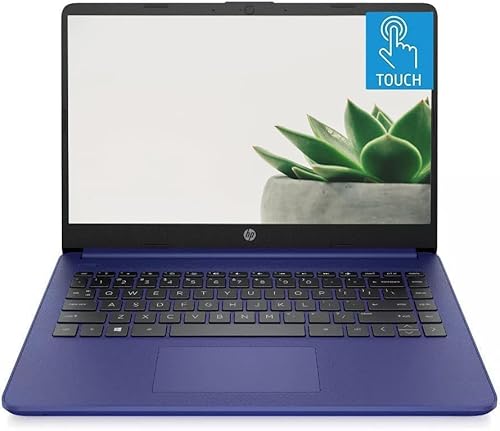
This compact HP laptop packs a touchscreen experience in a 13.8-inch form factor, featuring an Intel Celeron N processor up to 2.78GHz, 4GB RAM, and a 64GB SSD. The BrightView touchscreen and built-in webcam support everyday communication and tasks, while multiple ports including USB-C enhance compatibility with accessories and external displays. Its Windows 11 operating system provides a familiar, accessible interface for seniors seeking a lighter, portable option with essential productivity capabilities.
HP 17.3’’ Touchscreen Laptop

The HP 17.3-inch touchscreen laptop provides a large display ideal for seniors who benefit from bigger text and icons. It features an 8-core Intel Core i3-N305 processor, 8GB RAM, and 128GB eMMC storage for reliable everyday tasks such as web browsing, video calls, and document management. The larger screen supports easier reading and navigation, while the integrated webcam and Wi-Fi 6 ensure stable connections for online activities. The spacious keyboard and Num Pad add to overall usability for long sessions and productivity tasks.
Buying Guide: Key Purchase Considerations
- Screen size and readability: Larger displays reduce eye strain and improve readability. If a senior uses a lot of text or video calls, consider 15-17 inch screens or external touch monitors for bigger text and easier interaction.
- Touch responsiveness: A responsive touchscreen with accurate input helps reduce frustration. Test models for multi-touch support and smooth swiping, tapping, and scrolling.
- Operating system familiarity: Windows 11 offers a familiar interface with accessibility features. If a senior prefers simplicity, Windows 11 S mode can limit apps for safer, streamlined use.
- Storage and memory: 4GB RAM with larger storage options (64GB eMMC or 128GB SSD) supports smoother multitasking and easier file management. Consider external storage or cloud options for additional space.
- Portability vs. screen size: Portable laptops are convenient, but larger screens provide comfort for extended use. External monitors can be a flexible alternative to upgrade an existing setup.
- Connectivity: Wi-Fi 6 and Bluetooth 5.4 offer better range and device compatibility. Ensure the device supports necessary peripherals like webcams, headsets, and external keyboards.
- Durability and build: Look for sturdy hinges, anti-glare screens, and reliable keyboards to reduce strain and enhance long-term usability.
- Security and updates: Regular software updates, built-in antivirus capabilities, and easy access to help resources contribute to a safer online experience.
- Budget and renewal options: Renewed devices can offer cost savings but ensure warranty terms and return policies align with user needs. Consider long-term value alongside initial cost.
- Accessibility features: Large on-screen targets, high-contrast display options, and straightforward menus support users with limited dexterity or vision.