Small, power-efficient e-paper displays are ideal for battery-powered gadgets, shelf labels, smart tags, and DIY projects. This guide highlights five compact, low-power tiny e ink displays from respected brands, with quick-start details and key features. Each product section links to its Amazon page for convenience and comparison. Read on to see which model best fits your Raspberry Pi, Arduino, or microcontroller project, whether you need a single color or tri-color panel, full or partial refresh, and how these displays manage power between refresh cycles.
| Product | Resolution | Size | Interface | Color Options |
|---|---|---|---|---|
| 1.54 Inch E-Ink Display Module | 200×200 | 1.54″ | SPI | Black & White |
| 2.13 Inch E-Ink Display HAT V4 | 250×122 | 2.13″ | SPI | Black & White |
| ELECROW ESP32 E-Ink Display 5.79″ | 272×792 | 5.79″ | SPI | Black & White |
| 7.5 Inch E-Ink Raw Display | 800×480 | 7.5″ | SPI | Black & White |
| 3 Color 2.9 Inch E-Ink Display | 296×128 | 2.9″ | SPI | Red, Black, White |
1.54 Inch E-Ink Display Module — Waveshare

This 1.54-inch e-paper module delivers a crisp 200×200 resolution via SPI, making it suitable for compact label displays or small status panels. It emphasizes ultra-low power usage, drawing power primarily during refresh cycles. The design supports partial and full refreshes, enabling dynamic content without sacrificing energy efficiency. It’s a versatile option for Raspberry Pi and Arduino projects with tight space constraints.
Key details
- High-Resolution 200×200 LCD-like clarity in an ultra-tiny footprint.
- SPI interface for straightforward integration with microcontrollers.
- Partial refresh enables faster updates for living content while staying frugal on power.
2.13 Inch E-Ink Display HAT V4 — Waveshare

The 2.13-inch e-paper HAT is designed for Raspberry Pi and other controllers, offering 250×122 resolution with a low-power footprint. This version preserves solder pads for SPI compatibility, making it easy to pair with Arduino, Nucleo, or similar boards. It’s optimized for projects that require a compact, always-on display with efficient refresh behavior and broad controller support, including Jetson Nano.
Key details
- Ultra-low power consumption—refresh only when needed.
- SPI interface with preserved pads for easy wiring.
- Broad compatibility with Raspberry Pi and other microcontroller boards.
ELECROW ESP32 E-Ink Display 5.79″
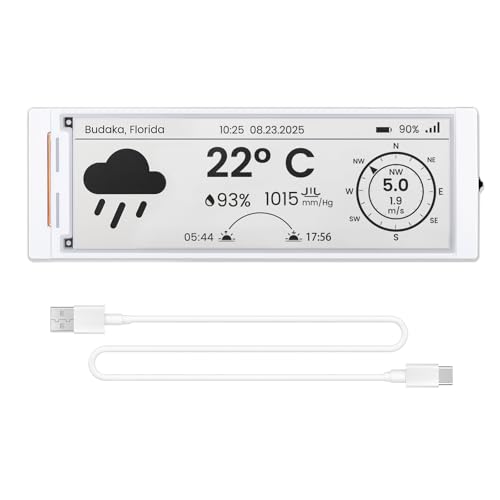
This 5.79-inch e-paper panel integrates an ESP32-S3 controller, delivering a complete development-ready HMI solution. With a 272×792 resolution, it provides outstanding sharpness and a familiar e-reader feel. It operates with low power, retaining static content without a constant power draw, making it ideal for battery-powered devices and smart labels that require responsive UI elements and reliable performance in a compact package.
Key details
- Built-in ESP32-S3 controller for straightforward development.
- High-resolution e-ink display with crisp black-and-white contrast.
- Ultra-low power consumption with power-off retention.
7.5 Inch E-Ink Raw Display — Waveshare

This raw display is a larger option within the tiny e ink category, offering 800×480 resolution and an embedded controller with SPI communication. It is designed for online manuals and varied applications, including shelf labels and industrial instruments, where a low-power, high-contrast interface is beneficial. The project can leverage standard interfaces across popular microcontrollers without heavy power demands.
Key details
- 7.5-inch, 800×480 resolution with SPI interface.
- Embedded controller enables broad hardware compatibility.
- Ideal for energy-efficient displays in industrial or retail contexts.
Three Color 2.9 Inch E-Ink Display Module — Waveshare

The 2.9-inch tri-color panel displays red, black, and white, enabling emphasis on important information or alerts within a compact form factor. It uses the SPI interface and supports full refresh, with onboard voltage translator for compatibility across 3.3V and 5V MCUs. This makes it well-suited for projects that require color accents on a small e-paper display.
Key details
- Cheerful tri-color capability for highlighted content.
- SPI interface with broad MCU compatibility.
- Supports full refresh for complete content redraws.
Buying Guide: Tiny E Ink Displays for Your Projects
Choosing the right tiny e ink display depends on your project constraints and goals. Consider the following factors to ensure you pick the best match.
- Size and resolution: Smaller panels (1.54″ to 2.13″) are ideal for compact devices, while larger panels (5.79″ and 7.5″) suit dashboards or visual labels. Resolution affects legibility and design possibilities, especially for fine text or UI elements.
- Power behavior: E-paper excels at low power, especially with power-off retention. Decide if you need frequent updates (partial refresh) or static displays (full refresh) to optimize battery life.
- Interface and compatibility: SPI is the most common interface for these modules. Ensure your board (Raspberry Pi, Arduino, Jetson Nano, etc.) supports the chosen display and that you’re comfortable wiring with SPI and optional voltage translators.
- Color options: Single-color displays work well for basic labels, while tri-color panels (red/black/white) help highlight critical information. Assess whether color accents improve usability in your design.
- Controller integration: Some models come with built-in controllers (like ESP32-S3) offering a turnkey solution, while others are raw controllers requiring more setup. Pick based on your desired development flow and time-to-market.
- Physical durability and viewing angle: E-ink offers wide viewing angles and readability under various lighting. If outdoor or bright-light use is planned, confirm glare performance and protective options.
All five displays in this guide emphasize ultra-low power consumption, making them strong candidates for projects where battery life matters. Developers should evaluate refresh needs, available I/O, and board compatibility to optimize performance and power usage. For hobbyists and professionals alike, these tiny e ink displays offer tangible benefits in durability, readability, and energy efficiency.