Preserving family videos and cherished tapes is easier than ever with dedicated tape-to-DVD recorders. This guide highlights top options that convert VHS, Hi8, and other analog media into digital formats or DVDs without needing a computer. Each pick offers built-in screens, HDMI outputs, and simple one-button recording, helping you safeguard memories for future viewing. Below, you’ll find practical features, storage options, and what to consider when choosing the right model for your needs.
Summary of chosen products:
| Product | Brand | Storage / Output | Key Benefit |
|---|---|---|---|
| Portta VHS to Digital Converter | Portta | USB/TF storage; MP4/MP3 | Compact, no PC needed |
| Clariviews VHS to DVD Recorder | Clariviews | DVD/USB/SD; HDMI & AV | Standalone with built-in screen |
| Roxio Easy VHS to DVD 3 Plus | Corel | DVD or digital formats | Editing and stabilization features |
| Qonakism VHS to Digital Converter | Qonakism | USB/TF storage; HDMI output | 4″ HD preview; flexible formats |
| DigitPro VHS to Digital Converter 2.0 | DigitPro | USB/TF; HDMI | One-touch conversion with smart settings |
Whether you’re archiving decades of family footage or converting a few keepsakes, these devices provide straightforward, PC-free ways to digitize and preserve memories for modern viewing on TVs, phones, or computers.
Portta VHS To Digital Converter Overview

The Portta device offers a plug-and-play solution to convert analog video and audio into digital files, with recording up to 1080P at 30Hz. It accepts AV/RCA CVBS+R/L, S-Video, and AUX inputs, and stores content on USB drives or TF cards. A built-in 3.0″ preview LCD and speaker enable direct playback and snapshots on the capture box. It is a converter/recorder/capture unit—not a standalone player for tapes or DVDs.
Clariviews VHS To DVD Recorder Overview
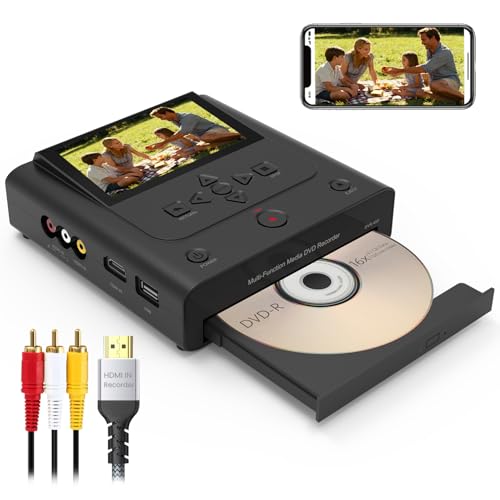
This standalone recorder handles VHS/VCR/Hi8/camcorder sources and records directly to DVD or to USB/SD. With a built-in 4.3″ screen, users preview and record in one step, avoiding computer setups. It accepts AV inputs and HDMI for modern displays, enabling straightforward, driver-free archiving and easy playback on televisions.
Roxio Easy VHS To DVD 3 Plus Overview

Roxio’s Easy VHS to DVD 3 Plus blends classic analog capture with editing tools. It enables direct burning to DVD or conversion to digital formats for easy sharing. Features include video trimming, color enhancement, noise reduction, and stabilization to improve aging footage, providing a comprehensive upgrade path for older tapes while preserving the originals.
Qonakism VHS To Digital Converter Overview

Qonakism emphasizes a straightforward, plug-and-play approach with a 4″ HD preview screen and built-in speakers. The device supports USB/TF storage options and HDMI output, enabling direct viewing via a TV/monitor. It records in multiple formats, with flexible input options for S-Video or CVBS and separate audio recording channels, designed to preserve memories without a computer.
Clariviews VHS To DVD Recorder 2nd Overview

This model provides a “no computer needed” workflow to simultaneously capture and burn to DVD-R/RW discs or save to USB/SD, supporting VHS, VCR, and camcorder inputs. A 4.3″ preview and HDMI output ensure accurate capture and modern playback compatibility, reducing the risk of degraded footage over time.
DigitPro VHS To Digital Converter Overview

DigitPro’s offer centers on one-touch digital conversion from a variety of sources, including VHS, VCR, and camcorders. It records up to 1080P with options for USB/TF storage up to 512GB. A 3.5″ HD preview screen and built-in speakers enable real-time playback, while smart settings automate features like auto pause/resume upon signal loss.
Buying Guide: Key Considerations For Tape To DVD Converters
When choosing a tape-to-DVD recorder, consider the following perspectives to fit your setup and goals:
- Standalone vs. PC- dependent: Standalone units simplify operation and reduce setup complexity, but some users prefer PC-enabled workflows for editing after capture.
- Input compatibility: Look for AV/RCA, S-Video, HDMI, and auxiliary audio inputs. Ensure the device can handle Hi8, VHS, camcorders, and other legacy formats you own.
- Output formats and storage: Decide whether you want DVDs, USB or SD card outputs, or direct MP4/MP3 storage. Confirm maximum storage capacity supported (USB/TF limits vary).
- Preview display: A built-in screen helps verify captures in real time. Larger screens (4.3″ or more) provide easier framing and quality checks before finalizing a transfer.
- Playback and editing features: Some models offer trimming, color correction, noise reduction, stabilization, or scheduled recording. These can improve archival quality.
- Ease of use: One-touch recording, clear menus, and minimal setup reduce the risk of wear on aging tapes and devices.
- Durability and reliability: Choose brands with solid reputations for preserving signal integrity and long-term storage on USB drives, SD cards, or discs.
- Future-proofing: If you plan to share videos widely, consider devices that produce widely compatible MP4 or DVD formats and support HDMI for easy television viewing.
- Warranty and support: A reliable return policy and accessible customer support help guard against compatibility issues with older media.
The selections above provide a mix of standalone recorders and capture devices designed to protect aging media without requiring a computer. Each option emphasizes ease of use, direct storage to modern media, and compatibility with common formats, helping you build a durable archive of cherished moments.