Whether you’re a student, professional designer, or casual artist, a reliable stylus pen enhances digital drawing, note-taking, and illustration on graphic tablets and capacitive devices. Below is a curated list of five standout options that pair well with popular drawing tablets and touchscreens, offering precision, battery-free performance, and versatile usability across Windows, macOS, Android, and iOS environments. The brief product table ahead helps you compare essentials at a glance.
| Product | Brand | Main Benefit | |
|---|---|---|---|
| StarG640 | XP-Pen | Battery-free, smooth drawing with compatible OSU/teaching use | USB tablet connection (battery-free stylus) |
| Deco 01 V3 | XP-Pen | High precision with tilt support and Android compatibility | Battery-free stylus; Android/iOS capable via tablet |
| G430S OSU | XP-Pen | Ultra-compact OSU-focused drawing | Battery-free stylus |
| HUION 420 | HUION | Affordable beginner-friendly drawing experience | Passive stylus; plug-and-play |
| ChaoQ Stylus (3-pack) | ChaoQ | Dual-tip options for precise control on touch screens | Capacitive touch; no charging |
Note: This article focuses on stylus performance for graphics work, digital note-taking, and educational use on mainstream tablets and touch devices. Prices are not listed to keep the focus on features and compatibility.
StarG640 Battery-Free Stylus and Tablet Bundle
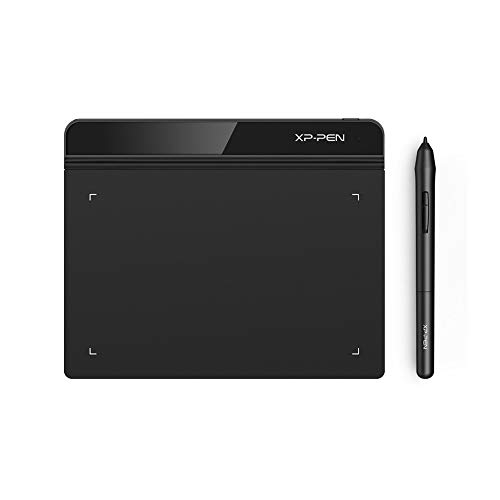
The StarG640 is a compact drawing tablet that pairs with XP-Pen’s battery-free PN01 stylus, enabling uninterrupted drawing without charging interruptions. Its slim 2 mm profile supports easy portability and is designed for digital drawing, painting, and e-signatures across platforms like Windows, macOS, and Chromebooks. It also supports online teaching and remote work scenarios, making it suitable for classrooms and teleconferencing. The tablet’s efficient surface area is ideal for quick sketches and precision lines in teaching, note-taking, and lightweight art projects.
Deco 01 V3: Advanced Graphic Tablet With Battery-Free Stylus

The Deco 01 V3 features 16,384 pressure levels and tilt support for smoother shading, with an Android compatibility option via XPPen Tools. Its battery-free stylus means no charging, and its eight express keys can be customized for a personalized workflow. The device is designed to work well with Android devices (version 10.0+) and adapts to different aspect ratios, enabling precise mapping on various screens. Beginners and pros alike can enjoy a natural drawing experience, from sketching to detailed line art.
PA1 Stylus: Tilt-Sensitive, Battery-Free Precision

The PA1 stylus offers tilt functionality up to 60 degrees and up to 8,192 levels of pressure sensitivity, enabling precise control for sketching, shading, and detailed digital artwork. Its battery-free design eliminates charging concerns, and its sleek black/silver aesthetic provides a professional look on desk setups. Suitable for use with XP-Pen Deco Pro S/MW and related tablets, the PA1 helps artists refine line weight, texture, and pressure dynamics across various software packages.
ChaoQ Stylus Pen: 3-Pack For Any Capacitive Screen

ChaoQ offers a 3-pack of high-sensitivity styluses with dual-tip options for precision drawing and note-taking on capacitive screens. The 0.20” and 0.26” rubber nibs provide flexibility for fine details or broader marks. The lightweight aluminum body is comfortable for extended sessions and requires no charging or Bluetooth pairing. This set is compatible with iPads, Android tablets, and other touch devices, supporting a wide range of graphic and writing tasks.
G430S OSU Graphic Tablet: Ultra-Compact Drawing
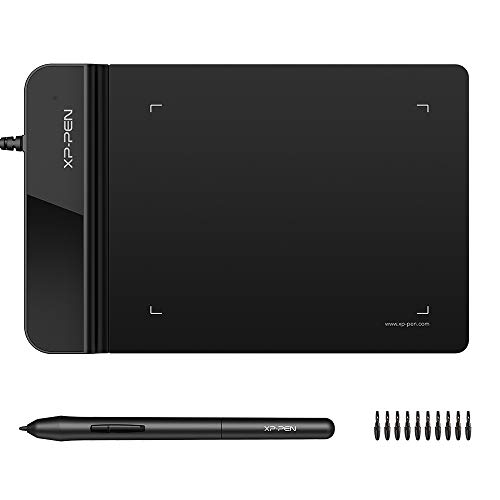
The G430S OSU tablet emphasizes portability with a 4 x 3 inch active area and 8192 pressure levels. While compact, it delivers precise control for OSU gameplay, drawing, painting, and e-signatures. The star feature is a battery-free PN01 stylus that remains ready for immediate use, providing smooth lines and quick response without the need for charging. It supports both right- and left-handed use, making it a practical entry point for on-the-go digital art and teaching sessions.
HUION 420 OSU Tablet: Beginner-Friendly Graphics Pad

Huion 420 offers an affordable option for beginners seeking a simple plug-and-play drawing pad. The tablet is compatible with popular collaboration tools like Xsplit, Zoom, and Microsoft Office applications, making it suitable for online teaching, remote work, and creative practice. It’s designed to be easy to set up and use, with a focus on accessibility for kids and new artists who want to explore digital drawing and design tasks with minimal setup.
Buying Guide: Key Considerations For Choosing A Stylus Pen For Computer Graphics
- Working area and portability: Consider the size of the active drawing area and whether you need a compact unit for travel or a larger surface for detailed work.
- Pen technology: Battery-free pens reduce maintenance, but some advanced models support tilt and pressure sensitivity to create nuanced shading and line variation.
- Pressure sensitivity and tilt: Higher pressure levels (e.g., 8192) and tilt support enable more natural brush dynamics and accurate control for digital painting and illustration.
- Latency and tracking: Low latency ensures your strokes align with your intent, which is crucial for handwriting and precise artwork.
- Compatibility: Check device compatibility with Windows, macOS, Android, and iPadOS. Some styluses pair with specific tablet brands better than others.
- Ergonomics: Look for a comfortable grip, balanced weight, and a design suited to long drawing sessions to minimize wrist fatigue.
- Versatility: Some styluses offer multiple tips or nibs for different textures and stroke qualities, aiding in a broader range of styles.
- Software integration: Ensure compatibility with your preferred art, design, and note-taking apps (e.g., Photoshop, Illustrator, Clip Studio Paint, Zoom, Word, PowerPoint).
- Price-to-value: Balance features like pressure sensitivity, tilt, and ease of use against your budget and intended use cases.
In summary, the five selections above cover a spectrum from entry-level to more advanced capabilities, with options suitable for students, educators, and professional artists. Battery-free styluses, high pressure sensitivity, and cross-platform compatibility are common threads among the top picks, enabling fluid drawing experiences across tablets, OSU devices, and touchscreen laptops.