Finding a reliable stylus for touchscreens can improve drawing, note-taking, and navigation on phones and tablets. The following five options emphasize high sensitivity, comfortable design, and compatibility with a wide range of devices, including iPhone, iPad, Android, and Windows tablets. Each pick is paired with key features to help you compare at a glance.
| Product | Brand | Highlights |
|---|---|---|
| ChaoQ Stylus Pen | ChaoQ | Dual tips, high sensitivity, aluminum body |
| Bopomofo Stylus (5 Pcs) | Bopomofo | 2-in-1 tips, disc tip for precision |
| MEKO 3 in 1 Stylus Pens (2 Pack) | MEKO | Disc tip + two rubber tips, 3-in-1 |
| Dxlam 2-in-1 Stylus Pen | Dxlam | Disk tip + silicone tip, universal fit |
| Abiarst Stylus Pens (10-Pack) | Abiarst | 10-pack, anti-scratch, finger-friendly |
ChaoQ Stylus Pen for Touchscreen

The ChaoQ stylus is designed for immediate use on capacitive screens without Bluetooth or charging. It offers dual rubber tips—5mm and 6.6mm—for precise control in writing, drawing, or gaming. The lightweight aluminum body provides durability and vibrant color options. The high-sensitivity rubber tip delivers smooth movement with minimal lag, and ergonomic shaping helps reduce wrist fatigue during extended sessions. This model is compatible with tablets, phones, and laptops, making it a versatile option for mixed-device use.
Key features include: No charging needed; dual-tip versatility; high sensitivity for accurate input; anti-scratch and fingerprint-resistant tips; bright metal finishes for creative appeal.
Bopomofo Stylus (5 Pcs)

The Bopomofo 5-piece set provides a 2-in-1 experience with a lightweight alloy body and two end tips for flexibility. It emphasizes high precision and sensitivity, with a transparent disc tip that lets you see contact points for accurate input. The disc tip, paired with a flexible rubber tip, offers distinct touch experiences, making it suitable for note-taking, drawing, and navigation on iPhone, iPad, and Android devices. The no-charge design ensures rapid readiness straight from the package.
MEKO 3 in 1 Stylus Pens (2 Pack)
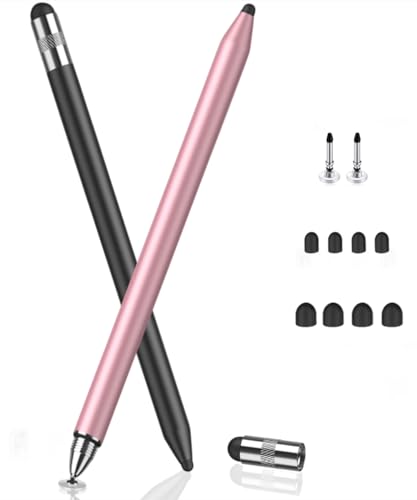
The MEKO 3-in-1 stylus builds on dual rubber tips with an enhanced transparent disc tip for greater precision and visibility. A protective cap accompanies the set, and the disc tip enables smooth, lag-free input with reduced screen scratching. The two rubber tips (0.18″ and 0.27″) offer options for detailed work or broad strokes. Designed for Apple iPad and other tablets, it supports comfortable, extended use with high sensitivity and reliable performance across devices.
Dxlam 2-in-1 Stylus Pen

The Dxlam 2-in-1 stylus features a universal design compatible with all touchscreen devices, including iPhone, iPad, Android, and Windows tablets. It combines a disk tip for precise input with a durable silicone tip for scrolling and browsing, minimizing fingerprints. Out-of-the-box usability means no pairing or charging is required, enabling quick note-taking, drawing, or casual browsing with smooth, lag-free performance across multiple platforms.
Abiarst Stylus Pens (10-Pack)
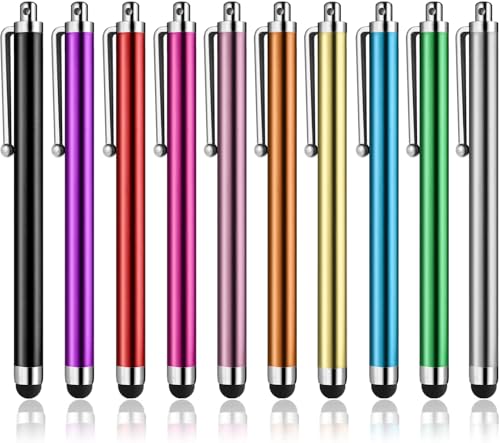
The Abiarst 10-pack provides a budget-friendly option for households, classrooms, or teams needing multiple styluses. It emphasizes an anti-scratch tip made of soft rubber to protect screens while maintaining strong finger-like precision. A slim, lightweight profile and clip design make it easy to carry in pockets or notebooks. The set supports universal compatibility with capacitive touch screens on iPads, iPhones, and Android devices, suitable for long-term daily use and kids’ activities.
Buying Guide
When choosing a stylus for touchscreen phones, consider these key factors to balance performance and value:
- Tip type and precision: Disk tips offer high accuracy and visibility of the contact point, while rubber tips provide broad, comfortable swipes. Many models include dual-tip options for flexibility.
- Compatibility: Ensure the stylus works with your primary devices (iPhone, iPad, Android, Windows tablets). Most modern capacitive screens are supported, but confirm any special requirements.
- Power and latency: Most non-powered styluses require no charging, delivering instant usability. Look for low-latency input and smooth line rendering for writing and drawing.
- Build quality: Aluminum or high-quality alloy bodies tend to be more durable and can reduce fatigue during long sessions. Ergonomic shapes help with extended use.
- Tip durability and screen protection: Soft, scratch-resistant tips help protect screens and reduce fingerprints. Some tips are replaceable, extending the device’s lifespan.
- Pack size and value: Larger packs reduce cost per stylus and are useful for multi-user environments, classrooms, or families. Compare tip options and included caps or clips.
- Portability: Slim designs with clip features fit easily into pockets or notebooks, important for travel or on-the-go use.
- Special features: Some styluses include transparent disc tips for visibility, while others emphasize grip comfort or color options for personal style.