This article reviews five in-car streaming boxes designed to deliver Netflix, YouTube, and TikTok from the car’s touchscreen. Each option converts a wired CarPlay or Android Auto setup into a wireless experience, adds built‑in video apps, and supports offline playback via TF/USB. Read on to compare features, compatibility, and practical considerations to help you choose the right box for your vehicle.
| Product | Brand | Key Benefit |
|---|---|---|
| Ai Magic Box for Streaming Netflix/YouTube/TikTok | WhyBox | Wireless CarPlay + built‑in video apps |
| LAMTTO 3-in-1 Magic Video Box | LAMTTO | Wireless CarPlay/Android Auto + video apps |
| 4-in-1 Wireless CarPlay Adapter | ByteWave | Hybrid CarPlay/Android Auto + offline media |
| 2-in-1 Wireless Apple CarPlay & Android Auto | GUYOSPE | Integrated Netflix/YouTube + wireless upgrade |
| HGLEQ 2-in-1 Wireless CarPlay Adapter | HGLEQ | Netflix/YouTube + dual‑band WiFi |
Ai Magic Box for Streaming Netflix/YouTube/TikTok

This wireless CarPlay adapter supports both wired‑to‑wireless CarPlay and Android Auto, enabling hands‑free access to maps, music, and apps while preserving the original car system. It also integrates Netflix, YouTube, and TikTok for on‑screen streaming via the car’s display. A TF card and USB support enable offline playback without a hotspot. Note that streaming apps may require a hotspot for initial access or licensing constraints, and compatibility is limited to cars that already support wired CarPlay.
LAMTTO 3-in-1 Magic Video Box for Streaming Netflix/YouTube/TikTok

LAMTTO’s box emphasizes a plug‑and‑play upgrade for cars with wired CarPlay or Android Auto. It supports wireless CarPlay and Android Auto, with built‑in video apps to stream Netflix, YouTube, and other services. The device includes a TF card slot for offline video playback and notes practicality for Android Auto‑only systems and certain models. It requires that the vehicle type is compatible with wired CarPlay/Android Auto and may need vehicle‑specific setup steps outlined in the manual.
4-in-1 Wireless CarPlay Adapter for Streaming Netflix/YouTube/TikTok
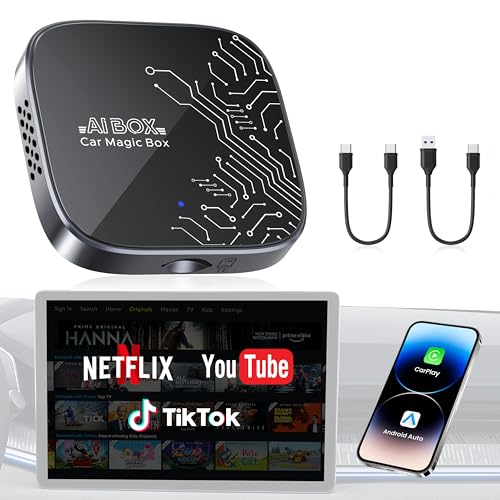
This device combines 4 features in one: wireless CarPlay, wireless Android Auto, Android 12.0, and a TF card slot for offline media. It ships pre‑loaded with streaming apps like Netflix and YouTube to entertain passengers on long drives. A hotspot or Wi‑Fi connection is typically needed for initial streaming, and the product stresses compatibility with OEM wired CarPlay cars while noting limitations for non‑wired systems.
2-in-1 Wireless Apple CarPlay & Android Auto Adapter 2026

This 2‑in‑1 adapter converts OEM wired CarPlay or Android Auto to wireless, with built‑in Netflix and YouTube. It also includes a TF card slot for offline playback. The kit carries a 3‑year warranty and emphasizes verification of car compatibility before purchase. It notes that it works only with vehicles that support OEM wired CarPlay/Android Auto and not with fully wireless systems or certain brands.
Foscomax 3-in-1 Wireless CarPlay/Android Auto & Video

Foscomax combines wireless CarPlay, Android Auto, and built‑in video apps including Netflix and YouTube, plus a TF card slot for offline viewing. It uses dual‑band WiFi to keep CarPlay/Android Auto running while streaming video. The product highlights compatibility with OEM wired CarPlay/Android Auto vehicles, and it notes the need for a hotspot or WiFi connection for streaming, with offline options via TF card.
Buying Guide
- Vehicle compatibility: Most adapters require OEM wired CarPlay or Android Auto. Confirm your vehicle’s support status and touchscreen capability before purchasing.
- Wireless streaming vs offline playback: If you frequently drive without reliable WiFi, prioritize a unit with a TF/USB card slot for offline playback.
- Streaming app availability: Netflix, YouTube, and TikTok are common, but some devices restrict which apps can be installed or streamed. Check app licensing and hotspot requirements.
- Connectivity and ease of use: Look for plug‑and‑play setups, auto‑reconnect after startup, and stable WiFi/Bluetooth chipsets to minimize setup friction.
- Safety and usability: Ensure the device preserves original car controls (steering wheel, knobs) and does not distract from driving. Follow manufacturer installation and safety warnings.
- Updates and support: A device backed by a warranty and responsive customer support helps address compatibility issues with new phones or car infotainment updates.
- Power and heat: Some models rely on USB power; ensure your vehicle’s USB port can supply adequate power and that the unit won’t overheat on long trips.
- Firmware limitations: Some devices require hotspots for streaming or restrict installation of third‑party apps. Review these notes to set expectations.
- Real‑world usage: Consider vehicle interior space, dash layout, and whether a shorter or longer cable/antenna is needed for your setup.