Artists, students, and professionals can sketch, annotate, and animate directly on a screen without a computer. The following picks are standalone drawing tablets that run their own software, offer active pens, and deliver immersive displays for digital art, note‑taking, and design tasks. Each option emphasizes portability, battery life, and a rich app ecosystem to fit different budgets and workflows.
Summary of selected products:
| Product | Brand | Screen Size | Key Benefit |
|---|---|---|---|
| Simbans PicassoTab A10 | Simbans | 10″ | All‑in‑one art tablet with bundled apps and accessories |
| Frunsi T11 Pro | Frunsi | 10.1″ | Affordable standalone with pre‑installed apps and tutorials |
| Viewedge 11″ Standalone | Viewedge | 11″ | High‑quality display with anti‑glare and tilt pen |
| X11 PicassoTab | PicassoTab | 11″ | Premium pre‑installed software for drawing and tutorials |
| XP‑Pen Magic 12.2″ | XP‑Pen | 12.2″ | Advanced pressure sensitivity with paper‑like screen |
PicassoTab A10 Drawing Tablet

The PicassoTab A10 is a standalone, 10‑inch drawing tablet designed for sketching, animation, and note taking. It ships with an active pen and pre‑installed drawing and animation apps, making it suitable for artists, students, and casual creators who want immediate usability out of the box. The device also includes four bonus items in the box—a tablet case, drawing glove, universal power adapter, and screen protector—adding value for on‑the‑go work. Its MediaTek octa‑core processor supports multitasking, and the IPS HD display provides clear visuals. With 128GB of storage, users can download numerous apps from the Play Store and keep projects locally for quick access.
Frunsi T11 Pro Standalone Tablet

The Frunsi T11 Pro is a 10.1‑inch standalone drawing tablet that requires no computer. It ships with a pen and a pre‑installed drawing app, enabling immediate sketching or noteTaking. It features a 1920×1200 Full HD IPS display for a wide, bright workspace and a 64GB storage capacity to house drawings and software. The device runs on Android 12 with a quad‑core MTK CPU and 4GB RAM, providing a balanced performance for everyday creative tasks. A large 5800mAh battery supports several hours of drawing away from a power source, and the tablet is designed to be portable for on‑the‑go creativity.
Viewedge Standalone Drawing Tablet
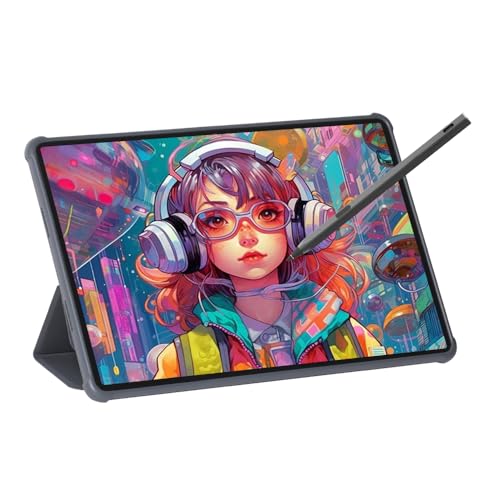
The Viewedge 11‑inch standalone tablet emphasizes a vibrant display and a responsive drawing experience. It features a 1920×1200 Nano anti‑glare screen and a tilt‑enabled pen with 4096 pressure levels for nuanced strokes. The device offers a soft light glass surface that minimizes glare and eye strain, along with a full‑laminated design for improved touch precision and image clarity. An anti‑fingerprint coating helps keep the screen clean during long sessions, making it suitable for artists who value clarity and comfort during extended creativity.
X11 Drawing Tablet — PicassoTab

The X11, from PicassoTab, is a portable 11‑inch drawing tablet designed for beginners and intermediate artists. It includes premium drawing software and tutorials, with pre‑installed apps such as Concepts, Infinite Painter, and Flipaclip to expand creative options. The Artixo app adds drawing tutorials to help users improve skills from the start. The compact form and bundled software make it a convenient option for learners who want guided practice and a ready‑to‑go toolkit on a single device.
XP‑Pen Magic 12.2 Inch Pad

The XP‑Pen Magic Drawing Pad offers a larger 12.2‑inch screen with 16K pressure sensitivity, a tilt‑aware X3 Pro stylus, and a paper‑like screen texture. The display uses AG‑etching technology with a high color gamut and a 2160×1440 resolution, delivering a natural drawing feel and vivid color. It also claims eye comfort features, including TÜV Rheinland certification and soft light treatment to reduce eye strain. The pad pairs with a 8GB RAM and 256GB storage configuration to support robust drawing and storage needs for serious digital artists.
Buying Guide
Key considerations for choosing a standalone drawing tablet with a screen include display quality, pen technology, and software ecosystem. For beginners, a device with bundled tutorials and pre‑installed apps can shorten the learning curve. For more advanced users, look for higher pressure sensitivity (12K–16K), tilt support, and a larger color gamut to capture subtle strokes and shading. Battery life matters for on‑the‑go work; seek tablets offering long endurance or fast charging. Storage capacity (64GB–256GB or more) determines how many apps and projects you can keep onboard. Consider weight and thickness for portability, and ensure the device runs a modern OS (Android 12–14) to access the latest creative apps. Finally, verify accessory quality—pens, cases, and screen protectors influence long‑term usability and cost efficiency.
Perspective considerations:
- Artistry focus: If your priority is illustration and painting, prioritize high color accuracy, pen sensitivity, and robust drawing apps.
- Education use: For students taking notes and basic sketching, a tablet with excellent note‑taking software, tutorials, and case could be best.
- Travel and field work: Emphasize battery life, lightweight design, and stable wireless connections for cloud syncing while traveling.
- Budget constraints: Entry‑level models with bundled accessories can offer substantial value; upgrade later if needed.