Upgrading storage often means squeezing a modern 2.5″ SSD into a desktop or external enclosure that’s sized for 3.5″ drives. This guide highlights reliable adapters and mounting brackets that convert 2.5″ SSDs/HDDs to 3.5″ bays. Each option supports SATA interfaces, hot swapping, and straightforward installation. Whether you’re expanding a gaming rig, creating a compact NAS, or refreshing an old PC, these brackets help you maximize drive flexibility and airflow without hassle.
| Product | Form Factor | Interface | Notes |
|---|---|---|---|
| ORICO 2.5″ to 3.5″ SSD Adapter (1125SS) | 2.5″ to 3.5″ | SATA III (6Gbps) | Hot swap, plug and play |
| Corsair Dual SSD Mounting Bracket | 3.5″ bay to 2.5″ drives | SATA | Supports up to two 2.5″ SSDs |
| ORICO 2.5″ to 3.5″ Bracket (1125SS-2) | 2.5″ to 3.5″ | SATA III | Two-pack option |
| SABRENT 2.5″ to 3.5″ Bracket Kit | 2.5″ to 3.5″ | SATA | Simple installation |
| DSLRKIT 2.5″ to 3.5″ Drive Cage Adaptor | 3.5″ drive cage compatible | SATA/Hot swap | Designed for hot-swap drive cages |
Below are five high-value options suitable for a range of build sizes and budgets, with objective notes on compatibility and setup to help you choose quickly.
ORICO 2.5 Inch To 3.5 Inch Drive Adapter (1125SS)

This ORICO adapter converts a 2.5″ SATA drive to a standard 3.5″ drive bay. It supports 7/9.5/12.5mm height drives and includes a SATA III interface for up to 6Gbps transfers. It works with Windows, Mac OS, and Linux, and enables hot swapping and plug-and-play use. Backward compatible with SATA I/II, it’s a practical choice for expanding an existing desktop or server chassis without extra cables.
- 2.5″ to 3.5″ conversion for HDD/SSD
- SATA III interface; up to 6Gbps
- Hot swapping and plug-and-play
Corsair Dual SSD Mounting Bracket (3.5” to 2.5”)
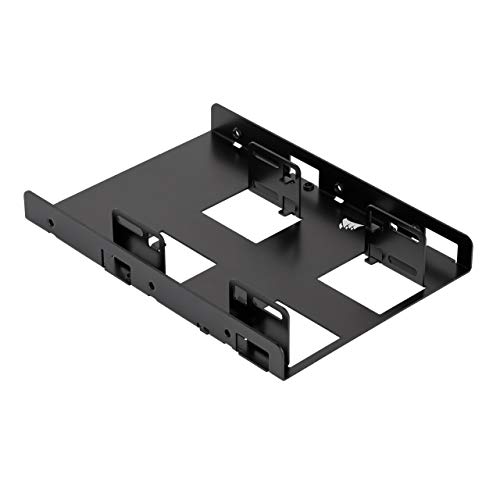
Corsair’s mounting bracket adapts one 3.5″ drive bay to hold up to two 2.5″ SSDs. It fits any desktop case with at least one 3.5″ bay and supports SSD heights of 7mm or 9.5mm. Installation is straightforward, and the design emphasizes stability and airflow, making it a solid choice for gaming rigs or workstations that require quick access to multiple SSDs without adding external cages.
- Adapts 3.5″ bay for two 2.5″ drives
- Supports 7mm and 9.5mm drives
- Solid for desktop builds and tight spaces
ORICO 2.5″ To 3.5″ Bracket Set (1125SS-2)

This two-pack option mirrors the single 1125SS design, offering two brackets to outfit multiple drives in a single system. It emphasizes the same hot-swappable, plug-and-play benefits, with a SATA III interface rated up to 6Gbps and broad compatibility with Windows, Mac OS, and Linux. It’s suitable for users who want additional brackets for spare bays or multi-drive configurations within a single chassis.
- Two brackets per package
- Compatible with 7/9.5/12.5mm drives
- Hot swap ready and driver-free
SABRENT 2.5 Inch To 3.5 Inch Bracket Kit

SABRENT’s bracket kit converts any 2.5″ drive into a 3.5″ bay, offering quick and easy installation. It’s compatible with standard 2.5″ HDD/SSD formats and is a popular option for users building a budget-friendly upgrade path for desktops or external drive enclosures. The installation steps are straightforward, and the kit is designed to hold drives securely while allowing convenient internal routing of cables.
- Converts 2.5″ drives to 3.5″ bays
- Broad drive compatibility including SSDs
- Efficient and simple to install
ECKDZMY 2.5″ To 3.5″ Mounting Bracket Set (2 Pack)

Designed for efficient use of internal space, ECKDZMY offers a two-pack of metal brackets suitable for 2.5″ drives in 3.5″ bays. They support SATA I/II/III drives and come with mounting screws for easy installation. These brackets are practical for PC builders looking to maximize drive density while maintaining solid construction and cooling potential in mid to full-tower cases.
- Two-pack metal brackets
- Supports SATA I/II/III
- Includes mounting screws
Buying Guide: Key Factors For Choosing A 2.5″ To 3.5″ Drive Bracket
When selecting a 2.5″ to 3.5″ drive adapter, consider drive height compatibility, case space, and the intended use case. Here are essential factors to evaluate:
- Drive height compatibility: Most brackets support 7mm and 9.5mm drives. Confirm your SSD/HDD height before purchase to ensure a secure fit.
- Interface and speed: Look for SATA III (6Gbps) support for maximal data throughput, especially for modern SSDs. Backward compatibility with SATA I/II is common.
- Internal space and airflow: Metal brackets often offer better heat dissipation. Ensure there’s enough clearance for cables and fans to avoid bottlenecks.
- Number of drives: If you plan to mount more than one drive, consider a two-pack or a bracket that supports multiple drives in a single bay (as with Corsair’s option).
- Installation effort: Favor plug-and-play designs with simple screwless mounting or minimal screws for faster upgrades.
- Durability: Choose brackets with sturdy construction to prevent vibration and noise in operation, especially in gaming rigs or NAS devices.
- Compatibility with cases: Some brackets are optimized for desktop chassis, others for drive cages or external enclosures. Match the bracket to your case type.
In summary, these adapters enable flexible storage upgrades by allowing 2.5″ SSDs/HDDs to inhabit standard 3.5″ drive bays. They provide straightforward installation, reliable data transfer, and a range of pricing to fit different project budgets. Assess your case space, desired drive count, and the height of your drives to pick the best option for your build or upgrade plan.