For homes and small offices, ethernet splitters offer a simple way to expand a single wired port into multiple connections without a full switch. They are ideal for quick setups, streaming, and multi-device use when managed carefully. This guide reviews five reliable options, highlighting how they handle 1-to-2, 1-to-3, and 1-to-4 configurations, compatibility with Cat cables, and practical use cases. Note that splitters differ from network switches and sharing bandwidth can vary by device and network conditions.
Product Overview
| Product | Brand | Key Benefit |
|---|---|---|
| AILVLVNG Ethernet Splitter 1 to 2 | AILVLVNG | Gigabit sharing and wide cable compatibility |
| LIEZHUA Gigabit Splitter 1 to 2 | LIEZHUA | LED indicators and universal Cat compatibility |
| LIEZHUA 1 to 4 Ethernet Splitter | LIEZHUA | Four devices on a single port |
| NEWCARE Gigabit 1 to 2 Splitter | NEWCARE | Plug-and-play with a bundled LAN cable |
| dockteck Ethernet Splitter 1 to 3 | dockteck | Multiple devices with 1000 Mbps support |
Each product below is selected for relevant use cases, from two-device setups to small-office layouts, ensuring compatibility with common Cat5 through Cat8 cables and straightforward, plug-and-play installation.
AILVLVNG Ethernet Splitter 1 to 2

AILVLVNG’s 1-to-2 splitter expands a single Gigabit Ethernet port to support two devices simultaneously. It emphasizes stable, high-speed transfers up to 1000 Mbps when used with CAT6 cables. While two machines share the same bandwidth, each can reach up to the device-capable limit if the connected equipment supports it. The device is described as compatible with Cat6, Cat7, Cat8, Cat5, and Cat5e, making it versatile for various setups. It is especially useful for reducing frequent cable plugging in shared-use spaces.
AKWOR Ethernet Splitter 1 to 3

AKWOR presents a 1-to-3 RJ45 splitter designed to reduce cable rearrangements in rooms with limited wall outlets. The manufacturer notes that this is not a switch; all three devices share one Ethernet line and operate one at a time. This makes it suitable for scenarios where multiple devices need access at different times, such as a home office with a printer, TV, and computer. Compatibility spans Cat 5 through Cat 8, with emphasis on durability and practical daily use, noting that simultaneous internet access for all three devices isn’t supported.
LIEZHUA Gigabit Splitter 1 to 2

LIEZHUA’s 1-to-2 Ethernet splitter enables two devices to share a single port with speeds up to 1000 Mbps. It includes a USB power connection and LED indicators to help identify active connections. The product highlights universal compatibility with Cat 5–8 cables and a compact form factor, which makes it flexible for desks, home theaters, or small offices. The device is intended for simultaneous dual-device operation, offering a straightforward way to expand limited ports without a full switch.
ukiism Ethernet Splitter 1 to 2

ukiism offers a 1-to-2 RJ45 splitter designed to convert a single RJ45 line into two sockets, enabling two computers to share a high-speed connection without a router. It supports Cat5 through Cat7 cables and features a robust PCB design with conductive tracks to protect against interference. The device is described as suitable for wall-mount or fixed-panel installation, with emphasis on stable transmission and practical longevity for extended use in home or small office environments.
LIEZHUA Ethernet Splitter 1 to 4
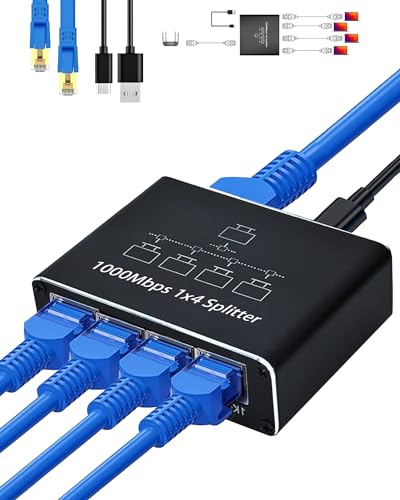
This LIEZHUA model expands a single port to four devices while supporting up to 1000 Mbps. It targets more extensive home or office layouts where multiple devices need wired access from a single outlet. The 1-to-4 configuration remains within Gigabit Ethernet norms and is compatible with Cat 5 through Cat 8 cables, ensuring broad compatibility across existing networks. It is positioned as a scalable option for growing device needs without adding switches or hubs.
dockteck Ethernet Splitter 1 to 3

dockteck’s 1-to-3 splitter addresses scenarios with three devices sharing a single Ethernet line. It is powered by a USB cable and claims support for speeds up to 1000 Mbps, with a practical note that actual speed depends on the overall network and cable quality. The product supports Cat5 through Cat8 cables and offers a plug-and-play experience suitable for homes, small offices, or classroom environments where multiple devices require wired access without a switch.
Buying Guide: Key Considerations for Ethernet Splitters
- Bandwidth sharing and simultaneous use: Most 1-to-2 splitters enable two devices to access the network at the same time, but the total bandwidth is shared. If full-speed performance on multiple devices is essential, consider how your devices will use the connection and whether a switch may be a better fit.
- Number of outputs: Choose a model that matches your needs—2-, 3-, or 4-device configurations. Higher-output splitters can simplify wiring in compact spaces, but confirm that your network activity aligns with the advertised capabilities.
- Cable compatibility: All listed options support Cat5 through Cat8 cables. For best stability, use Cat6 or higher, especially over longer runs or in environments with interference.
- Power requirements: Some models require external power or USB power to maintain performance across multiple devices. Verify whether power is needed and if a bundled cable is included.
- Indication and diagnostics: LED indicators help identify active connections, aiding troubleshooting in multi-device setups.
- Placement and installation: Splitters are typically plug-and-play. Consider a fixed-panel or desktop setup for longevity and ease of access, particularly where cables may be moved frequently.
- Distance and cable quality: While many splitters advertise up to 100 meters, actual performance depends on cable quality and network load. Use high-quality cables for reliable throughput.
- Limitations relative to switches: Splitters distribute a single port to multiple endpoints, but do not manage traffic like switches. For networks with heavy data transfer or multiple concurrent streams, a Gigabit switch may provide more predictable performance.