For PC entertainment, gaming, and home theater setups, a dedicated sound card can unlock true 5.1 surround sound quality. This guide highlights five solid options that support 5.1 channels, ranging from PCIe internal cards to USB external adapters. Each entry includes key features, native surround capabilities, and how they affect CPU load and overall audio clarity. Whether you’re upgrading an older desktop or building a compact system, these cards aim to deliver cinema-like audio without breaking the bank.
Summary of selected products
| Product | Brand | Channel Support | Connection | Notable Feature |
|---|---|---|---|---|
| Creative Sound Blaster Audigy Fx V2 | Creative | 5.1 Discrete & Virtual | PCIe | High-res 24-bit/192 kHz; Scout Mode; SmartComms Kit |
| GODSHARK 5.1 Internal PCIe | GODSHARK | 5.1 | PCIe | Low-profile bracket; 3D stereo surround |
| HUANGENG USB External 5.1/7.1 | HUANGENG | 5.1/7.1 | USB | Aluminum body; true-channel support |
| axGear PCI-E 5.1 Ch 6 Channel | axGear | 5.1 6-channel | PCIe | Desktop-grade fidelity; EAX-inspired effects |
| Padarsey PCIe 5.1 Internal | Pardarsey | 5.1 | PCIe | 3D stereo surround; low-profile bracket |
Creative Sound Blaster Audigy Fx V2 Upgradable PCIe Sound Card

The Audigy Fx V2 is designed to upgrade a PC’s built-in audio processing while offloading tasks from the CPU. It supports up to 24-bit/192 kHz playback and provides both 5.1 discrete and virtual surround, enabling vivid multi-channel output through speakers or headphones. A built-in headphone amplifier drives up to 600-ohm headphones, enhanced by the Creative Acoustic Engine for richer sound. The card is complemented by software that offers customizable EQ profiles to shape the listening experience precisely.
Key strengths include high-resolution audio with improved signal-to-noise ratio and the flexibility to route surround sound to multiple outputs. It appeals to gamers and multimedia enthusiasts who want clearer dialogue, more realistic footsteps, and immersive ambience without relying solely on onboard real-time processing. The SmartComms Kit and Scout Mode help optimize in-game and voice chat experiences for clearer communication and heightened cue recognition.
GODSHARK 5.1 Internal PCIe Sound Card
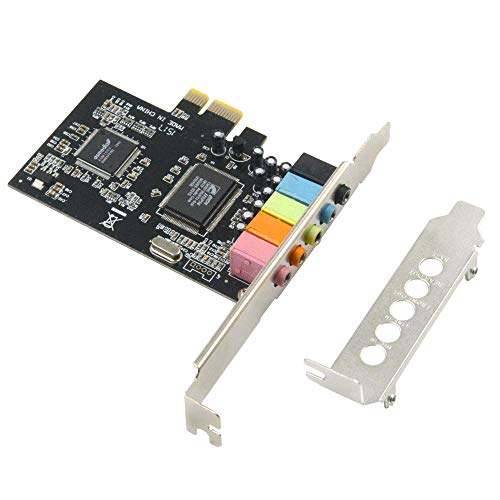
GODSHARK’s PCIe 5.1 card targets desktop builds that demand cinema-like surround. The card ships with a low-profile bracket suitable for smaller cases, making it attractive for compact or 2U rack-mounted setups. It translates 5.1-channel audio into a robust multi-speaker output, delivering a cinematic listening experience while keeping compatibility with a wide range of software and media players. Its 3D stereo surround is designed to fill living spaces more effectively than basic onboard audio.
In practice, the card focuses on stable multi-channel performance and straightforward installation. While it emphasizes surround rather than elaborate feature sets, users gain clear front-back separation and more impactful rear-channel cues. It’s a practical choice for gamers and movie fans who want a simple upgrade path without relying on external USB adapters or software-heavy ecosystems.
HUANGENG USB External Sound Card with SPDIF Digital Output

HUANGENG’s external USB sound card emphasizes true 5.1 and 7.1 channel support with a robust aluminum body for durability and heat dissipation. The SPDIF digital output simplifies integration with home theater receivers and AV setups, while USB connectivity guarantees portability and compatibility with laptops and desktops. The device targets audiophiles and gamers who want immersive surround without modifying internal PC components. It supports standard sampling rates and is designed for broad OS compatibility, offering straightforward plug-and-play usage.
While external solutions may introduce a small amount of latency in some configurations, the benefit is a clean upgrade path for many systems. The aluminum chassis also reinforces shielding against interference, helping maintain clean channel separation across 5.1 and 7.1 configurations. It’s a practical all-in-one solution for users who prefer external modules over internal PCIe installs.
SING F LTD External 5.1 USB Stereo Sound Card Kit

This package grants four external 5.1 USB sound cards, each with 3.5 mm headset and microphone jacks. The kit supports virtual 5.1 sound and is designed to operate independently of existing internal sound cards. It’s compatible with Windows across multiple versions and Mac OS, with plug-and-play simplicity—no driver installation required in most cases. The setup is particularly useful for multi-user environments, LAN gaming, or quick audio upgrades on shared systems.
Because the kit includes several units, it’s ideal for rooms where multiple people need separate audio channels or for experimentation with diagonal speaker placements. While external USB solutions can introduce latency, the benefit of independent channels and easy swappable configurations often outweighs this for casual use and gaming scenarios.
axGear PCI Express 5.1 Ch 6 Channel PCIe Audio Card

axGear offers a PCIe solution that emphasizes fidelity and surround versatility. The card supports 5.1-channel output and aligns with gaming and home theater requirements by delivering detailed 3D audio. It includes EAX-like environment options and multi-speaker support for an immersive experience across different speaker setups. It’s suitable for desktop systems that require a dedicated PCIe audio path without relying on USB adapters.
The card’s architecture focuses on stable driver compatibility and reliable channel separation. It’s a viable option for users who want to balance performance with cost, particularly in configurations where internal expansion is preferred to maintain cable tidy and minimize latency caused by external interfaces.
Padarsey PCIe 5.1 Internal Sound Card
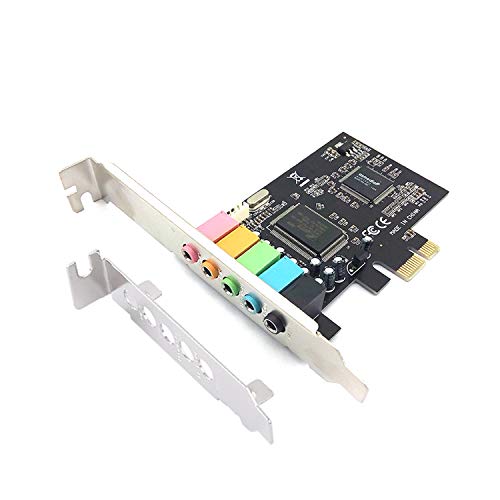
Padarsey provides a PCIe 5.1 internal solution aimed at upgrading desktop audio with a straightforward installation. Its 5.1 surround capabilities and 3D stereo output are tailored for users seeking an immediate, plug-and-play improvement to home theater or gaming rigs. The low-profile bracket makes it compatible with compact builds, preserving space while delivering enhanced audio from the motherboard’s baseline performance.
As with other PCIe cards, drivers and compatibility with your operating system affect setup. The Padarsey option is positioned for users who want an affordable upgrade path that still emphasizes immersive multi-channel output and reliable performance within a standard PC case design.
Buying Guide: Key Purchase Considerations for 5.1 Sound Cards
- Internal vs. external: Internal PCIe cards generally offer lower latency and stable performance for gaming and movies, while USB external adapters provide portability and easy upgrades without opening the PC case.
- Channel configuration: Look for true 5.1 (discrete) or virtual 5.1 support. Some devices also offer 7.1 compatibility or hybrid modes for flexibility with different speakers and receivers.
- Output options: Ensure the card matches your setup, whether you rely on analog 3.5 mm jacks, RCA, or SPDIF/optical outputs for a home theater receiver.
- Headphone amplification: If you plan to drive high-impedance headphones, check the built-in amp specs (e.g., 600-ohm support) for sufficient power and clarity.
- Software and features: Enhanced software suites (EQ, Scout Mode, Noise Reduction, VoiceDetect) can improve gaming cues, voice chat, and overall sound customization.
- CPU load and latency: Dedicated sound hardware often reduces CPU overhead and allows the system to allocate more resources to games and graphics rendering.
- Compatibility: Confirm OS support and driver availability, especially for older systems or laptops with limited PCIe options.
- Build and compatibility: For PCIe cards, verify your case depth and available PCIe slots; for USB, ensure sufficient ports and power delivery.
- Future-proofing: If you anticipate moving to higher-end receivers or speakers, consider a card with robust digital outputs and scalable driver support.
When selecting a sound card for 5.1 speakers, the goal is to balance audio fidelity, ease of installation, and compatibility with your existing hardware. Internal PCIe cards generally provide more consistent low-latency performance for gaming and cinematic playback, while external USB options shine in flexibility and portability. Evaluating the rest of your audio chain—speakers, amplifiers, and room acoustics—will further inform which card best aligns with your listening goals.