Transform your existing door hardware into a modern, keyless entry system without a full replacement. The following smart locks install over your current deadbolt or replace it while preserving the door’s look. They offer remote access, activity history, and convenient guest sharing, all while keeping the original keys in case you need them. This guide highlights five top options, their standout features, and practical buying considerations for American homes.
| Product | Brand | Key Benefit |
|---|---|---|
| August Wi-Fi Smart Lock | August Home | Easy over-deadbolt upgrade with shared access via app |
| Level Bolt (Wi‑Fi) | Level | Remains compatible with existing hardware; remote control and keyless entry |
| Level Bolt (Matter) | Level | Matter-over-Thread for broad smart‑home interoperability |
| ULTRALOQ Bolt | ULTRALOQ | 7‑in‑1 entry options with built‑in Wi‑Fi and fingerprint |
| InstaLock Smart Remote Door Lock | InstaLock | Fast, tool‑free installation over existing deadbolt |
Note: All products listed are designed to fit over or replace a standard single‑cylinder deadbolt, delivering secure access control without changing the door’s appearance. Availability and compatibility may vary by door construct and existing hardware.
August Wi‑Fi Smart Lock Over Deadbolt
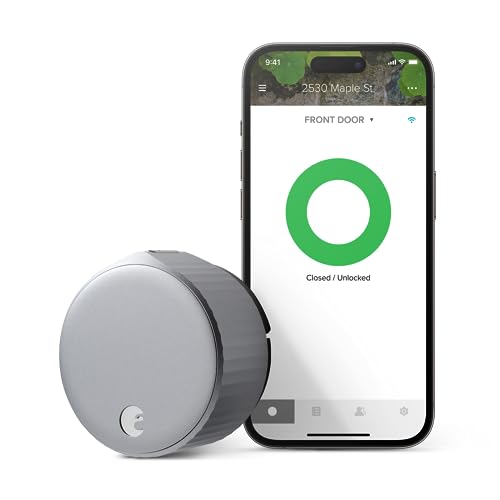
The August Lock installs on the inside of your door, upgrading your existing deadbolt for a smarter, more secure experience. It connects via Wi‑Fi and integrates with the August app to grant access without issuing physical keys. Installation is designed to be quick, often around ten minutes, and the lock is sized to fit over most single‑cylinder deadbolts. The system emphasizes convenience, with options to share permanent, scheduled, or temporary access with trusted people.
Level Bolt With Wi‑Fi Bridge

Level Bolt replaces the deadbolt itself, turning your existing hardware into a smart lock while preserving the door’s exterior appearance. A built‑in Wi‑Fi bridge enables remote locking and unlocking, live activity history, and key code management for Level Keypad. The Level Home app provides control from anywhere, alongside status checks and secure access sharing with trusted contacts. It’s designed to work with iOS and Android devices and requires a 2.4 GHz Wi‑Fi network.
Level Bolt (Matter) Smart Deadbolt

This Matter‑over‑Thread compatible bolt integrates with Apple Home, Google Home, Amazon Alexa, and Samsung SmartThings. By replacing the deadbolt, it preserves existing keys and hardware while enabling remote access and voice control. The Level Bolt Matter supports multi‑platform interoperability and offers lock and unlock commands via the Level Home app. It’s ideal for households adopting Matter ecosystems and seeking consistent smart‑home automation.
ULTRALOQ Bolt Smart Lock With Built‑In Wi‑Fi

The ULTRALOQ Bolt is a 7‑in‑1 smart lock that combines multiple access methods, including fingerprint ID, codes, and a remote feature via 2.4 GHz Wi‑Fi without a hub. It also supports voice control and can share access securely with guests. In addition to app control, it offers a web portal, eKey/code sharing, and even compatibility with Matter‑enabled hubs for broader smart‑home integration. The built‑in Wi‑Fi enables remote management without extra hardware.
InstaLock Smart Remote Door Lock

Instalock installs over an existing deadbolt to deliver a smart lock experience without complex tools. It includes two pre‑programmed key fobs and maintains compatibility with your original key. The installation is described as tool‑free and apartment‑friendly, allowing remote control from up to about 80 feet. The system emphasizes a straightforward upgrade path for users who want a quick, secure smart‑lock solution without replacing hardware.
Buying Guide: Key Considerations For Smart Locks Over Deadbolts
- Compatibility and fit: Ensure the device fits over your existing deadbolt and works with your door’s material, thickness, and single‑cylinder configuration. Some models replace the bolt, others mount inside the door, but all are designed to preserve the exterior look.
- Power and connectivity: Many options rely on built‑in Wi‑Fi or a connected hub. Consider whether you want built‑in Wi‑Fi, a bridge, or a hub‑less setup. Battery life varies by model and usage patterns, so check expected longevity and replacement requirements.
- Smart home integration: Look for compatibility with Apple HomeKit, Google Home, Amazon Alexa, and Matter. Matter‑enabled devices offer broader interoperability across ecosystems and can simplify automations.
- Access management: Evaluate how you’ll grant entry to guests or service providers. Features include temporary or scheduled codes, permanent codes, and shareable digital keys via apps. Some products also log access history for security auditing.
- Security and encryption: Prioritize devices with strong encryption, rolling codes, and encryption in transit. Consider models that support multi‑factor access or require Bluetooth/phone proximity for added security.
- Installation and maintenance: Compare ease of installation, whether professional help is needed, and how updates are delivered. Self‑install options appeal to renters or those who prefer minimal disruption.
- Keys and fallback options: Decide how you want to handle physical keys. Most models retain a mechanical key option or keep a traditional deadbolt intact as a backup, which can be important for emergencies.
- Remote access and alerts: Confirm that the product offers real‑time notifications, activity logs, and remote locking/unlocking. Some systems also provide tamper alerts and geofencing features for automatic door behavior.
- Costs and warranties: While prices vary, consider long‑term value, including battery life, warranty terms, and customer support quality. Durable construction and reliable after‑sales service matter for security devices.
- Privacy considerations: Be aware of data handling practices and app permissions. Ensure you’re comfortable with how access events and user data are stored and shared.