Finding a compact 3-in-1 printer that fits a tight workspace without sacrificing print quality can be a challenge. This guide focuses on small, versatile models that combine print, scan, and copy functions in compact footprints. The selections below are tailored for home use and small offices, emphasizing ease of setup, reliable performance, and space-saving design. Below the intro, a quick summary table highlights the core attributes of the chosen products for easy comparison.
| Product | Brand | Type | Notable Feature |
|---|---|---|---|
| HP DeskJet 2827e Wireless All-in-One | HP | 3-in-1 Inkjet | AI-Enabled Prints |
| Canon PIXMA TR4720 All-in-One | Canon | 4-in-1 Wireless | Auto Document Feeder |
| Canon PIXMA TS3720 Wireless All-in-One | Canon | 3-in-1 | Easy Setup |
| HP Envy 6155e Wireless All-in-One | HP | 3-in-1 | Auto Duplex, AI Features |
| CLABEL 320B Label Maker | CLABEL | Label Printer | 3-inch labels, Bluetooth |
HP DeskJet 2827e Wireless All-in-One
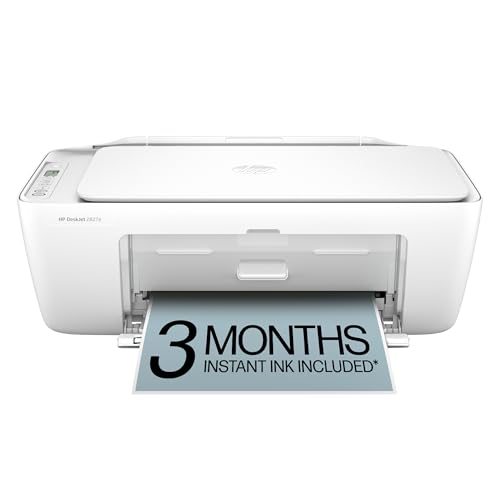
The DeskJet 2827e is a compact all-in-one suitable for a home office or kitchen desk. It delivers color and black-and-white printing with modest speeds (color up to 5.5 ppm, black up to 7.5 ppm) and includes scanning and copying capabilities in a small footprint. HP AI technology helps optimize page layouts by reducing extraneous content, ensuring prints are clean and aligned. The device includes a 60-sheet input tray for light to moderate workloads and supports wireless printing from a variety of devices. This model is especially appealing for people who want reliable everyday output and simple operation in a tight space.
Canon PIXMA TR4720 All-in-One

The Canon PIXMA TR4720 is a wireless 4-in-1 all-in-one that includes print, copy, scan, and fax capabilities. It is designed for home use with features like an Auto Document Feeder and built-in Wi-Fi for easy mobile and desktop printing. The printer emphasizes convenience in small spaces with relatively low idle power consumption and straightforward ink cartridge maintenance. While it adds a fax function, its compact design and reliable performance make it a versatile option for households handling a mix of documents and photos.
Canon PIXMA TS3720 Wireless All-in-One

The Canon PIXMA TS3720 is designed for basic home printing with all-in-one functionality. It emphasizes a streamlined setup process and reliable single-sided printing performance. While faster color and black-and-white speeds are modest, this model focuses on ease of use, compact size, and straightforward scanning and copying tasks. It is well-suited for students or households that need a simple, affordable machine for everyday documents and light photo printing.
HP Envy 6155e Wireless All-in-One
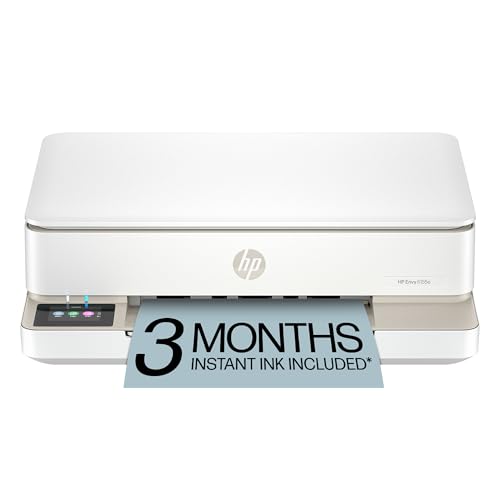
The Envy 6155e targets home offices needing reliable color printing and a broad feature set. It offers auto duplex printing, a 100-sheet input tray, and AI-enabled features to help improve print layouts. Its wireless capabilities support mobile printing and scanning, making it a practical choice for households that balance homework, work-from-home tasks, and quick photo prints in a small footprint.
CLABEL 320B Label Maker

As an alternative for small business labeling needs, the CLABEL 320B supports 3-inch label width with Bluetooth and USB connectivity. It offers templates and symbol libraries suitable for organizing office catalogs, products, and mail labeling. While not a traditional all-in-one printer, it complements a small office setup where label production is a frequent task and space is at a premium.
Buying Guide: Key Considerations For Choosing The Right Smallest 3-In-1 Printer
- Print family and media support: For households that print documents and photos, ensure the printer supports essential media sizes and borderless photo printing if needed. Check paper tray capacity to avoid frequent refills in busy weeks.
- Print speed and efficiency: Consider the balance between color and monochrome speeds. If you print larger volumes, auto duplex (two-sided printing) can save time and paper, plus reduce clutter.
- Scanning and copying features: A capable scanner with optical resolution of at least 600 dpi is suitable for documents, while a flatbed vs. ADF (auto document feeder) affects multi-page scanning efficiency.
- Connectivity: Wireless (Wi-Fi), mobile printing, and compatibility with major platforms (Windows, macOS, iOS, Android) are essential. USB can be useful for direct connections to a computer.
- Ink/toner strategy: Inkjet printers are common for color documents and photos, while some models offer instant ink or subscription services to simplify replenishment. Consider cost-per-page.
- Size and footprint: For small spaces, measure the desk clearance and destination for the printer. Look for models marketed as compact or “space-saving” and confirm tray dimensions fit your setup.
- Maintenance and support: Check cartridge availability, ease of replacement, and warranty terms. A longer warranty or readily available replacement parts can reduce downtime.
- Future needs: If you anticipate faxing, auto document feeders, and higher-volume use, a model with additional features may be worth the extra footprint and cost.