For sharp 4K images in a compact, desktop-friendly size, these 32-inch and near-32-inch monitors offer 4K resolution, HDMI and DisplayPort connectivity, and features tailored to work, streaming, and gaming. This guide highlights five top choices that balance size, image quality, and smart extras for American readers seeking a couch-to-desk setup with minimal clutter. Each option expands your screen real estate without dominating your workspace.
| Product | Brand | Screen | Key Feature |
|---|---|---|---|
| LG 32UR500K-B Ultrafine | LG | 32-inch 4K UHD | HDR10, built-in speakers, on-screen control |
| Samsung 32” Smart Monitor M7 (M70F) | Samsung | 32-inch 4K UHD | Smart TV apps, AI-assisted visuals, Energy insights |
| Gawfolk 27 Inch 4K Monitor | Gawfolk | 27-inch 4K UHD | IPS, wide viewing angles, bezel-less design |
| CRUA 27″ 4K White Monitor | CRUA | 27-inch 4K UHD | IPS, 120% sRGB, built-in speakers |
| KTC 32 Inch 4K Smart Monitor | KTC | 32-inch 4K UHD | Google TV, 65W PD Type-C, HDR |
LG 32UR500K-B Ultrafine 32″ 4K Monitor

The LG 32UR500K-B delivers a 32-inch 4K UHD panel with HDR10 support and a broad color gamut up to 90% DCI-P3. Its built-in speakers add stereo sound, and on-screen control simplifies brightness, contrast, and color adjustments. The borderless design supports a modern, immersive desk setup, and HDMI 2.0 and DisplayPort connections ensure broad compatibility with desktops and laptops. This model emphasizes visual clarity for productivity, media consumption, and light gaming, making it a versatile centerpiece for a compact workspace.
Samsung 32” Smart Monitor M7 (M70F) 4K UHD

This Samsung M7 model blends a 4K UHD panel with built-in smart apps, enabling streaming directly from the monitor. AI Picture Optimizer tailors visuals for documents and games, while Samsung Vision AI enhances overall image quality. The monitor also supports easy smart-home interaction through a 3D Map View and provides energy usage insights. It suits users who want a single, compact screen for work, entertainment, and light home automation without a separate TV or PC monitor.
Gawfolk 27 Inch 4K Monitor IPS 60Hz

The Gawfolk 27-inch 4K monitor emphasizes IPS color accuracy and wide viewing angles, ideal for photo editing, design work, and general productivity. It features 60Hz refresh with a flicker-free design to reduce eye strain during long sessions. The near-bezel-less frame minimizes distractions, creating a clean, immersive workspace suitable for multi-window setups and content creation tasks on a smaller display footprint.
CRUA 27″ 4K White Monitor
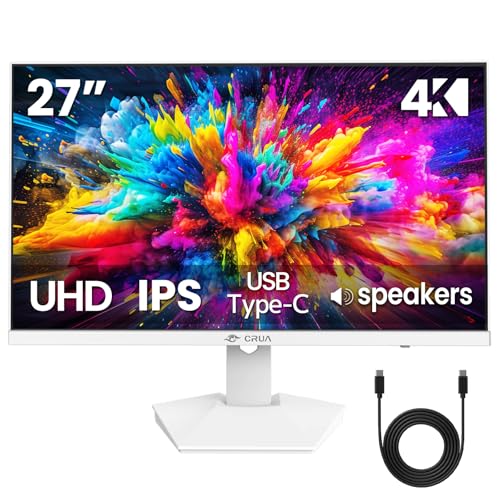
The CRUA 27″ 4K monitor delivers 3840×2160 resolution with an IPS panel for accurate colors and wide viewing angles. It supports 120% sRGB, claims a bright 300 cd/m², and includes built-in speakers. AMD FreeSync integration reduces tearing during casual gaming, while the 27-inch form factor remains friendly for desk spaces that require a balanced mix of productivity and media consumption.
KTC 32 Inch 4K Smart Monitor

The KTC 32-inch smart monitor runs Google TV with Netflix licensing and a USB-C 65W PD port to simplify connectivity for laptops and mobile devices. HDR support adds deeper contrast for movies, while wireless display capabilities and Google integration provide a streamlined, all-in-one entertainment and productivity experience on a single screen.
Buying Guide: Key Considerations for Small 4K Monitors
- Display size and workspace fit: 27–32 inches strike a balance between 4K detail and desk real estate. Consider how far you sit from the screen and whether you need wall-mount options.
- Color accuracy and HDR: IPS panels generally offer better color consistency across viewing angles. HDR10 support helps with dynamic range in movies and games, though peak brightness varies by model.
- Connectivity: Look for HDMI, DisplayPort, and USB-C (with power delivery) to cover laptops, desktops, and peripherals. Built-in speakers are convenient but may not replace dedicated audio.
- Smart features vs. traditional monitor: Smart monitors offer streaming apps and voice control but can be heavier and more expensive. If you mainly work, a traditional monitor with strong color and ergonomics might be preferable.
- Eye comfort and ergonomics: Flicker-free technology and low blue light modes reduce eye strain during extended use. Adjustable stands or VESA compatibility improve ergonomics.
- Color coverage and accuracy: 90% DCI-P3 or higher is ideal for content creation and photo editing. 120% sRGB or more helps ensure vivid, accurate visuals for general viewing.
- Durability and warranty: Check panel quality, input lag for gaming, and the manufacturer’s warranty terms for longer-term reliability.
When selecting a small 4K monitor, consider your primary use case—productivity, media consumption, or light gaming—and weigh the value of built-in smart features against a purist display focused on color accuracy and ergonomics. The models listed here provide a range of approaches to fit compact desks, living rooms, or shared spaces while maintaining the crisp detail of 4K on a manageable screen size.