Smart sliding door locks offer convenient, secure access for patio doors and glass installations. This guide highlights top WiFi-enabled options, detailing features like fingerprint entry, app control, card access, and remote unlocking. Built to fit a range of door thicknesses and frame widths, these models support multiple users and provide activity logs for peace of mind. Read on to compare choices and find the right fit for modern homes and rentals.
| Product | Brand | Key Features |
|---|---|---|
| Sliding Door Smart Lock (Black) | JNZCH | Fingerprint, Tuya app, IC card, keypad, keys, anti-peep touchscreen |
| Sliding Glass Door Lock (Slim Frame) | Pedkoct | Multiple unlock methods, 300 users, doorbell image verification |
| eLinkSmart 2085 Lock | eLinkSmart | Fingerprint, IC card, password, app control, RFID, keys |
| Anweller 2085 Slimmer Lock | Anweller | 5 unlock methods, tamper alarm, compatibility notes |
| Pothunder 2885 Mortise Lock | Pothunder | 6 in 1 unlock, 0.2s fingerprint, remote, tamper alerts |
JNZCH Sliding Door Smart Lock
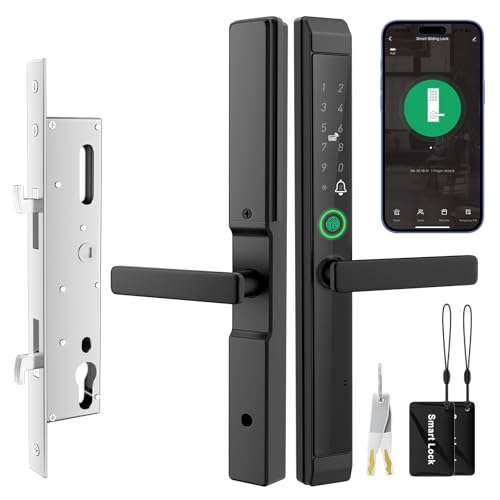
A safer, smarter way to unlock a sliding glass door blends security with convenience. The JNZCH smart mortise lock uses a built-in security chip to resist hacking and tampering. Setup requires a 2.4 GHz Wi-Fi network, and it is managed via the TUYA app for remote control, one-time passwords, and entry logs. Multiple unlock options include fingerprint, IC card, PIN code, app, and a traditional key. The handle auto-relocks after use for ongoing security.
Pedkoct Sliding Glass Door Lock With Handle

The Pedkoct model supports doors ranging from mid-widths up to thick frames, with a reversible handle for left- or right-opening doors. It offers a five-point access system: fingerprint, PIN code, WiFi app (Tuya), RFID card, and backup keys, accommodating up to 300 users. A visual verification doorbell provides real-time visitor images via WiFi, enabling remote unlocking with added security through cloud-stored images.
eLinkSmart 2085 Ultra-Slim Lock

The eLinkSmart lock is designed for a range of door thicknesses and frame widths, with a 32mm lock body and multiple installation options. Unlock methods include fingerprint, IC card/NFC, password, app control, and keys. It supports one-time and scheduled passwords for guests or service staff, making it adaptable for homes and short-term rentals. A robust aluminum keypad and waterproofing add durability for outdoor use.
Anweller 2085 Slimmer Sliding Glass Lock
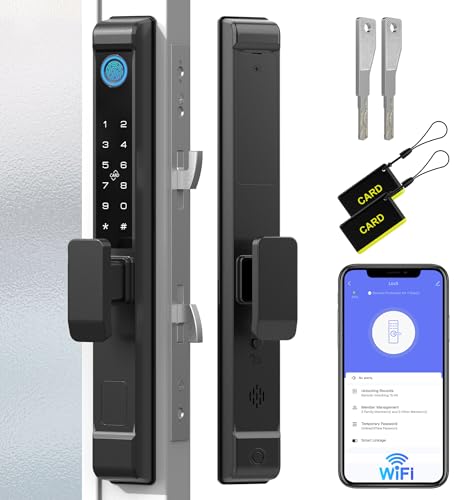
Anweller’s 2085 Slimmer model fits a broad range of doors, requiring careful compatibility checks with door thickness and frame width. It offers fingerprint, keypad, RFID, app control, and spare keys, with protections against wrong entries and tampering alarms. The system supports up to a large user base, ensuring flexible access management for households and rental properties.
Pothunder Smart Lock With Double Hook

Pothunder’s 2885 mortise lock features 6-in-1 unlocking: fingerprint, passcode, WiFi app, RFID card, physical key, and time-limited one-time codes. It supports up to 300 users, provides push unlock records, and includes tamper alerts. The 0.2-second fingerprint recognition delivers quick access, while the anti-peep code feature helps protect against observation-based fraud.
TKOWTB Tuya Waterproof Smart Lock

TKOWTB’s Tuya WiFi app-enabled lock emphasizes waterproofing (IP66) and a broad unlock repertoire, including fingerprint, keypad passwords, app control, and temporary access codes. It is designed for doors with a variety of thicknesses and features anti-peeping virtual password options to reduce shoulder-surfing risks. Compatibility notes should be checked for frame width and mortise compatibility before purchase.
Buying Guide: Key Considerations For Choosing A Sliding Glass Door Wifi Lock
- Compatibility: Confirm door thickness, frame width, and mortise compatibility with your door model. Some locks require specific frame dimensions and may not fit all sliding doors.
- Unlock Methods: Consider which methods you prefer—fingerprint, PIN/password, RFID card, app control, remote unlocking, or a physical key. Multi-method locks offer flexibility for all household members and guests.
- Connectivity: Most locks rely on 2.4 GHz WiFi for setup and operation via a mobile app (often Tuya). Ensure your router supports the needed band and that your network is reliable.
- Security Features: Look for tamper alerts, auto-relocking, anti-peep codes, and strong encryption (AES-256 or better) to protect against unauthorized access and spoofing attempts.
- Guest Access Management: If you rent or share space, consider the number of users supported (some locks handle hundreds) and the ability to issue one-time or time-limited codes or passwords.
- Doorbell Integration: Some models offer visual verification by sending doorbell images to the cloud, enabling remote decision-making without approaching the door.
- Power and Durability: Check battery life expectations and the lock’s weather resistance if installed on exterior doors. Waterproofing and rugged materials extend longevity in outdoor environments.
- Installation and Support: Review installation complexity, needed tooling, and whether the lock is designed for left- or right-opening doors. Verify warranty terms and customer support accessibility.
- Privacy Considerations: When using cloud-connected features, understand where data is stored and the privacy practices of the app ecosystem and manufacturer.
- Budget And Use Case: For rentals or short-term stays, prioritize robust access logs and admin control. For single-family homes, emphasis on ease of use and quick unlock speed may be more important.