In modern meetings and classrooms, a reliable slide clicker with a laser pointer can keep your presentation flowing smoothly. This guide highlights five top options designed for PowerPoint, Keynote, Google Slides, and more. Each entry covers key features such as page navigation, volume control, screen modes, and wireless range, so you can choose the right tool for your space and style. Below you’ll find a quick comparison and detailed overviews to help you decide which device best fits your needs.
| Product | Brand | Laser Pointer | Key Feature |
|---|---|---|---|
| Logitech Wireless Presenter R400 | Logitech | Red | Presenter mode, 50 ft range |
| Wireless Presenter (DinoFire) | DinoFire | Red | 100 ft wireless range, volume control |
| Presentation Clicker E600 | ELISWEEN | Red | USB-C dual port, full/black screen, volume |
| QUI Presentation Clicker | QUI | Red | Up to 328 ft range, plug-and-play |
| Logitech Wireless Presenter R500s | Logitech | Red | Green laser, 20 m range |
Logitech Wireless Presenter R400
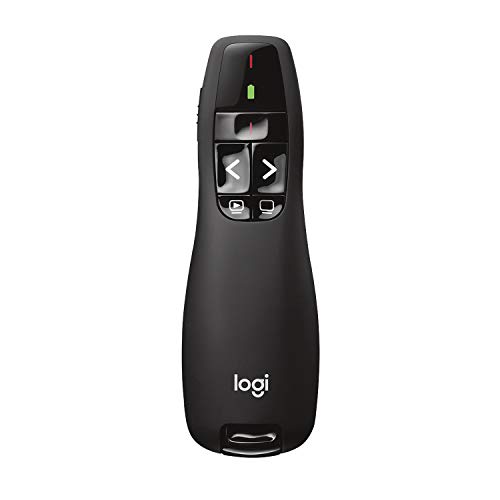
Logitech’s R400 combines a simple design with reliable wireless performance. It offers a dedicated presenter mode and a built-in Class 2 red laser pointer for highlighting slides. The intuitive touch keys enable easy slide navigation and program control, making it a strong choice for PowerPoint and other presentation software. The device provides up to a 50-foot wireless range, allowing freer movement around the room. It runs on AAA batteries, and Logitech recommends Polaroid AAA batteries for best performance. This model emphasizes straightforward operation and dependable range for everyday presentations.
Wireless Presenter (DinoFire)

The DinoFire wireless presenter emphasizes plug-and-play use with a 2.4 GHz USB receiver. It supports typical presentation functions like page forward/backward, volume control, hyperlink, and screen switching. The device showcases a bright red laser pointer with a claimed range of up to 100 feet, helping you highlight points from across the room. The remote is designed for quick setup without software installation, making it suitable for frequent presenters in classrooms or conference rooms. It is built to be a versatile tool for various presentation environments.
ELISWEEN Presentation Clicker E600

ELISWEEN’s PowerPoint clicker supports volume control and full/black screen functions, with a contoured keypad layout designed for comfortable use in darker rooms. The device offers a USB Type-C option alongside USB, enabling compatibility with multiple devices, including Macs. It requires two AAA batteries (not included) and features a magnetic dongle holder for secure storage. The bright red illumination helps highlight key points, and the ergonomic design aims to reduce fatigue during long sessions in classrooms or meeting rooms.
QUI Presentation Clicker

QUI’s presentation clicker focuses on a long-range, stable connection with a 2.4 GHz USB receiver, enabling movement up to approximately 328 feet. Its one-button-per-function design provides straightforward navigation for page up/down, hyperlink triggering, volume control, and screen modes. The bright red laser pointer helps keep attention on critical slide elements. The device is designed for compatibility across Windows, macOS, and some Linux setups, as well as popular presentation software, delivering a reliable option for large rooms or auditoriums.
Logitech Wireless Presenter R800

The R800 model introduces a green laser pointer for high visibility on many background colors. It retains presenter mode and intuitive touch keys for easy control of slides. The AAA battery setup remains standard, with an emphasis on reliable operation and improved visibility in well-lit or outdoor venues. The wireless range can extend up to 100 feet, giving presenters greater freedom to move around the room. Logitech positions this as a versatile option for both classroom and business presentations requiring a brighter laser signal.
Logitech Wireless Presenter R500s
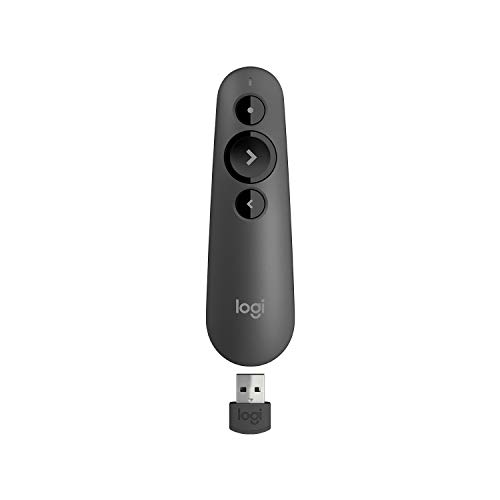
The R500s offers a green laser pointer option with a different visibility profile compared to red lasers. It includes presenter mode and intuitive touch controls, with a 20-meter wireless range suitable for typical conference rooms. Powered by AAA batteries, this model is designed for dependable everyday use. Its compact design emphasizes portability and ease of use for instructors, trainers, or meeting presenters who want a familiar Logitech experience with solid range and laser clarity.
Buying Guide
Key purchase considerations help you pick the right slide clicker with a laser pointer for your situations.
– Laser color and visibility: Red lasers are common and work in many environments, while green lasers can offer higher visibility on bright backgrounds. Consider your room lighting when choosing color and brightness.
– Range and reliability: Wireless range varies from about 20 meters to 100 feet or more. For large rooms or auditoriums, prioritize longer ranges and stable connections to prevent dropouts.
– Compatibility and software: Most clickers support Windows and macOS without software installation, but verify compatibility with your preferred presentation platform (PowerPoint, Keynote, Google Slides) and devices (laptop, tablet, or desktop).
– Battery life and recharge options: AAA batteries are common, though rechargeable USB-C options exist. Consider battery availability and device weight for comfortable long sessions.
– Ergonomics and controls: A comfortable grip and logically placed buttons help prevent fatigue during long presentations. Some devices include magnet holders for USB dongles and dual-port options for device flexibility.
– Additional features: Volume control, full/black screen, hyperlink navigation, and screen mode transitions can enhance the flow of a talk. Magnetic dongles and plug-and-play design reduce setup time.
– Portability and storage: Compact form factors with secure dongle storage are ideal for frequent travelers or researchers who present in multiple venues.
– Durability and build quality: A sturdy remote with a reliable laser pointer will survive regular transport and handling in classrooms and meeting rooms.
Summary: For a balanced mix of range, ease of use, and feature sets, the Logitech R400 and R800 lines offer reliable options with familiar interfaces. The QUI and CLIKBUTM devices add long-range capability and Type-C compatibility, while the DinoFire model emphasizes straightforward setup and a broad range. When evaluating, align laser visibility, range, and compatibility with your typical presentation environments to ensure you pick a model that enhances your delivery rather than complicating it.