Discover top TV-friendly webcams that are optimized for Skype and other video platforms. The following picks blend high resolution, smart framing, built-in mics, and simple plug-and-play setups to enhance video calls from a TV-connected or living-room setup. Each option supports easy integration with Skype on smart TVs, PCs, or media centers.
| Product | Brand | Key Benefit | Resolution |
|---|---|---|---|
| EMEET 1080P Webcam | EMEET | Low-light optimization and privacy cover | 1080p |
| RayBit 4K Pro | RayBit | AI auto framing and presenter tracking | 4K |
| Septekon 1080P HD | Septekon | Plug & Play with built-in mic | 1080p |
| Samsung Slim Fit Camera | Samsung | Magnetic mounting and slim design | 1080p |
| QOMO QWC 004 | QOMO | Wide-angle with dual mics | 1080p |
EMEET 1080P Webcam With Privacy Cover
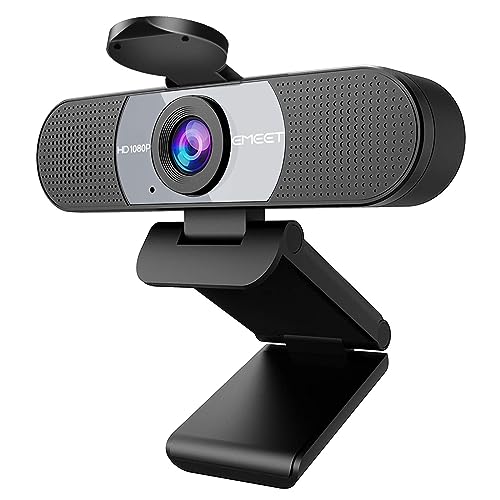
EMEET’s C960 webcam provides full 1080p video with a 5-layer anti-glare lens and a privacy cover. The fixed focal length targets content around 11.8 to 118.1 inches, delivering clear images during Skype calls on a TV or desktop. It includes two built-in noise-reducing microphones to minimize ambient noise, helping voices come through clearly. The camera supports automatic low-light correction, color boost, and exposure adjustments to maintain quality in varied lighting conditions. It is easy to set up via USB plug-and-play.
Key features support Skype usage on living-room setups: privacy cover when not in use, stable framing at typical conference distances, and straightforward driver-free operation. The two mics offer improved vocal pickup, reducing echo and background chatter during video conferences. For rooms with modest lighting, its low-light optimization helps maintain a presentable image on a TV screen.
RayBit 4K Pro AI Conference Camera

RayBit’s 4K Pro combines a high-resolution camera with integrated HiFi speakers and noise-cancelling microphones in a single device. The AI-powered auto-framing keeps the meeting focus centered as participants enter and exit the frame, which is especially useful for TV-connected conference rooms. Additionally, auto-speaking following uses presenter tracking to keep the current speaker in view, aiding Skype meetings where multiple participants contribute from different angles. The all-in-one design helps reduce cable clutter in smaller home office spaces.
The device emphasizes an all-in-one solution for TV-based conferencing: 4K video offers crisp detail on large displays, while AI framing and presenter tracking minimize manual adjustments. Built-in speakers ensure audible communication without external accessories, though you may pair it with a sound system for larger rooms. USB connectivity supports quick setup with compatible TVs, PCs, and streaming devices used with Skype.
Septekon 1080P HD Webcam with Microphone
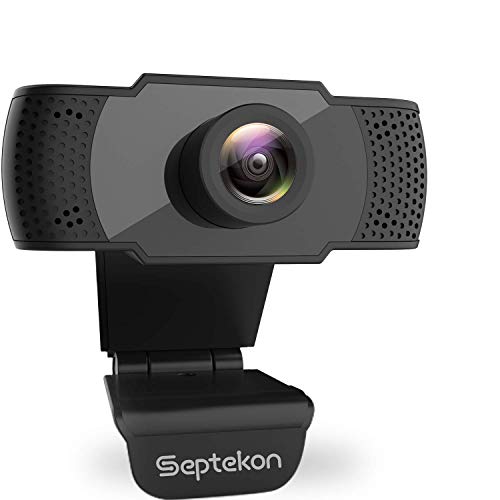
Septekon’s 1080p webcam offers a 2-megapixel sensor with a built-in stereo microphone that captures voices clearly from a distance. The 1080p resolution provides sharp, smooth video at 30 fps, which is suitable for Skype calls on TVs or desktops. The plug-and-play design simplifies use on multiple devices, as no driver installation is required. Its built-in mic and easy setup make it a practical option for quick conferencing from a TV-based display.
Audience considerations include room acoustics and lighting; the built-in mic can handle typical home environments, but users in noisy rooms may benefit from additional audio peripherals. The webcam’s universal USB interface makes it compatible with most smart TVs, laptops, and desktop setups. Overall, it’s a reliable, affordable choice for basic Skype video calls on a TV-connected system.
Samsung Slim Fit Camera
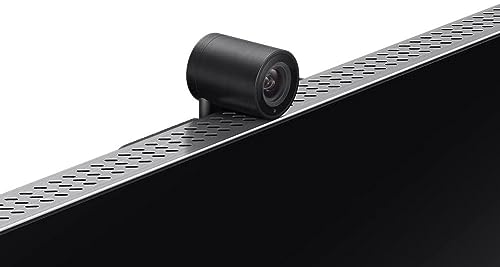
The Samsung Slim Fit Camera is designed to integrate with a TV’s form factor, featuring a slim profile and magnetic mounting for secure placement. It streams at Full HD 1080p 30 fps, making Skype video calls comfortable on living-room displays without obstructing the viewing area. The magnetic attachment allows flexible positioning close to the screen, reducing cable clutter and providing a discreet setup for TV-based conferencing.
Considerations include compatibility with your particular TV model and the ease of mounting. The slim design enhances aesthetics in a seating area while delivering dependable video quality. For environments where a clean, unobtrusive look matters, Samsung’s Slim Fit Camera offers a practical balance of form and function for Skype on a TV.
QOMO QWC 004 Full HD Webcam

QOMO’s QWC 004 offers 1080p streaming with dual microphones and a 360° rotatable lens for flexible viewing angles. The USB plug-and-play setup supports Windows, Mac, and various TV interfaces for Skype usage. A wide viewing range helps capture multiple participants around a TV screen, making it suitable for family gatherings or small group calls. The microphone array reduces background noise for clearer communication during video chats.
Considerations include the balance between field of view and desk/sofa spacing. The 360° rotation simplifies adjustments without repositioning the camera, which can be advantageous in living room setups where seating changes across conversations. For multi-person Skype calls, QOMO’s coverage helps keep everyone in frame while maintaining straightforward operation.
Buying Guide
- Video resolution and frame rate: Prioritize 1080p at 30 fps for smooth Skype calls. For larger TV displays, 4K options are available but may require more bandwidth and processing power.
- Field of view: A wider angle (around 90–116°) captures more participants in a living room. Consider a camera with auto-framing or presenter tracking if the meeting involves multiple speakers or a presenter.
- Audio quality: Look for built-in dual mics with noise reduction. In noisier rooms, an external microphone or soundbar can improve clarity.
- Mounting and placement: Slim designs or magnetic mounting help keep a TV setup unobtrusive. Consider cable management for a clean appearance near the TV.
- Plug-and-play compatibility: Ensure USB connectivity works with your TV, computer, or streaming device and that Skype supports the device on your platform.
- Privacy and security: Cameras with physical privacy shutters provide quick control when not in use.
- Software features: AI framing, auto-follow, and speaker tracking can enhance meeting dynamics, especially in TV-based conference rooms or living rooms with multiple participants.
- Compatibility considerations: Check your TV or streaming device’s supported input types (USB-C, USB-A, HDMI) and ensure the camera can interface with Skype on your chosen platform.
- Future-proofing: If you frequently switch between devices, look for cameras with broad compatibility and ongoing firmware updates from the brand.
These selections offer a range of options tailored to Skype-enabled TV setups, from simple plug-and-play webcams to advanced AI-assisted conference cameras. When choosing, align the camera’s features with room layout, participation level, and the desired level of automation to ensure comfortable, high-quality video calls on a TV screen or living-room PC setup.