Choosing a sit-to-stand monitor arm can transform daily work by promoting better posture, easier height adjustments, and cleaner desks. This guide highlights five top options that support up to 32-inch screens, offer gas or pneumatic springs, and provide full motion to adapt to sitting or standing positions. Each product includes a link to Amazon for quick access and a snapshot of key features to help you compare at a glance.
| Product | Brand | Key Features |
|---|---|---|
| Mount-It! Sit Stand Wall Mount Workstation MI-7905 | Mount-It! | |
| Mount-It! Sit-Stand Monitor Arm Desk Mount (B01MY4VVC3) | Mount-It! | |
| Mount-It! Sit-Stand Monitor Arm Desk Mount with Keyboard Tray (B084KLTZFL) | Mount-It! | |
| VIVO Black Sit-Stand Height Adjustable Pneumatic Arm STAND-SIT1BW | VIVO | |
| VIVO Sit-Stand 17–32″ Wall Mount with Pneumatic Keyboard Tray (STAND-VWKB1) | VIVO |
Whether you work from home or in a traditional office, these sit-to-stand monitor arms are designed to maximize space, reduce strain, and keep cables tidy. The options below span wall-mounted and desk-mounted configurations, with single or dual monitor capabilities and varying reach to accommodate different room layouts.
Mount-It! Sit Stand Wall Mount Workstation MI-7905
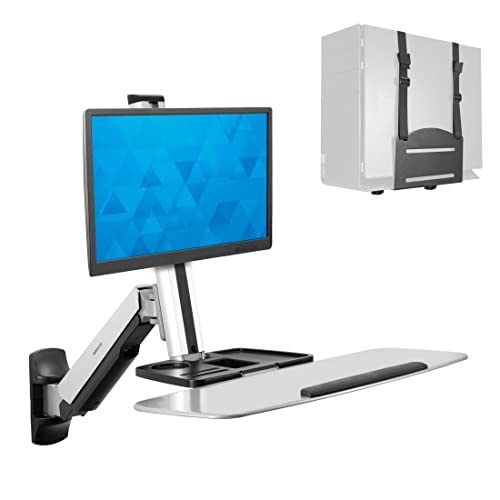
This wall-mounted workstation is designed to save space while enabling easy transitions between sitting and standing. The MI-7905 includes a single monitor mount, a keyboard tray, and a CPU holder, all mounted directly to the wall and secured to studs or concrete. A notable feature is the gas-assisted height range that supports quick up-and-down movement, with tilt, swivel, and rotation to optimize viewing angles. The arm can extend up to 41 inches from the wall, so plan for sufficient clearance in your workspace.
Key considerations include wall clearance and the need for proper mounting space. This unit is ideal for shared workstations, compact offices, or rooms where desk real estate is at a premium. The integrated CPU holder helps declutter the desk, while the robust gas-spring mechanism allows stable, controlled repositioning as users move between tasks.
Mount-It! Sit-Stand Monitor Arm Desk Mount With Keyboard Tray

This desk-mounted system converts a standard desk into a sit-stand workstation by raising both the monitor and keyboard tray together. It supports monitors up to 32 inches and 19.8 pounds and uses a smooth gas spring for height adjustment. The unit is compatible with VESA patterns 75x75mm and 100x100mm and can be installed as a clamp-on or via grommet. It’s well suited for users who want a compact, integrated solution that keeps screen and input devices aligned.
When evaluating this option, consider monitor size limits and weight, as well as whether you prefer clamp or grommet mounting. The gas spring offers intuitive height changes, while the integrated tray helps maintain ergonomic typing angles. This model is a practical, all-in-one solution for desks that need to maximize space without sacrificing adjustability.
Mount-It! Sit-Stand Monitor Arm Desk Mount With Keyboard Tray
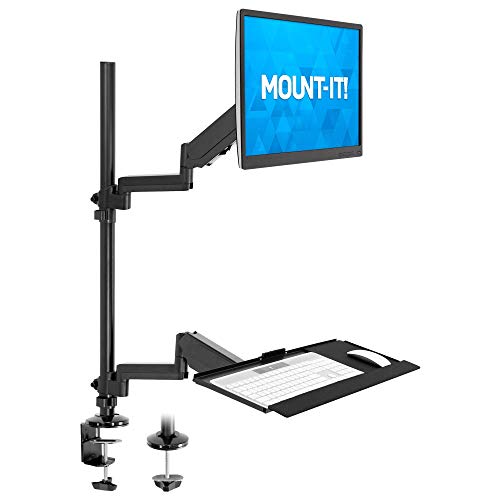
This single-monitor arm combines a height-adjustable arm with a built-in keyboard tray in one sleek package. It supports monitors up to 32 inches and uses a gas spring for smooth height changes. The design aims to keep the monitor, keyboard, and mouse aligned for better ergonomics, helping to reduce shoulder and neck strain during long work sessions. The option to mount via clamp or grommet adds flexibility for different desk configurations.
Consider how the integrated tray affects desk depth and whether your keyboard and mouse will fit comfortably. Users who want a streamlined setup without separate accessories may find this all-in-one solution appealing, especially in smaller home offices or shared workspaces.
VIVO Black Sit-Stand Height Adjustible Pneumatic Arm STAND-SIT1BW

The VIVO STAND-SIT1BW offers a wall-mounted, height-adjustable pneumatic-spring arm with full articulation for a 17″ to 32″ monitor. The system supports tilt, swivel, and rotation to tailor the viewing angle, along with height adjustments along the center pole for precise positioning. A cable management feature keeps cords organized, contributing to a neat workspace. The wall-mount design saves desk space while allowing flexible monitor positioning for both seated and standing tasks.
Evaluate wall clearance to ensure the arm can swing and rotate without obstruction. This option suits users who want a simple, space-saving monitor solution with strong range of motion and straightforward cable management.
VIVO Sit-Stand Wall Mount Counterbalance Monitor And Keyboard Workstation STAND-SIT1K
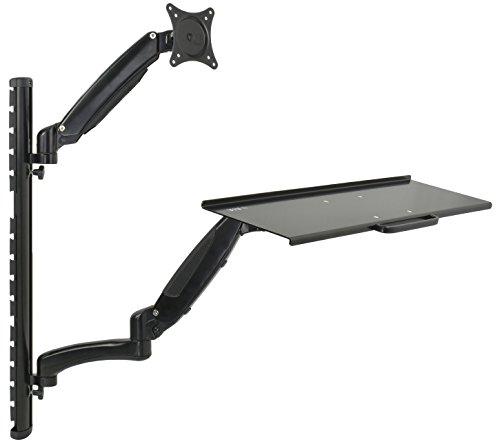
This wall-mounted workstation pairs a monitor arm with a keyboard tray, using a mechanical spring for the monitor and a pneumatic spring for the keyboard. The integrated cable management system helps reduce desk clutter, and both the arm and tray can be folded up to save space. The design is adaptable for different tasks and screen sizes up to 27 inches, offering a compact solution for efficient, stand-up-ready workspaces.
Consider whether you need dual-function storage (monitor and keyboard) in a single wall unit and how often you’ll fold the setup when not in use. This model provides a balanced approach to space-saving and ergonomic flexibility for smaller rooms or dedicated standing desks.
VIVO Sit-Stand 17–32 Inch Wall Mount With Pneumatic Keyboard Tray

Designed for a modular wall-mounted setup, this VIVO model supports a 17”–32” monitor with VESA 75x75mm or 100x100mm patterns and includes a pneumatic keyboard tray for easy typing adjustments. The arm offers tilt, swivel, and rotation to align the screen precisely, while the wall-mount profile remains low to the surface for a streamlined appearance. Height and layout flexibility make this a solid choice for home offices and shared workspaces seeking a compact sit-to-stand arrangement.
When selecting this unit, assess wall structure and how low-profile the system needs to be. A low-profile mount helps maximize room for other items, while the pneumatic keyboard tray supports comfortable typing positions across different tasks.
Buying Guide: Key Purchase Considerations
- Monitor size and weight: Check max supported size and weight (most models here support up to 32 inches and around 17–19 pounds per arm). Ultrawide or heavy gaming monitors may require higher capacity mounts.
- Mount type: Wall mounts save desk space but require wall clearance; desk clamps offer easier setup and flexibility for renters or temporary spaces.
- Movement range: Gas or pneumatic springs determine how smoothly you can move between seated and standing and whether you can dial in the exact height and tilt you need.
- Ergonomics: Look for tilt, swivel, rotation, and height adjustability to achieve a neutral posture—elbows at 90 degrees, wrists straight, eyes level with the top of the monitor.
- Cable management: Integrated channels keep cords tidy and reduce snagging during movements.
- Assembly and compatibility: Ensure you can mount to your desk or wall where studs or solid anchors are present; verify VESA compatibility (75×75 or 100×100 are common).
- Space constraints: Consider depth and clearance—some wall mounts extend significantly; others stay compact when folded.
- Future needs: If you plan to move to a larger monitor or add a second screen, consider dual-monitor systems or models that support weight and width expansion.
In sum, your selection should balance space, weight capacity, and ease of use. Wall-mounted units excel in saving desk space, while desk-mounted designs may offer easier relocation in changing work setups. For shared environments or multi-user homes, models with intuitive height adjustments and robust cable management deliver the most consistent ergonomic benefits.