Finding a keyboard that minimizes typing noise without sacrificing comfort is essential for focused work, late-night coding, or shared spaces. The following selection highlights five dependable options designed for quiet operation, ergonomic comfort, and versatile connectivity. Each product is chosen for its notable silent typing performance, build quality, and practical features suitable for Windows, Mac, and more.
| Product | Brand | Key Quietness and Comfort | Connectivity/Extras |
|---|---|---|---|
| TECKNET Wired Keyboard, Silent, 104-Key | TECKNET | Low-profile membrane keys; soft keystrokes; significantly reduced typing noise | Full-size, spill-resistant, plug-and-play |
| Hamile Large Print Backlit Wireless Keyboard | Hamile | Scissor-switch keys; ultra-quiet with 7-color backlight and smart memory | 2.4G wireless; full-size with large print |
| RECCAZR Wireless Keyboard and Mouse Combo | RECCAZR | Full-size quiet keyboard; smooth operation | 2.4GHz with USB receiver; mouse included |
| Logitech MK955 Signature Slim Wireless Keyboard and Mouse Combo | Logitech | Quiet typing and clicking; comfortable full-size layout | Multi-device Bluetooth; cross-OS |
| Redragon BK7366 Wired Keyboard | Redragon | Multimedia keys; splashproof design; quiet for a wired keyboard | USB wired; full-size with numeric keypad |
TECKNET Silent USB Keyboard For Quiet Office Use

TECKNET’s wired silent keyboard is engineered for quiet, comfortable typing. It uses low-profile membrane keys that deliver soft keystrokes and significantly reduce noise, making it ideal for offices, libraries, or shared spaces. The full-size, ergonomic 104-key layout supports efficient data entry and multitasking, while adjustable tilt feet and anti-slip pads improve stability during long sessions. It also includes 12 FN+F shortcuts to access essential tasks quickly, including volume, mute, and multimedia controls.
Hamile Large Print Backlit Wireless Keyboard
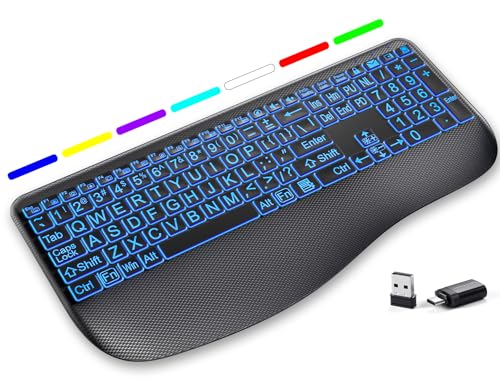
Designed for readability and quiet typing, the Hamile Large Print Backlit Keyboard emphasizes accessibility with oversized high-contrast keys. This full-size wireless keyboard uses scissor-switch keys to provide a laptop-like feel with near-silent operation. Seven backlight colors with adjustable brightness create a comfortable typing ambiance, especially in dim environments. Its memory feature preserves last-used lighting settings for hassle-free power-ons, making it suitable for both home and office use.
RECCAZR Wireless Keyboard And Mouse Combo

RECCAZR offers a practical wireless keyboard and mouse combo with 2.4GHz connectivity for stable performance up to 33 feet. The keyboard features a full-size layout and 12 multimedia function keys for quick access to tasks like volume control and email, contributing to a smoother workflow. The setup plugs in with a single nano USB receiver and can be used with or without the mouse, making it adaptable to various desk configurations and workstations.
Logitech MK955 Signature Slim Wireless Keyboard And Mouse
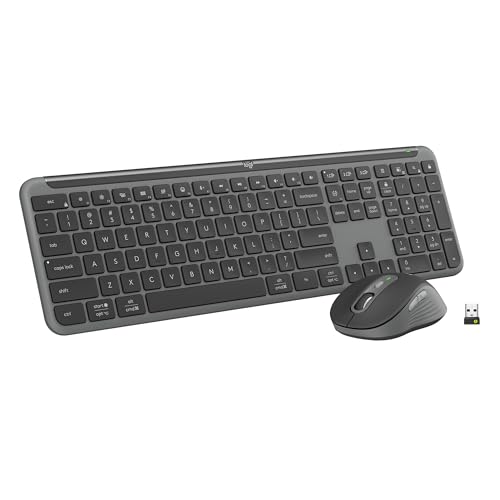
The Logitech MK955 Signature combo emphasizes quiet typing and clicking with a full-size keyboard and a contoured wireless mouse. It supports multi-OS use (Windows and Mac) and can switch across devices via the Logi Options+ App. The keyboard’s solid build and familiar laptop-style typing provide a comfortable experience for long typing sessions, while the mouse design uses recycled plastic for an eco-friendly touch. This option is well-suited for users who multitask across devices.
Redragon BK7366 Wired Keyboard

Redragon’s BK7366 is a full-size wired keyboard designed for quiet operation within a robust, feature-rich package. It includes a numeric keypad and 12 multimedia keys to streamline daily tasks, enhancing productivity. The keyboard is splashproof, thanks to a sealed membrane design, which helps protect against minor spills. Its straightforward USB connection ensures immediate usability without software requirements.
Buying Guide: Key Considerations For Choosing Silent Keyboards
When selecting a silent keyboard, several factors influence overall typing comfort, noise level, and productivity. Consider the following perspectives to balance quiet operation with your workflow:
- Typing Noise and Key Type: Silent keyboards often use membrane or scissor-switch mechanisms. Membrane keyboards tend to be quieter but can feel softer, while scissor switches offer a more laptop-like feel with reduced noise. Test the actuation force if possible to match your preferred touch.
- Layout and Size: Full-size keyboards with a numeric keypad suit data entry and accounting tasks, but compact 80% or 90% layouts save desk space. If you use a numeric keypad frequently, a full-size model may be better.
- Connectivity: Wired keyboards provide immediate, lag-free input and reliability, while wireless options (2.4GHz or Bluetooth) offer flexibility. Multi-device capability is valuable for users alternating between devices.
- Backlighting and Visual Accessibility: For dim work environments, backlit keys or high-contrast keycaps improve readability. Consider color options and brightness memory features to avoid readjusting settings each time you power on.
- Ergonomics: Angle adjustment, wrist support, and key travel influence long-term comfort. Some models include built-in stands or wrist rests to reduce strain during extended typing sessions.
- Durability and Cleanliness: Splashproof designs or sealed membranes help protect against accidental spills, especially in busy office or shared spaces. Material quality and keycap durability affect long-term performance.
- OS Compatibility and Customization: Multi-OS compatibility (Windows, macOS, Linux) and software support (e.g., customizable keys) can enhance efficiency and user experience, particularly for complex workflows.
These factors help align a silent keyboard to your specific needs—whether you value ultra-quiet operation for late-night work, accessibility features for readability, or a multi-device setup for cross-platform productivity.