For many businesses and hobbyists, adding reliable RS232 serial ports to a PC is essential for connecting POS systems, industrial equipment, scanners, and legacy devices. The following selection highlights five solid PCIe/PCI Express serial port cards designed to expand connectivity, support multiple operating systems, and offer easy installation. Each product prioritizes compatibility, driver availability, and practical I/O performance to ensure smooth integration with Windows, Linux, and other platforms.
Summary of Selected Products
| Product | Brand | Ports | Interface | Key Features |
|---|---|---|---|---|
| LinksTek 2-Port PCI Express RS-232 | LinksTek | 2 | PCIe | 2x DB9, Windows/Linux drivers, broad compatibility |
| XRIKUI Dual Port PCIe RS-232 | XRIKUI | 2 | PCIe | ASIX AX99100, 256-byte FIFO, Linux driver CD |
| ELIATER 2-Port PCIe Serial Expansion | ELIATER | 2 | PCIe | CH38XDRV, 16C550 UART, auto IRQ/IO, Plug and Play |
| BZIZU 2-Port PCIe RS-232 | BZIZU | 2 | PCIe | DB9 compatibility, Linux/Windows drivers, cross-platform |
| StarTech.com 2-Port PCI Express Serial Interface | StarTech.com | 2 | PCIe | 16C1050 UART, low/full profiles, optional power, Windows/Linux |
LinksTek 2-Port PCI Express RS-232 Card

The LinksTek PCIE-SE2 card adds two RS232 DB9 ports to desktop PCs via a PCI Express slot. It supports Windows XP through Windows 11 (32/64-bit) and Linux with a driver on the included CD. This card is suitable for connecting devices such as POS systems, industrial testers, security equipment, and logistics gear. The dual-port design enables simultaneous connections to multiple serial devices, expanding control and data capture capabilities in mixed environments.
XRIKUI Dual Port PCIe RS-232 Card

The XRIKUI dual-port card provides two independent RS232 ports and broad OS support, including 32/64-bit Windows and Linux. It uses ASIX AX99100 with a 256-byte FIFO on-chip to improve data handling. The driver CD is included for Linux, and Windows users will typically install drivers from the accompanying software. It is a practical upgrade for users needing reliable, multi-device serial connectivity in data collection, manufacturing, or fieldwork scenarios.
ELIATER 2-Port PCIe Serial Expansion Card

ELIATER’s 2-port PCIe expansion is designed for Windows and Linux, featuring two 16C550-compatible UARTs and data rates up to 230400 bps. It emphasizes Plug and Play and automatic IRQ/IO address selection, with IRQ sharing support. The kit includes a low-bracket option and straightforward setup with the CH38XDRV driver folder for installation, making it a straightforward upgrade path for serial-heavy workflows.
BZIZU 2-Port PCIe RS-232 Card

BZIZU’s 2-port PCIe RS-232 card is designed for fast, reliable serial communications. It connects via PCIe, offering two DB9 ports with compatible drivers for Windows XP/7/8/10/11 and Linux kernels 2.6.x to 5.x. This card supports broad device compatibility in environments such as POS, industrial control, and logistics, and it is built to support various application needs requiring stable RS232 connections.
PCIe Combo Serial Parallel Expansion Card
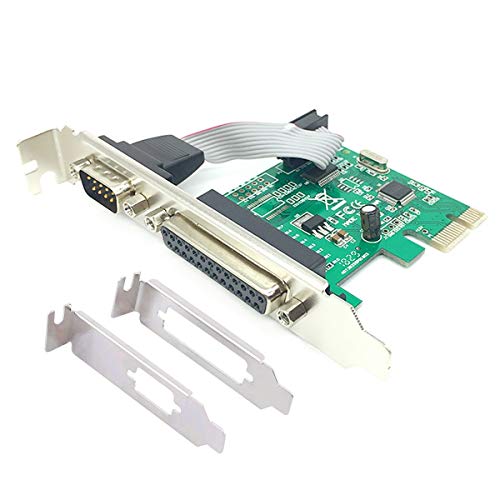
This PCIe card combines serial (RS232) and parallel (IEEE 1284) support in a single expansion. It uses the CH38X driver, offers multi-mode compatibility (SPP, PS2, EPP, ECP), and data rates up to 1.5 Mbps for the parallel port. It is Plug and Play with automatic IRQ/IO address selection and IRQ sharing, suitable for users needing a mix of legacy communications and printing capabilities in Windows and Linux environments.
StarTech.com 1-Port PCI Express RS232 Card

StarTech’s StarTech.com 1-Port PCI Express RS232 Card features a single RS232 port with a 16C50x-series UART (ASIX AX99100) and supports transfer speeds up to 921.6 Kbps. It includes a low-profile bracket and a full-profile bracket for flexible installation, plus a 9th data bit and 256-byte FIFO. It is compatible with Windows and Linux, making it a solid option for single-port expansion in compact builds or smaller form-factor systems.
StarTech.com 2-Port PCI Express Serial Interface Card
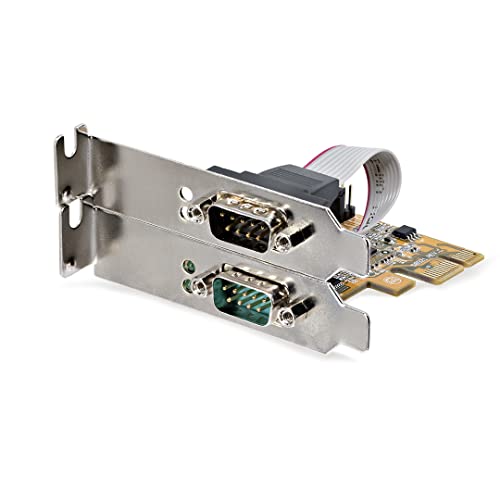
StarTech’s 2-Port PCIe Serial Interface Card provides dual RS232 ports with high-performance 16C1050 UARTs and supports Windows and Linux. It includes LEDs to monitor activity and offers full/full-profile brackets for flexible placements in workstations or server racks. The card is well-suited for IT setups requiring reliable, continuous serial communication with multiple devices like barcode scanners, scales, and medical devices.
Buying Guide: Choosing the Right Serial Port Card
- Port count and type: Determine how many RS232 ports you need and whether you require single- or dual-port configurations. Consider DB9 connectors and whether you need DB25 compatibility.
- Bus interface: PCIe is common for modern systems; ensure your motherboard provides an available PCIe slot (x1, x4, x8, etc.).
- Driver and OS support: Check driver availability for Windows, Linux, and any other required OS versions. Some vendors provide driver CDs or downloadable packages for Linux.
- UART chipset and performance: Look for cards using reliable UARTs (e.g., 16C550/1050) and features like FIFO buffers to handle higher data rates with multiple devices.
- Installation and form factor: Low-profile (slim) brackets are useful for small form-factor PCs; full-profile brackets suit standard towers. Verify IRQ sharing and Plug and Play support if you want minimal setup effort.
- Power and cabling: Some cards supply power over pin 9; confirm whether your devices require extra power rails or external adapters.
- Longevity and compatibility: For industrial environments, select cards with broad OS compatibility and robust driver support, ensuring stable long-term operation.
- Price-to-performance balance: Compare features like dual ports, FIFO depth, and driver CD inclusion against the price to find the best value for your setup.
The selection above emphasizes cards with dual-port options, broad operating system coverage, and clear installation paths. When upgrading, consider how these cards will integrate with existing equipment, whether you need hot-swappable connections, and how many serial devices will operate concurrently in your environment.