When you need quick access to SATA drives without opening your computer, a reliable SATA to USB adapter is essential. This guide highlights top options that work well with USB 2.0 and provide straightforward plug-and-play data transfer, supporting 2.5″ and 3.5″ drives, SSDs, and legacy IDE connections. Below you’ll find five strong picks, each with a brief feature snapshot and a practical use case to help you choose the right adapter for backups, disk imaging, or drive recovery.
| Product | Brand | Type | Key Benefit |
|---|---|---|---|
| SABRENT SATA to USB Cable | SABRENT | SATA I/II/III to USB 3.0 (EC-SSHD) | Up to 5 Gbps with UASP, hot-swappable |
| TRIPP LITE USB 2.0 Hi-Speed to SATA/IDE | TRIPP LITE | USB 2.0 to SATA/IDE (U238-000-1) | Supports both SATA and IDE drives |
| Vantec CB-ISATAU2 | Vantec | SATA/IDE to USB 2.0 | Supports 2.5″ and 3.5″ drives |
| SGElectronix IDE SATA to USB 2.0 | SGElectronix | IDE/SATA to USB 2.0 | Broad drive compatibility (IDE and SATA) |
| POSUGEAR USB 3.0 to IDE/SATA | POSUGEAR | USB 3.0 to IDE/SATA | High compatibility with multiple drive types |
Note: While several options here highlight USB 3.0, they remain compatible with USB 2.0 hosts and can still provide convenient external access to SATA or IDE drives. Each entry is chosen for reliability, broad drive support, and straightforward operation without requiring complex setup.
SABRENT SATA To USB Cable (EC-SSHD)

The SABRENT adapter enables you to connect a 2.5″ SATA I/II/III hard drive or SSD directly to your computer. It features UASP support for higher transfer speeds up to 5Gbps with USB 3.0, hot-swappability, and plug-and-play operation—no drivers required. This makes it a practical choice for quick backups, disk imaging, or data recovery tasks involving consumer SSDs and HDDs.
TRIPP LITE USB 2.0 To SATA And IDE Adapter

The TRIPP LITE U238-000-1 adapter supports USB 2.0 connections to both SATA and IDE drives (2.5″ and 3.5″ formats). It is a versatile option for users needing broad compatibility with legacy drives or for multi-drive backups and data transfers. The device emphasizes simplicity with wide OS support and straightforward plug-and-play use, making it accessible for both beginners and advanced users.
Vantec CB-ISATAU2 SATA/IDE To USB 2.0 Adapter

The Vantec adapter offers straightforward storage expansion for any system via USB. It supports up to 2TB drives and delivers reliable transfer rates with USB 2.0. It is a practical pick for basic backups, local file transfers, and quick drive access when upgrading or maintaining a computer setup that relies on older USB interfaces.
SGElectronix IDE/SATA To USB 2.0

The SGElectronix adapter supports a range of drives, including 2.5″ IDE, 3.5″ IDE, and SATA drives, making it a versatile choice for mixed-drive environments. Users can connect legacy and modern disks to a single USB-enabled system, enabling data transfer, backups, and drive imaging across different drive formats.
POSUGEAR USB 3.0 To IDE And SATA Adapter
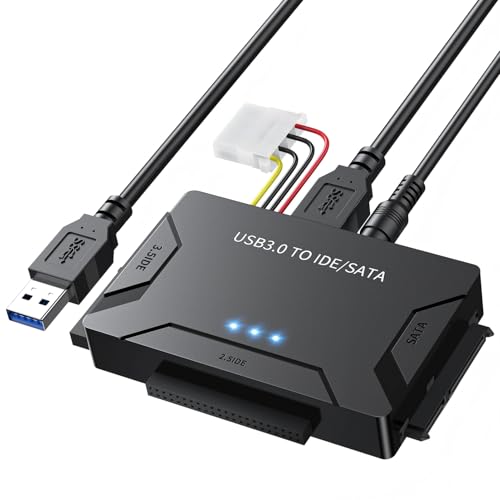
The POSUGEAR adapter stands out for its broad compatibility with 2.5″ and 3.5″ drives, offering USB 3.0 speeds up to 5Gbps with UASP support. It includes a 12V/2A power adapter for higher-capacity drives and is suited for large data transfers, backups, and drive cloning tasks across different drive types.
Buying Guide: Key Purchase Considerations For SATA/USB Adapters
- Drive compatibility: Confirm support for your drive sizes (2.5″ vs 3.5″), interface (SATA I/II/III or IDE), and drive type (HDD vs SSD). Some adapters are mixed-format while others specialize in one format.
- Connection speed and protocol: USB 2.0 adapters are common and affordable, but USB 3.0 or higher with UASP provides faster transfer speeds. If you only have USB 2.0 ports, prioritize models that still deliver reliable performance with 480 Mbps or better when possible.
- Power requirements: Desktop 3.5″ drives often need external power; look for adapters with a dedicated power supply or those that explicitly support 3.5″ drives.
- Driver and OS support: Most modern units are plug-and-play with Windows, macOS, and Linux. Check listed OS compatibility if you’re using older systems.
- Ease of use: Consider whether the adapter is hot-swappable, includes a dock-friendly design, or has a simple LED indicator to confirm connectivity and activity.
- Build quality and durability: Screws, cable quality, and connector reliability influence long-term use, especially when swapping drives frequently.
- Use case alignment: For backups and imaging, prioritize faster transfer capabilities and robust compatibility. For occasional data retrieval, a basic adapter with wide drive support may suffice.
- Brand and support: Reputable brands often offer better customer service and warranty coverage, reducing risk when handling valuable data drives.
These considerations help balance performance, compatibility, and cost. When selecting, map your typical drive types, the USB ports available on your computer, and how often you expect to swap drives to identify the best fit for your needs.