Finding a reliable SDXC card reader for a MacBook can streamline photo workflows, video editing, and on-the-go data transfers. This guide highlights top options that work well with MacBook Pro and MacBook Air, offering fast USB-C and USB-A connectivity, dual-card slots, and plug-and-play setup. Each pick is evaluated for speed, compatibility, and portability to help you choose confidently.
The following table summarizes five highly compatible SDXC card readers that pair well with MacBook ecosystems. All entries support SDXC and multiple memory formats, and are chosen for performance and cross-platform convenience.
| Product | Brand | Key Strengths | Connectivity |
|---|---|---|---|
| uni SD Card Reader | uni | Dual slots, fast USB 3.0/USB-C, simultaneous card access | USB-C / USB 3.0 |
| acer SD Card Reader USB C | acer | Dual slots, USB-C and USB-A compatibility, travel-friendly | USB-C |
| Anker SD Card Reader | Anker | 2-in-1 microSD + SD slots, compact design, broad device support | USB-C |
| Acer SD Card Reader USB C (Aluminum) | Acer | Ultra fast 5Gbps, dual slots, lightweight design | USB-C |
| UGREEN SD Card Reader USB C | UGREEN | USB 3.0 speed, easy plug-and-play, portable | USB-C |
Uni SD Card Reader: Dual Slots For Fast transfers

The Uni card reader provides USB 3.0 and USB-C interfaces, enabling high-speed data transfers up to 5 Gbps. It supports a broad range of card formats including SD, SDHC, SDXC, MMC, RS-MMC, and Micro SD variants. MacBook users can rely on a plug-and-play experience with no driver installation required. The dual-slot design allows simultaneous reading and writing on two cards, which is valuable for photographers and videographers who need to move files quickly from cameras, GoPros, or security cameras. The compact form and protective end caps help keep ports clean during travel.
Reference features include: dual card slots, high-speed USB 3.0/USB-C, broad card compatibility, backward compatibility with USB 2.0, and a design that minimizes constant plugging and unplugging. It’s particularly useful for rapid photo downloads and secure surveillance footage transfers when working on MacBooks or Chromebooks.
acer SD Card Reader USB C: Dual Slots For MacBooks

Acer’s dual-slot USB-C SD card reader offers ultrafast data transfer at up to 5 Gbps with USB 3.0. It is backward compatible with USB 2.0 for flexible setups. The device supports simultaneous data transfer on SD and microSD cards, making it ideal for photographers who need to review and copy files quickly while traveling. The slim, travel-friendly design is paired with protective covers to guard ports from dust and moisture. Note: Some thick cases may hinder full card insertion, and it reads memory cards rather than directly connecting to cameras.
Key considerations include the USB-C emphasis for modern MacBooks, the potential for thick cases to affect insertion, and the convenience of a compact form factor for on-the-go editing workflows.
Anker SD Card Reader: 2-in-1 SD & MicroSD
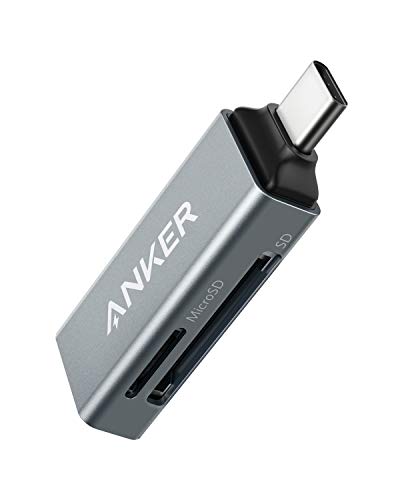
The Anker 2-in-1 reader provides one standard SD slot and one microSD slot, enabling quick file syncing and sharing across devices. Its ultra-compact design makes it easy to keep in a laptop bag or pocket, allowing MacBook users to transfer photos and videos without carrying extra cables. The reader is broadly compatible with USB-C devices and other USB-C gear, which makes it convenient for those who also work with tablets or phones in addition to a MacBook. The device emphasizes portability and reliable read/write performance for photographers on the move.
Acer SD Card Reader USB C: Aluminum Design

This Acer USB-C SD card reader features dual slots and a robust aluminum body, delivering a blend of durability and performance. It supports SD, SDHC, SDXC, and microSD formats, with data transfer rates up to 5 Gbps. The design is travel-friendly, lightweight, and includes protective caps to keep the ports free of dust. It is suitable for MacBook users who require fast, on-the-go card transfers and the option to read two cards simultaneously. Note that some cameras may not connect directly through this device; it reads cards rather than camera data directly.
UGREEN SD Card Reader: USB C 3.0 2-in-1

The UGREEN 2-in-1 SD/microSD reader offers USB-C connection with USB 3.0 speeds up to 5 Gbps. It’s designed to be plug-and-play, requiring no drivers for most MacBook setups. The compact form factor supports easy transport in camera bags or laptop sleeves, making it a strong choice for professionals who need quick backups of travel photos and 4K video footage. Its broad compatibility makes it a solid match for MacBook users who also own iPads or Android devices, ensuring a seamless data transfer experience.
Radidi SD Card Reader: 2-in-1 USB A & USB C

The Radidi reader combines USB-A and USB-C interfaces in a single device, enabling compatibility with a wide range of Macs, PCs, smartphones, and tablets. It supports SD, SDHC, SDXC, MMC, and Micro SD cards with up to 2TB capacity, and performs dual-card transfers simultaneously. The transfer speeds are capped at 480 Mbps for USB 2.0 or higher on USB 3.0 devices, which is suitable for standard photo and video file transfers. The integrated dual-slot design helps photographers minimize card swapping during field work and editing sessions on modern MacBooks.
Buying Guide: Key Purchase Considerations
- Compatibility: Ensure the reader supports SD, SDHC, SDXC, and Micro SD formats. If you use a MacBook with USB-C only, prioritize USB-C or dual-interface models.
- Transfer Speed: Look for USB 3.0/3.1 or USB-C 3.x with speeds up to 5 Gbps for rapid file transfers, especially when dealing with large RAW photos or 4K videos.
- Dual Card Slots: If you regularly copy from two cards at once or need to back up onto two cards, select a dual-slot reader to improve workflow efficiency.
- Design and Portability: A compact, lightweight design with protective end caps helps you carry it in a bag and protect ports. Consider attached cables vs. dongles based on your laptop setup.
- Compatibility Across Devices: If you switch between Mac, Windows, Android, or iPadOS, pick a model with broad compatibility and plug-and-play operation without extra apps.
- Brand and Support: Reputable brands often provide longer warranties and clearer compatibility notes, which reduces the risk of driver or firmware issues.
Usage Scenarios and Perspectives
- Professional photographers: Dual-slot readers support simultaneous transfers from multiple cameras, speeding up post-production workflows in Lightroom or Final Cut Pro environments on Mac.
- Video editors on Mac: Fast read speeds help with large 4K video files, enabling quick previews and efficient backups during shoots.
- Travel and on-the-go creators: A compact reader with USB-C makes it easy to offload footage directly to a MacBook Air during field work or in airports.
- Students and casual users: Plug-and-play simplicity and broad compatibility help for transferring files from microSD for tablets and cameras without installing software.
In summary, selecting the best SDXC card reader for a MacBook depends on your card formats, preferred connectivity (USB-C or USB-A), need for dual-card support, and travel considerations. The options listed here cover a range of use cases from ultra-compact to aluminum-bodied, ensuring you find a model that aligns with your MacBook setup and workflow.