Choosing the right SD card reader and hard drive docking station can streamline data transfer, backup, and multi-device sharing. The following five products combine generous storage, versatile interfaces, and convenient card reading capabilities to support Windows, Mac, Android, and more. This guide highlights what each offers, how they fit different workflows, and what to consider before buying. The products below are selected for broad compatibility and practical features for photographers, videographers, and tech enthusiasts.
| Product | Storage | Key Features |
|---|---|---|
| YOTUO 1TB External HDD Dock | 1TB | USB-C, USB 3.2/3.0/2.0, SD/TF card reader, dual data cables |
| YOTUO 750GB Dock | 750GB | USB-C, USB 3.2/3.0/2.0, SD/TF card reader, dual data cables |
| YOTUO 500GB Dock | 500GB | USB-C, USB 3.2/3.0/2.0, SD/TF card reader, dual data cables |
| FIDECO Docking Station | N/A (dock) | USB 3.0, 2.5″/3.5″ SATA HDD/SSD, SD/TF card readers, offline clone |
| RSHTECH Dual Bay Dock | Supports drives up to 16TB | Dual bays, USB 3.0, SD/Micro SD readers, offline clone |
The selections emphasize devices that combine external storage with card reading in one unit, offering plug-and-play setup, broad OS compatibility, and robust transfer speeds. Each entry below includes a direct link to its Amazon product page, an image, and an overview of its standout features drawn from the product listings.
YOTUO 1TB External HDD Docking Station
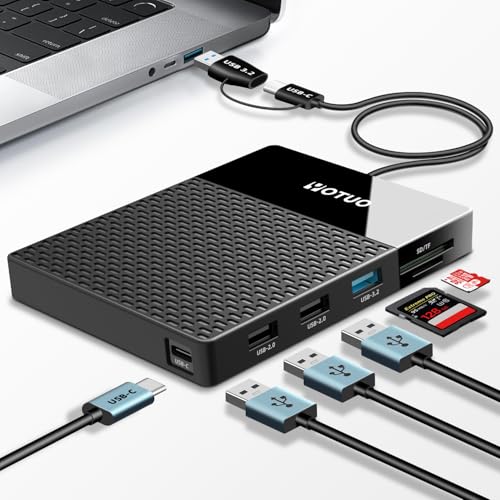
This YOTUO dock combines a 1TB external hard drive with a multi-port hub and SD/TF card reader. It supports USB-C, USB 3.2, USB 3.0, and USB 2.0, plus SD and TF slots, enabling convenient multi-device interoperability. A dual-socket data cable is included to maximize compatibility with various computer models, aiding quick backups and large file transfers across devices in a single setup.
YOTUO 750GB Docking Station
With a built-in 750GB hard drive, this YOTUO model emphasizes a compact, all-in-one design that blends storage with full multi-port connectivity. It supports USB-C, USB 3.2, USB 2.0, and SD/TF card slots, making it suitable for ongoing project work across laptops, desktops, and mobile devices. The dual-socket data cable expands compatibility to more model types, supporting diverse workflows without extra adapters.
YOTUO 500GB Docking Station
This 500GB YOTUO dock follows the same 7-in-1 concept, offering integrated storage with a multiport hub, SD/TF card readers, and dual data cables. The device is designed to support daily work with broad interface compatibility and straightforward plug-and-play operation, making it a practical choice for creators who need portable, consolidated access to both storage and card data.
RSHTECH Dual Bay Docking Station
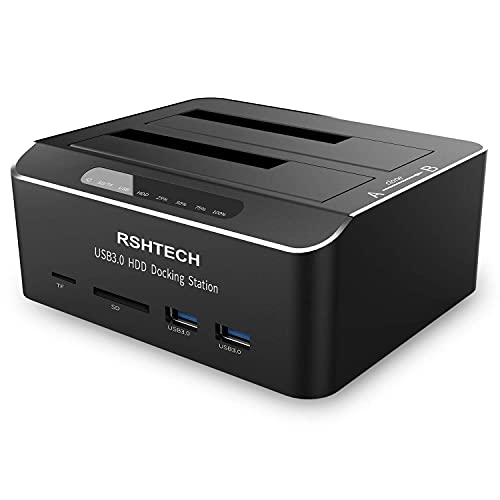
The RSHTECH dock is built for enthusiasts who manage multiple large drives. It supports 2.5″ and 3.5″ SATA HDDs/SSDs with USB 3.0 performance, plus front SD/Micro SD/TF card readers. An offline clone function enables duplication without a PC, a practical feature for rapid backups. The tool-free design and aluminum chassis emphasize durability and easy maintenance for heavy-use setups.
Acer SD Card Reader USB C Dual Slots

The Acer USB-C SD card reader features dual slots for SD and microSD cards with USB 3.0 transfer speeds. It supports a broad card format range and is designed for photographers and editors who require fast, simultaneous card access. The slim, travel-friendly design includes protective covers and a tethered cable for convenient use on the go.
Buying Guide
- Storage capacity and card support: Consider whether you need large, built-in storage (1TB or more) or a dock that relies on your own drives. Check SD/TF card compatibility and card speeds (UHS-I vs UHS-II) to match your workflow.
- Interface and transfer speeds: USB-C with USB 3.2/3.0 offers the fastest transfers. If you frequently move 4K video or RAW files, prioritize devices with USB-C and UASP support for higher throughput.
- Dock versatility: All-in-one docks save space and cables, but ensure the dock supports the drive sizes you use (2.5″ vs 3.5″ bays) and includes offline cloning if you do frequent backups without a computer.
- Multi-device compatibility: Look for dual data cables or dual USB ports to accommodate laptops, desktops, tablets, and even some TVs or gaming consoles. Consider whether you need Mac, Windows, or Linux compatibility.
- Portability vs. durability: Aluminum chassis often provide durability for travel; plastic enclosures may be lighter but less robust. If you travel often, a compact solution with integrated storage can be advantageous.
- Future-proofing: If you anticipate expanding storage, choose a dock with bays or module options, or one that accepts larger drives up to 16TB or more, as seen in some RSHTECH offerings.
- Security and reliability: For sensitive backups, evaluate features like offline cloning, write protection, and secure data transfer paths to minimize data loss during transfer.
When selecting a device, map your typical workflow: do you edit on the go, back up cameras, or run multi-device setups at a desk? A high-speed USB-C dock with SD/TF card readers is ideal for photographers and videographers who require quick card-to-drive transfers, while a dual-bay docking station suits those who routinely mirror or clone drives for redundancy. The listed options provide a balance of built-in storage, card access, and flexible connectivity to cover common use cases.