Finding a reliable scanner with a built-in or compatible auto document feeder (ADF) can streamline offices, home suites, and mobile work. This guide highlights five top models designed to handle duplex scanning, photos, receipts, and various document types. Each option combines fast performance, ease of use, and cloud or device connectivity to fit modern workflows. Explore practical choices for small desks, home offices, and on-the-go scanning needs.
Product Overview
| Product | Brand | Key Benefit |
|---|---|---|
| ScanSnap iX1300 | ScanSnap | Compact, fast, automatic color duplex scanning; space-saving design |
| Canon imageFORMULA R10 | Canon | Portable, USB-powered with feeder; ideal for mobile use |
| ScanSnap iX2500 | ScanSnap | High-speed, large touchscreen, cloud-ready with 100-page feeder |
| Epson Workforce ES-C320W | Epson | Ultra-compact, wireless, 2-sided scanning with Auto Document Feeder |
| Canon imageFORMULA R30 | Canon | Plug-and-scan with auto feeder; easy setup and versatile for mixed documents |
ScanSnap iX1300: Small Footprint, Big Productivity

The ScanSnap iX1300 combines a compact form with robust duplex scanning up to 30 pages per minute and automatic de-skew, ensuring clean, usable outputs without driver setup. It supports scanning photos, documents, and cards, then delivers optimized color results. The space-saving design keeps desks uncluttered while providing dependable daily scanning tasks. Quick Menu enables easy drag-and-drop routing to favorite apps, streamlining digital filing and organization across devices.
Canon imageFORMULA R10: Portable and USB-Powered
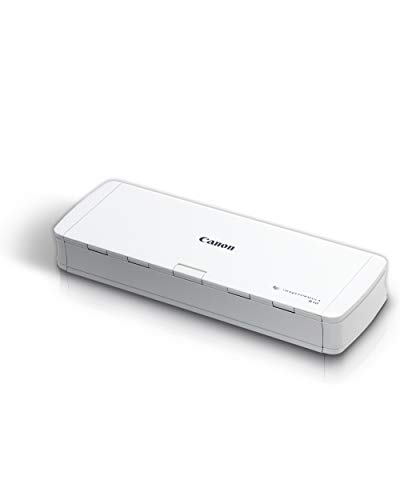
Canon’s R10 is designed for mobility and convenience. It converts paper into searchable PDFs and other formats while staying energy-efficient in portable setups. With USB-powered operation, it suits remote work, classrooms, or small offices where a reliable scanner is needed without a bulky power supply. It can handle receipts, business cards, reports, and similar media types, making it a versatile option for on-the-go digitization.
ScanSnap iX2500: Advanced Scanning At Your Fingertips

The iX2500 represents ScanSnap’s flagship in the mid-range, featuring a large 5″ touchscreen, 45 ppm duplex scanning, and a 100-page feeder. It supports Wi-Fi and USB, with built-in cloud connectivity and customizable profiles. The Quick Menu aids rapid scanning into preferred apps, and the flexible connection options broaden compatibility with PCs, Macs, and mobile devices. This model is ideal for busy offices that require scalable performance and easy cloud integration.
Epson Workforce ES-C320W: Ultra-Compact Wireless Scanning
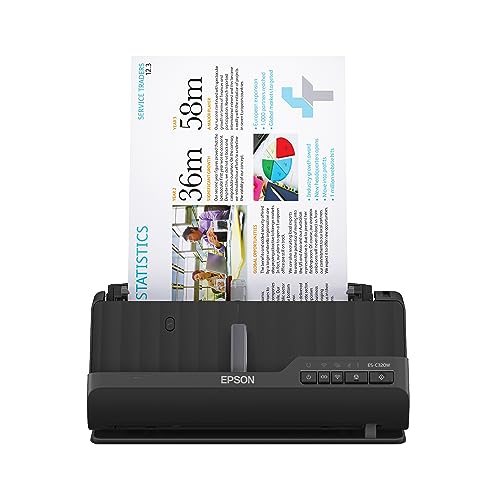
This Epson model emphasizes space efficiency with wireless scanning to smartphones, tablets, or cloud services via Epson Smart Panel. It supports two-sided scanning at up to 30 pages per minute through a 2-sided ADF. The compact design makes it suitable for small desks, while wireless capability keeps cables out of the way. It’s a practical choice for home offices seeking simple setup and reliable duplex performance.
Epson Workforce ES-C220: Compact Two-Sided Desktop Scanner

The ES-C220 focuses on compact desktop efficiency with 2-sided scanning and a robust 20-page Auto Document Feeder. It’s designed to deliver reliable performance in environments with limited space while handling varied document sizes. The combination of speed (up to 30 ppm) and a compact footprint makes it a sensible choice for small offices or workspaces that require consistent, unattended scanning for batch processing.
Epson Workforce ES-580W: Wireless, 100-Page Feeder

This model blends wireless capability with a larger 100-sheet feeder, designed for heavier workloads and cloud-based workflows. The built-in touchscreen and wireless connectivity enable scanning to mobile devices or cloud services without a computer. It’s best suited for small-to-medium offices needing high-volume, dependable duplex scanning in a compact form factor.
Canon imageFORMULA R30: Plug-and-Play Office Scanner
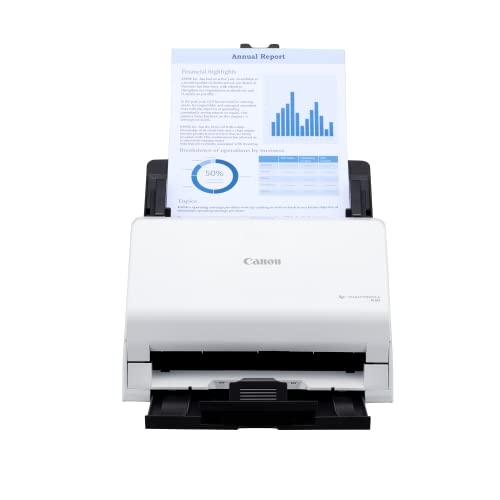
The R30 is designed for straightforward office scanning with an auto feeder and duplex capability. It emphasizes easy setup—plug in and start scanning without software installation. It supports mixed batches of documents, including invoices, contracts, business cards, and more, making it versatile for general document digitization in small offices or home setups.
Buying Guide: Key Purchase Considerations
- Document types and media handling: If you regularly scan thick documents, cards, or varied paper sizes, prioritize models with an adjustable feeder and reliable double-sided scanning.
- Connectivity: Decide between USB-only, wireless, or cloud-enabled models. Wireless and cloud features improve collaboration and remote work capabilities, but USB models can be simpler and more secure for some environments.
- Speed and capacity: Consider pages-per-minute (ppm) and the size of the auto document feeder (ADF). Higher volumes benefit from larger feeders and faster speeds, especially in busy offices.
- Software and compatibility: Look for included software for OCR, file naming, cloud uploads, and DMS integration. TWAIN/WIA drivers ensure compatibility with a wide range of applications.
- Desk space and footprint: Smaller footprints fit tighter workspaces, but ensure the feeder height and document path work for your typical batch sizes and paper types.
- Future-proofing: Cloud support, mobile apps, and ongoing driver updates can extend the scanner’s usefulness as your workflow evolves.
All five models above offer reliable paper-feeder scanning with duplex capabilities and broad compatibility across Mac and Windows ecosystems. When selecting, balance desk space, daily volume, and the preferred connectivity path to optimize your document workflow without overpaying for features you won’t use.